13.2 Viewing and recalling data sets
Narda IDA-3106 221
13.2 Viewing and recalling data sets
Main Menu • Memory Menu
Press the Data Viewer softkey.
The list of saved data sets is displayed.
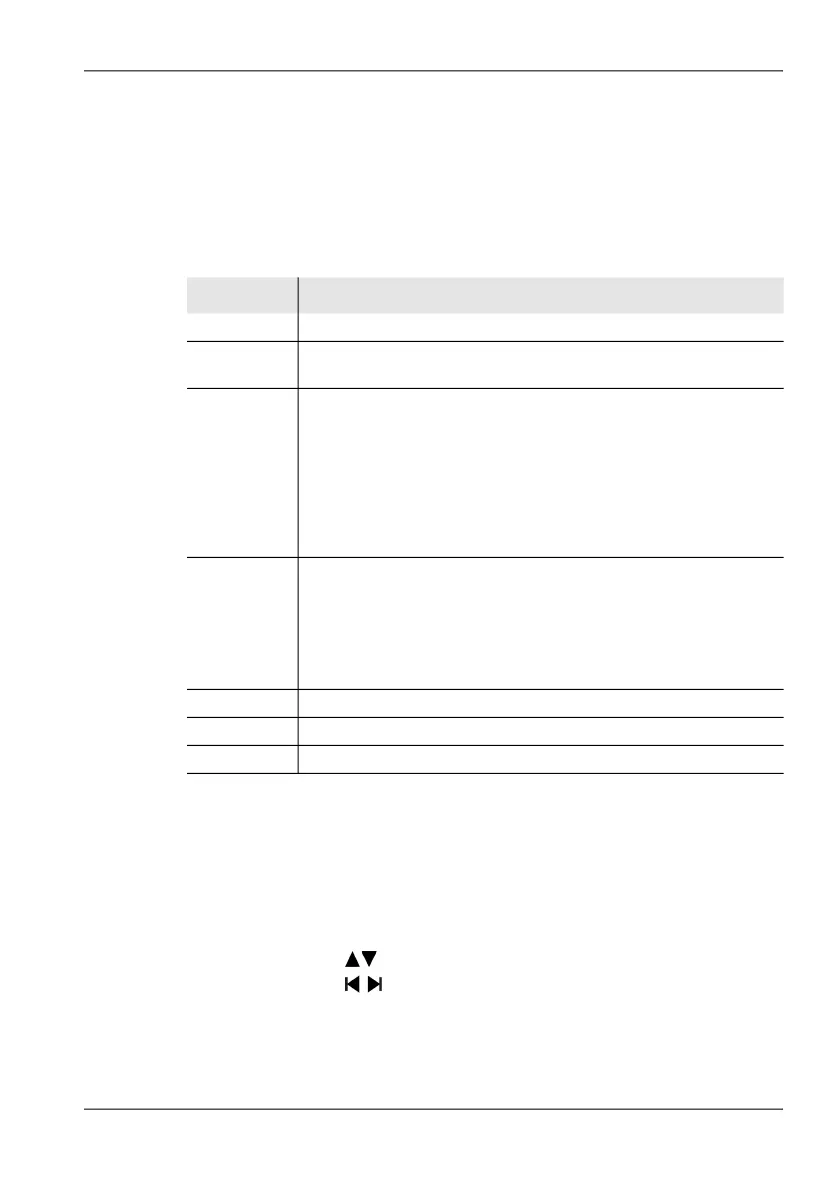
Table 40: Column descriptions
To view a data set:
Select a data subset using the rotary control knob and press the
Recall Data Set softkey or the OK key.
The data set is displayed in the form that it was saved. RECALL on
the screen indicates that the data set is a saved data set.
Column Function / Explanation
Index Consecutive index number
Num. Number of data subsets (every saved value in a localization or a
timer or condition controlled measurement is a data subset)
Mode Operating mode saved from:
• DIR_FIND: Direction Finding
• SPECTRUM: Spectrum Analyzer
• SGRAM: Spectrum Analyzer / Spectrogram
• LEVEL: Level Meter
• SCOPE: Time Domain (Scope)
• IQ_ANLZ: I/Q Analyzer
• MCP: Multi-Channel Power
Storing Save type
• MAN: Manual (all operating modes)
• LOC: Localization (Direction Finding mode only)
Additionally for SPECTRUM, LEVEL and MCP modes:
• TIME: timer controlled storage
• AUTO: Event-controlled storage using the AUTO SAVE function
Date Date of storage
Time Time of storage
Comment Comment (if activated)
Tip: • You can use the softkeys to page through the list.
• You can use the softkeys to jump to the previous or next data set
in the data viewer as well as in the operating modes.



 To Next Page