17
Channel Strip 1
Overview 1
One of the core design concepts of the 8424 is that each channel can select
its input from two alternative line input sources. This enables the 8424 to be
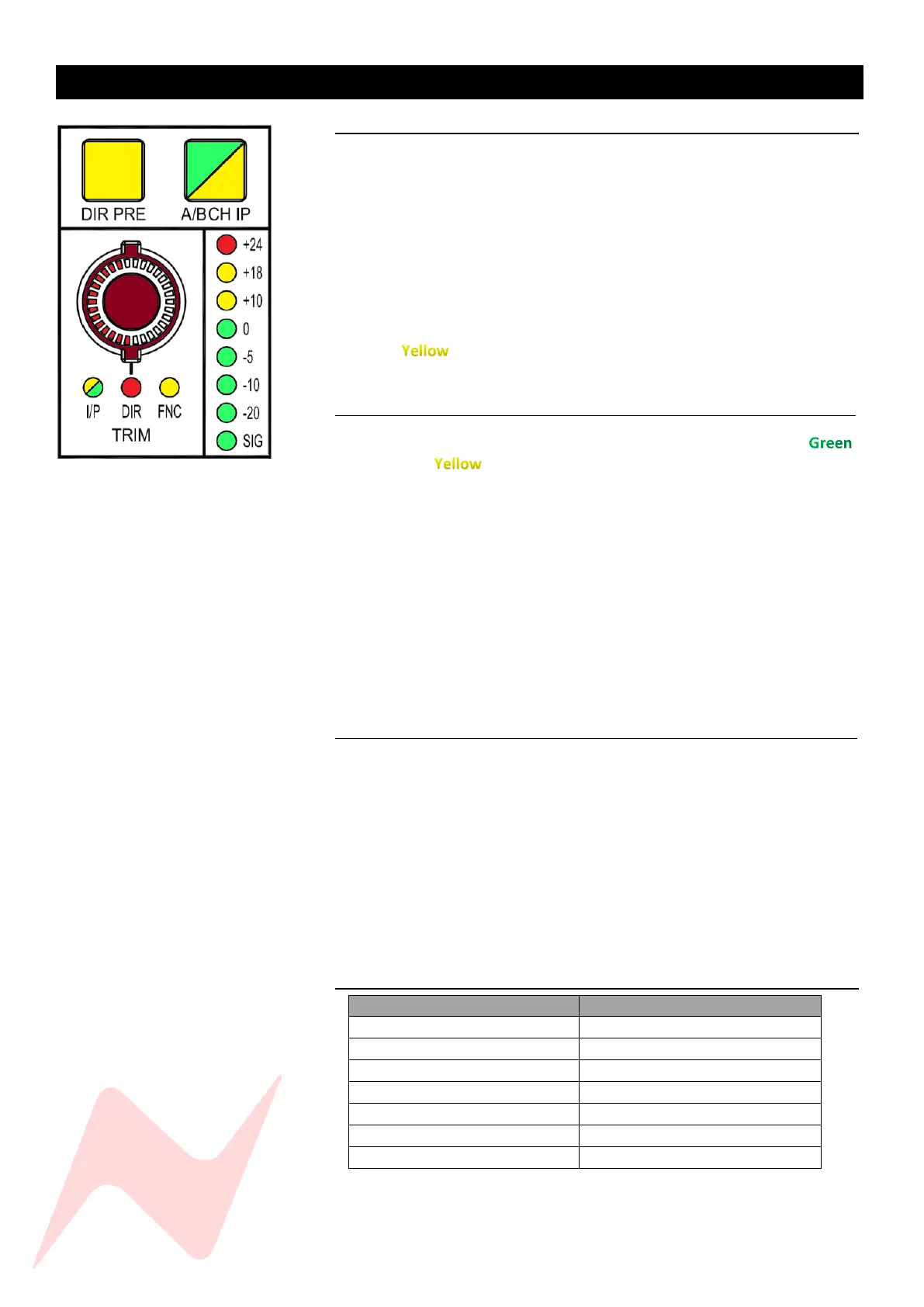
used for Mixing, Recording and Overdubbing. The A/B CH IP switch on every
channel will select either channel Input A (DAW Interface Outputs) or
channel Input B for line level instruments or external preamps. Each channel
trim pot will function independently for both Input A and Input B. The Input
trim LEDs will indicate the trim level for each input A or B. When Switching
between inputs, the TRIM level will swap between Input A and Input B
levels. The I/P LED will indicate the current selected input - Green for Input
A trim or for Input B trim. Each trim level is separate, this allows for
precise and independent trim control of both channel input levels.
A/B Channel Input 1
This function selects the input source for each channel and will light
for Input A or for Input B.
Input A is fed by a 25-way D-Type connector on the rear of each fader bank
in sets of 8.
Input A should be used to connect your DAW interface outputs to the
console.
To protect the system from feedback, the direct outputs from the channels
are fed from Input B by default. This can be changed in the services screen
by selecting MAST> IPA DIR [Y].
Input B is fed by ¼’’ TRS connectors to the rear of each individual channel.
Input B can be used for any line level input such as external pre-amp
outputs or line level instruments to be directly tracked through the console.
The Global A/B CH I/P switch can be found in the centre of the console.
Direct Pre 1
The DIR PRE button will route the channel direct output pre-fader. This can
be used to create DAW stem tracks un-affected by the current control room
fader levels. When DIR PRE is inactive, the direct outputs are post-fader, any
channel fader motions will affect the direct out signal. This can be used to
record audio adjustments directly onto the DAW stem tracks, creating
manual level changes on certain mix elements. Pre or Post fader Direct Outs
are sent post-channel insert, allowing for outboard hardware processing to
be added into the signal chain and recorded into the DAW.
The Global DIR PRE switch is activated from the services screen in
MAST>DIR PRE
Direct Output Signal Path 1
Direct outputs are post fader in their default state.


 To Next Page