27
Reverb Returns 1
Overview 1
The 8424 console features two dedicated stereo reverb returns which are fed
by the XLR inputs on the rear of the console. The reverb returns can be used
to return stereo effect unit outputs into the console or as additional stereo
line level inputs should you require more line inputs. Signals using the reverb
return channels can be routed to the 500 series slots via the group 1-4 routing
buttons.
Reverb Return Controls 1
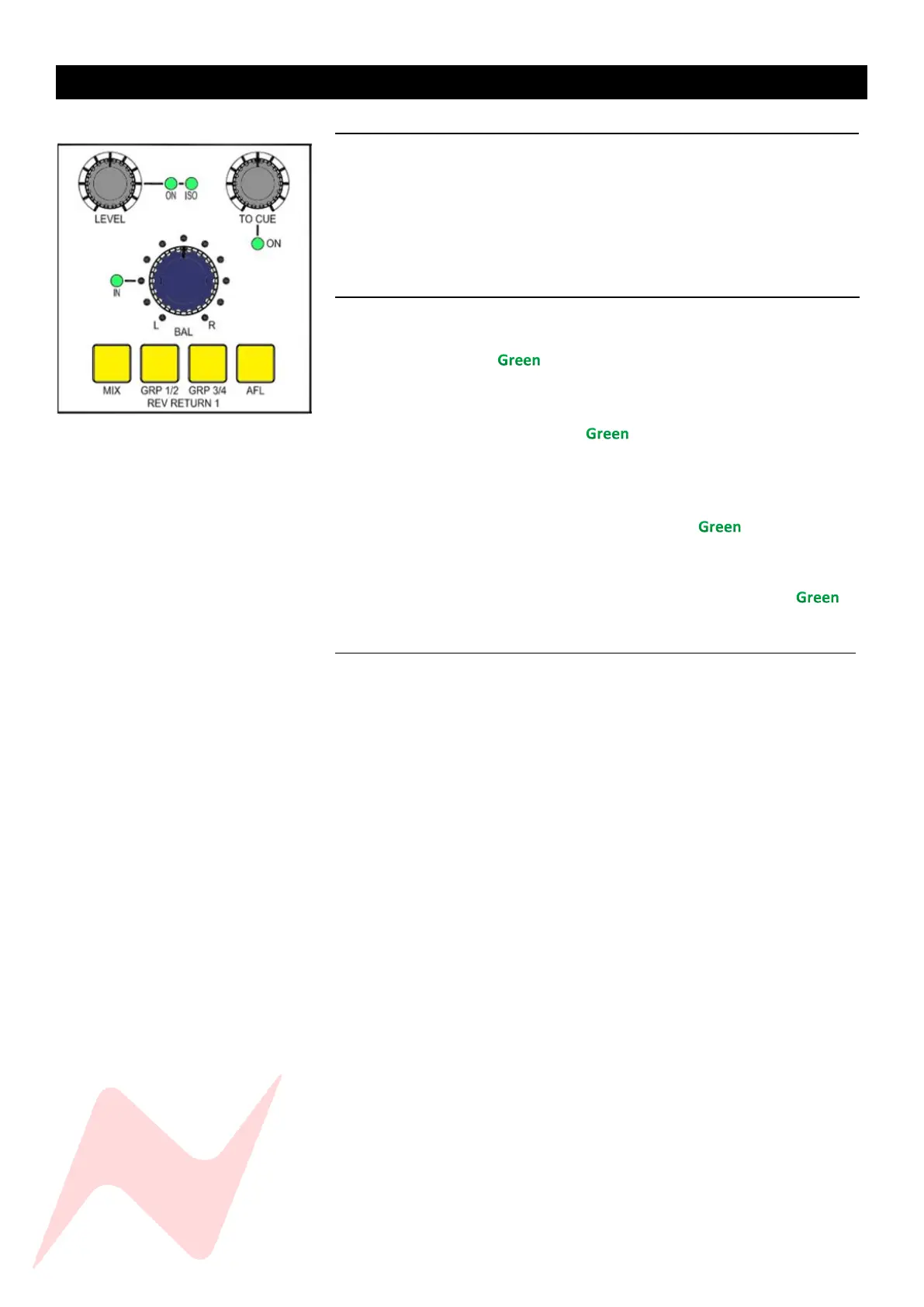
Each reverb return has a push-activation level trim pot that runs from Inf to
0dB and can be pressed to activate the reverb return. When activated the
ON light will illuminate .
To isolate the reverb from the solo and cue solo path-
Press and hold the Rev return LEVEL Pot.
the ISO light will illuminate to indicate the reverb return
isolation status.
Each reverb return has an independent TO CUE level pot which runs from inf
to 0dB. This pot is push-activation and sends the reverb return signal to the
Cue bus, when activated the ON light will illuminate .
The reverb returns also have a balance pot which will balance the left and
right levels by + or -6dB. The balance pot has push-activation and can be
pressed to activate the balance control. the IN light will illuminate to
indicate that the balance function is active.
Reverb Return Routing 1
Reverb return signals can be routed to the Stereo Mix bus by pressing the
MIX button, group 1 and 2 by pressing the GRP 1/2 button or Group 3 and 4
by using the GRP 3/4 button. Any combination or routing is also possible by
selecting multiple routing buttons. Each button will illuminate to indicate
the reverb return routing.
The reverb returns can also be soloed by pressing the AFL button which
illuminates when active.


 To Next Page