19
Stereo Cue 1
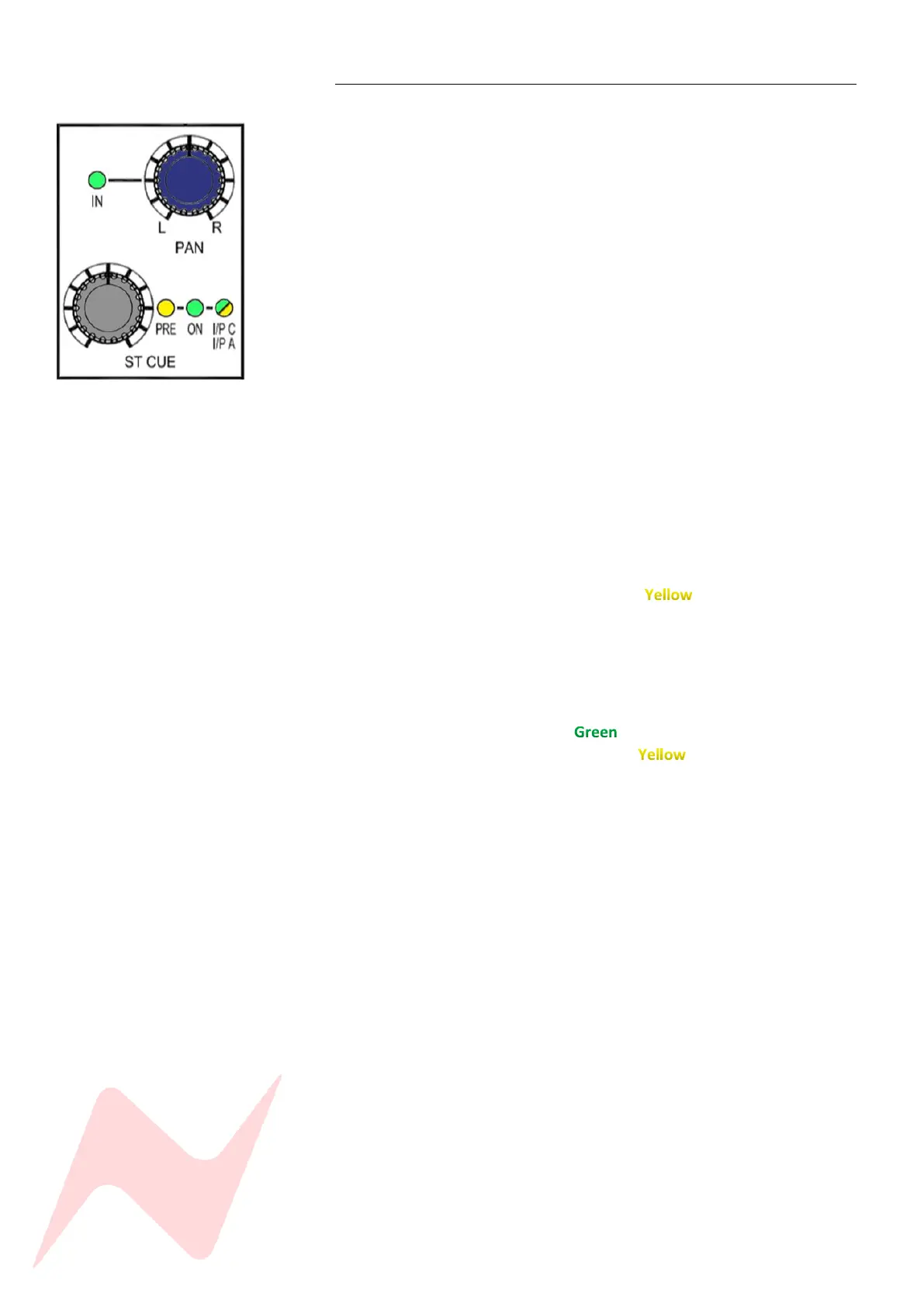
Each Channel on the 8424 has a stereo cue send which can send audio from
channel input A or B (depending which input is selected on the top of the
channel strip) to performers in the live/control room. The CUE send can also
be used as a stereo FX send. The ST CUE also has a third input option - Input
C. This input allows for an additional 24 inputs into the 8424 from the DAW.
More information on Input C uses can be found on page 53.
The CUE rotary send runs from -inf to 0dB and has push activation. Pressing
the Rotary level control will activate the cue send. The ON light will
illuminate green to indicate that the CUE is active. Each cue has its own L/R
Pan control which can be activated by pressing the ST CUE PAN control.
The CUE can be set Pre or Post fader via simple button combinations listed
below. By default, the CUE sends signal from the channels selected input A
or B but can also be fed from Input A independent of channel input
selection or an additional Input C. (see page 53/54 for more information)
To toggle between PRE/POST fader-
Press and hold the CUE PAN and then press the CUE level controller.
The PRE LED will indicate the sends pre-fader state.
To select Input C as the Stereo cue source-
Press and hold the CUE PAN and then press the CUE controller
twice. I/P C I/P A LED will illuminate to indicate that Input C
is the CUE source.
To toggle between I/P C or I/P A Cue send source-
When the I/P C, I/P A LED is illuminated, press and hold A/B CH IP at
the top of the channel strip then press the CUE level control, The I/P
A I/P C LED will illuminate to show that Input A is the signal
stereo cue source or will illuminate to indicate that Input C is
the signal source for the stereo cue send.
To Globally select Input C for all CUE inputs-
Press 48 MIX in the Master section of the console.
48 mix is explained in greater detail on page 53
To Globally select Input A for all CUE inputs-
Press 48 MIX in the Master section of the console
From the services screen press MASTER then select ILM [Y]
ILM is explained in greater detail on page 54
The CUE send pre-fade option will function differently depending on which
channel input A/B is selected. This is to ensure that when recording or
overdubbing, the channel cut does not cut the cue send. Similarly, when
recording/mixing, the channel cut will cut the cue send.
If channel Input B is selected – cue sends are pre-fade pre-cut
If channel Input A or C is selected – cue sends are pre-fade post-cut
Global Stereo cue sends pre/post state can controlled by interlocking the
Aux On/Pre button and ST CUE master knob in the centre of the console.
More information on page 28.



 To Next Page