54
In-Line Mode (ILM) 1
The 8424 is capable of functioning as an In-line studio console, with the ST
CUE level control becoming the monitor return ‘Small Fader’. This allows for
simultaneous mixing of both recording line inputs (I/P B) on the channel
faders and monitor return inputs (I/P A) on the ST CUE controls. These in-
line monitor returns can either be routed to the mix via the cue bus, or to
groups 3+4 which then become the master fader for any selected monitor
returns.
ILM works in a similar way to 48 MIX mode, each channel ST CUE can select
either Input A for DAW returns 1-24 (In Line mode) or Input C for DAW
returns 24-48 (48-Mix mode)
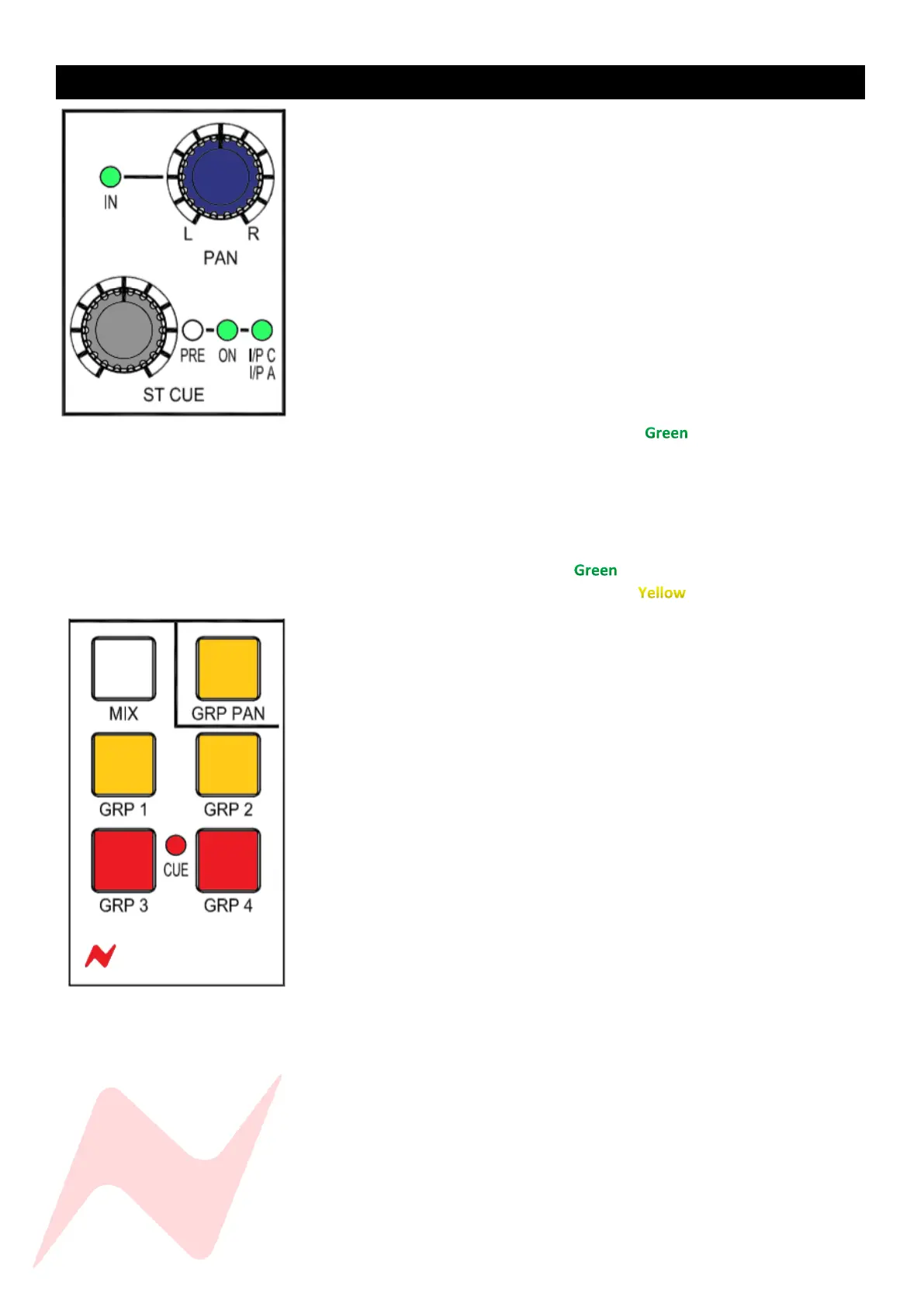
To select Input A as the Stereo cue source-
Press and hold the CUE PAN and then press the ST CUE controller
twice. I/P C I/P A LED will illuminate to indicate that Input A
is the ST CUE source.
To toggle between I/P C or I/P A Cue send source-
When the I/P C, I/P A LED is illuminated, press and hold A/B CH IP at
the top of the channel strip then press the ST CUE controller, The I/P
A I/P C LED will illuminate to show that Input A is the signal
stereo cue source or will illuminate to indicate that Input C is
the signal source for the stereo cue send.
Alternatively,…
In the services menu go to MASTER>ILM: [Y]
This will globally select Input A as channel 1-24 ST CUE input source.
When using the console in this mode, Input A is routed into the channel ST
CUE Via Input C. Inserts can be assigned to recording channel path (Input B)
or to the Monitor return input path (Input A) via the IP C and INS buttons.
The channel ST CUE Level and PANs now control the DAW Monitor Returns,
and the channel faders and pan pots will control the recording inputs.
The monitor returns and recording inputs can be monitored through the
Stereo Mix bus at the same time by pressing the CUS BUS button above the
Master Fader. The CUE Master pot will now be the main level control for the
monitor returns and must be pressed and switched ON.
If separate control or processing is required for the Recording or Monitor
Return inputs; the monitor returns (Input A) can be routed through Group
3+4 by pressing and holding each ST CUE pan pot, then pressing the channel
GRP 3 or GRP 4 routing button. The CUE LED in-between group 3 and 4
routing buttons will illuminate RED to indicate that the channel ST CUE is
routed to the group rather than the channel. The GRP 3 + GRP 4 routing
buttons themselves will also illuminate RED when pressed in this mode.
Recording inputs (Input B) can then be routed to groups 1+2 by pressing the
GRP 1 + GRP 2 buttons or into the Stereo Mix. Pressing GRP PAN will allow
the channel and ST CUE pan pots to assign to the group routing.
Global Cue to group routing can be activated from the services screen by
selecting MASTER>[CUE GRP]


 To Next Page