70
English
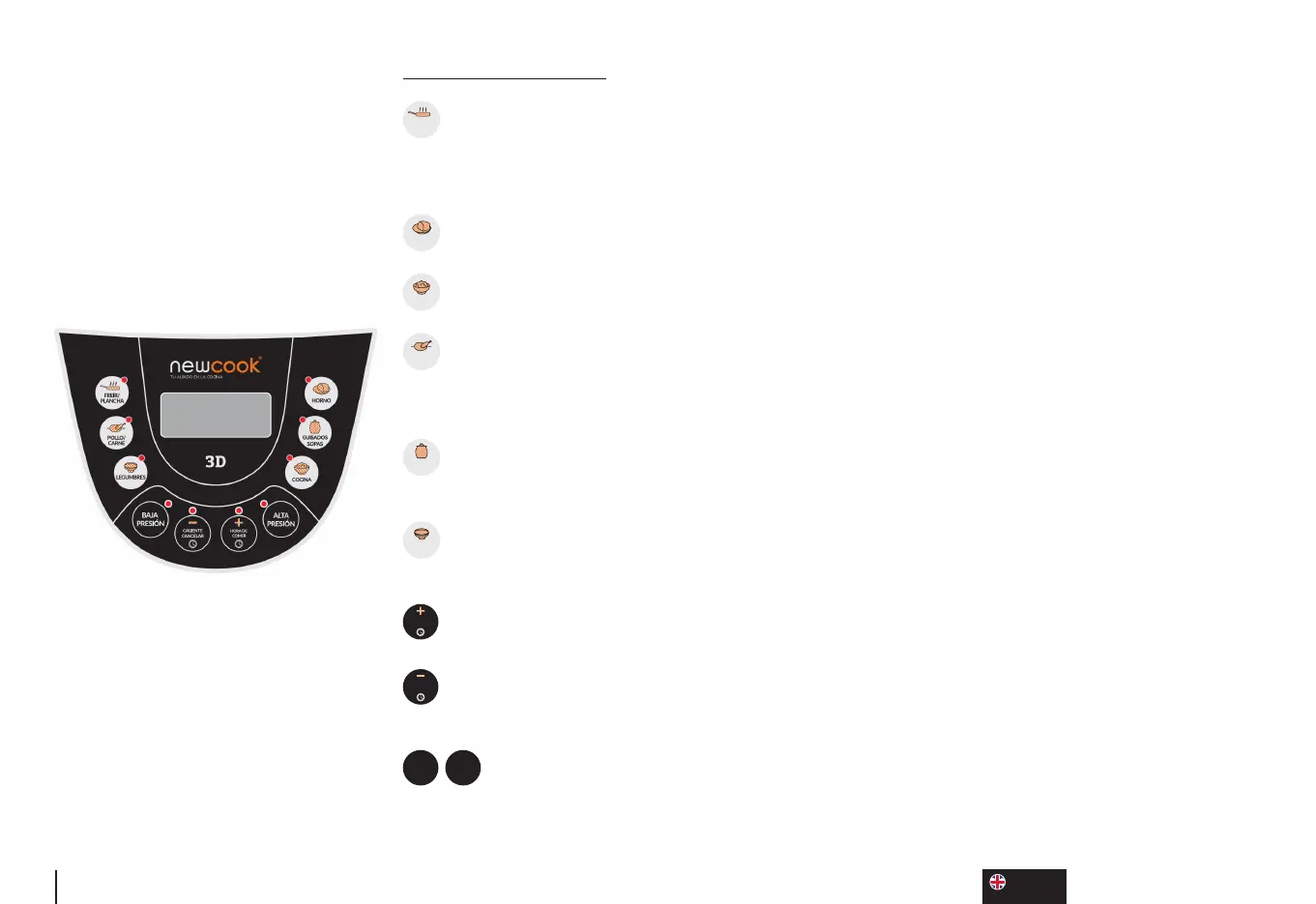
CONTROL PANEL
FREIR/
PLANCHA
FRY/GRIDDLE: Press the buon once and select the Griddle Menu without pressure, Ideal for
so cooking, such as torllas... In the Griddle Menu, you can select the cooking me, but not select
the type of pressure. To acvate the Fry Menu, press the buon twice, enter the food and oil according
to the recipe. These menus are used with the top open.
HORNO
OVEN: select the oven without pressure menu for backed dishes, selectable cooking me.
COCINA
COOKING: select the cooking menu, select both the pressure and the cooking me.
POLLO/
CARNE
CHICKEN/MEAT: Preset menu for meat, select the pressure type depending on the dish: High
Pressure for hard meats that need more cooking me and Low Pressure for tender meats that need
less me.
GUISADOS
SOPAS
STEWED/SOUPS: Preset menu for casseroles (low pressure) and soups (high pressure), select
the type of pressure depending on the dish.
LEGUMBRES
LEGUMES: preset menu for legumes, select the type of pressure depending on the dish. It should
be generally used in High Pressure.
HORA DE
COMER
LUNCH TIME +: use this buon to start the food programming funcon of food and to increase
the cooking and/or programming me.
CALIENTE
CANCELAR
HOT/CANCEL -: Use this buon to start manual warm mode, to cancel at any me the cooking
and to select less cooking or programming me.
ALTA
PRESIÓN
BAJA
PRESIÓN
HIGH AND LOW PRESSURE: These buons are used so that once the cooking menu is
selected, we can select the cooking mode, if we cook spoon dishes we will normally do it in high
pressure, if on the contrary we cook stewed or dried dishes we will use low pressure.


 To Next Page