5.2 When the Device Appears to be a Problem
5-7 ZM2376
5.2 When the Device Appears to be a Problem
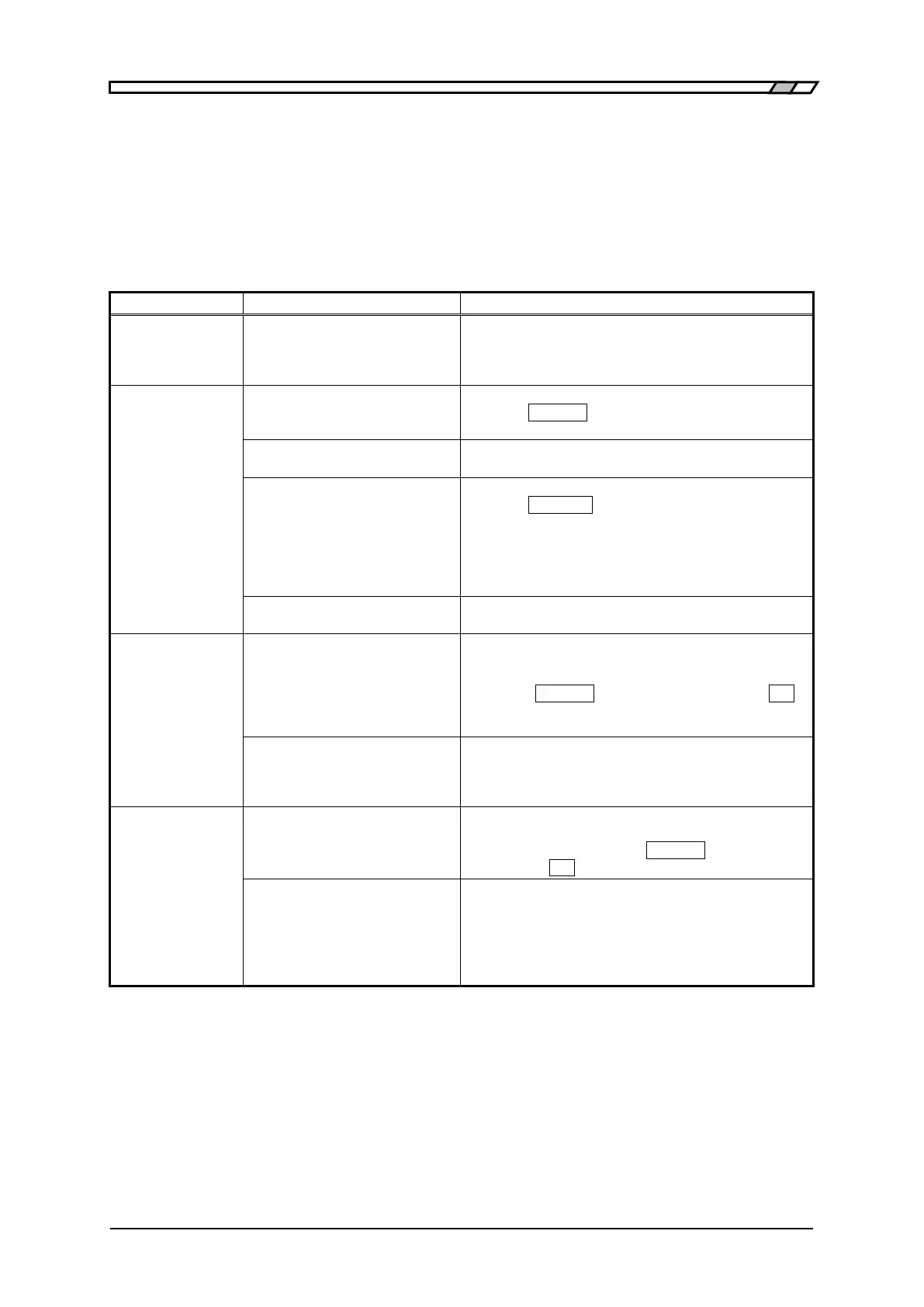
When the device appears to be a problem, check the following table to see if a corrective action is
given. When the problem persists or the device cannot be recovered though a corrective action was
taken, please contact NF Corporation or one of our representatives.
Table 5-1 When the device appears to be a problem 1/4
The power does
not turn on
The power cord is not
connected correctly.
The power supply out of rated
range is used.
Insert the power cord tightly.
Check the voltage of power outlet with a multimeter.
Panel operation
dose not work
The key lock is turned on.
When KEY LOCK lamp is lighting,
press the _SHIFT_ + [KEY LOCK]
keys to cancel the key lock.
/KEY_LOCK signal of handler
interface is active (Low).
Make the /KEY_LOCK signal inactive (High). No
other resetting method is available.
The device is in remote state.
When REMOTE lamp is lighting,
press the _LOCAL_
key to return to the local state.
If the local lockout is set with USB or GPIB, the
device cannot return to the local from the panel
operation. Return the device to local from the
controller, or disconnect the USB cable or GPIB
cable.
Please ask NF Corporation or one of our
representatives for repair.
By *RST command
:INIT:CONT OFF setting is
retained.
In this case, the trigger is not
applied even if trigger source is
INT (internal).
Try to perform the following operations:
•Initiate the trigger system with :INIT:CONT ON
or :INIT command.
•Press the _SHIFT_ + [INIT] keys and then the _1_
key to execute initialization.
•Turn off and on the power.
Trigger source setting is
incorrect.
Check the trigger source setting. For example, to
apply the trigger by remote control (USB, RS-232,
GPIB, LAN), set the trigger source to BUS. At this
time, manual trigger is ineffective.
Device does not
operate as
described in the
Instruction Manual
/ Remote control
commands do not
function as
expected
Settings are not initialized.
In general, the operations are described, provided
that the settings have been initialized. Retry after
initialization by pressing the _SHIFT_ + [INIT] keys
and then the _1_
key.
Operation mode is incorrect.
Set the operation mode correctly by referring to “4.18
Switching the Operation Mode”. The underline cursor
is displayed at the bottom right of display in other
than standard operation mode.



 To Next Page