- A ・ -
Q0340グラフィック用ロゴ
060411デザイン部伊藤
VBA14001-R.3694.A
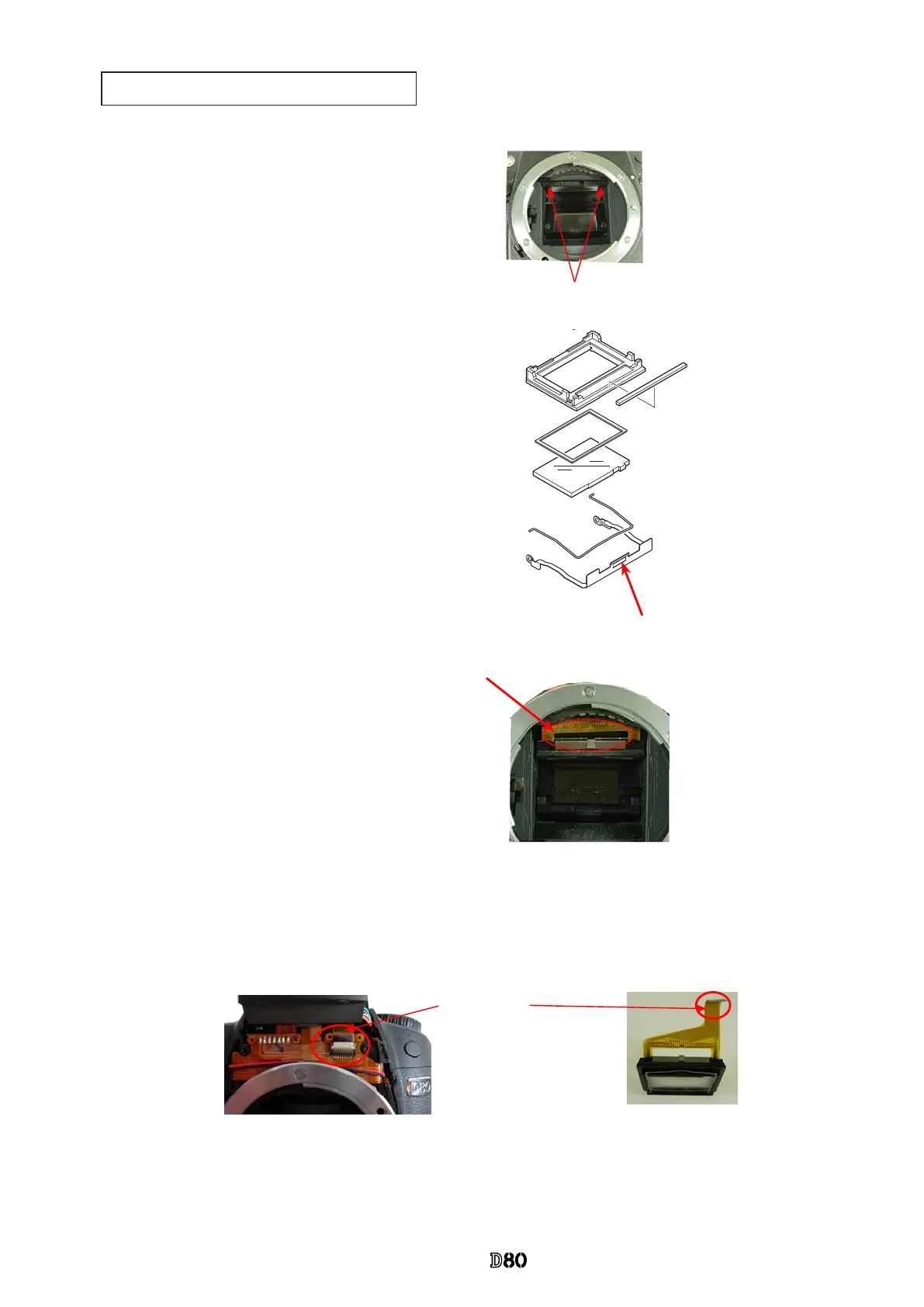
Cleaning between Penta prism and SI-LCD
・
Take out the two screws (#689), and remove the
mirror receiving part.
#689×2
#511
・
Pull the screen box section down straightforward
until the position shown in the picture.
*
Do NOT pull down with force because the FPC is
connected.
・
Cleaning by blower is possible from the arrow-
indicated area.
・
After the cleaning, reassemble the screen box by
pushing right upward, and x with the screen
box retaining plate (#511).
・
Release the claw (indicated by the arrow) of the
screen box retaining plate (#511), and lower
[#511].
・
Remove the front cover. Disconnect the SI-FPC from the connector, then it is possible to remove the
screen box section, and carry out cleaning.
《
In case of cleaning by NOT removing the screen box
》
《
In case of cleaning by removing the screen box
》
SI-FPC
Screen box section
Caution:
When the above cleaning is carried out, check the positioning of the nder eld frame 1 (#263), then make as-
sembly. After the assembly, inspect the focusing of the viewnder.
(
Refer to Page A15 for positioning.
)
Screen box



 To Next Page
 Loading...










