II
Deleting
Custom
Picture
Controls
from
the
Memory
Card
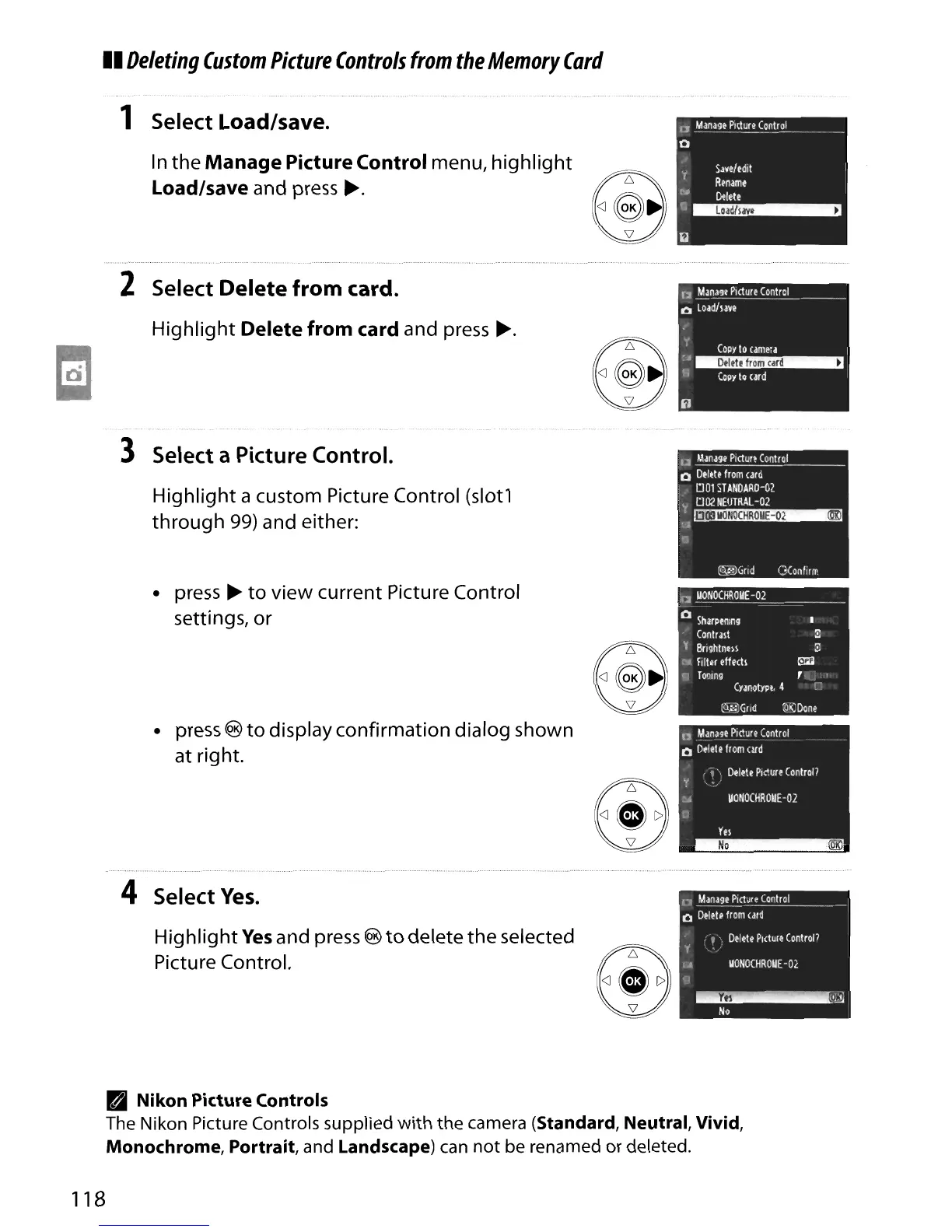
1 Select Load/save.
In
the
Manage
Picture Control menu,
highlight
Load/save and press
~.
2 Select
Delete
from
card.
Highlight
Delete from card and press
~.
3 Select a Picture Control.
Highlight a custom Picture Control (slot1
through
99)
and either:
• press
~
to
view current Picture Control
settings, or
• press
®
to
display confirmation dialog shown
at right.
4 Select
Yes.
Highlight
Yes
and press ®
to
delete the selected
Picture Control.
D
Mana9t
P1ctur~
Control
01
Load/laVe
"(
COpy
locamera
:,~
I'l (opylo
urd
• Nikon Picture Controls
The Nikon Picture Controls supplied
with
the camera (Standard, Neutral, Vivid,
Monochrome, Portrait,
and Landscape)
can
not
be renamed or deleted.
118





 To Next Page