EasyManua.ls Logo

Nikon D90 - Managing Custom Picture Controls

Nikon D90
359 pages
Print Icon
To Next Page IconTo Next Page
To Previous Page IconTo Previous Page
Loading...
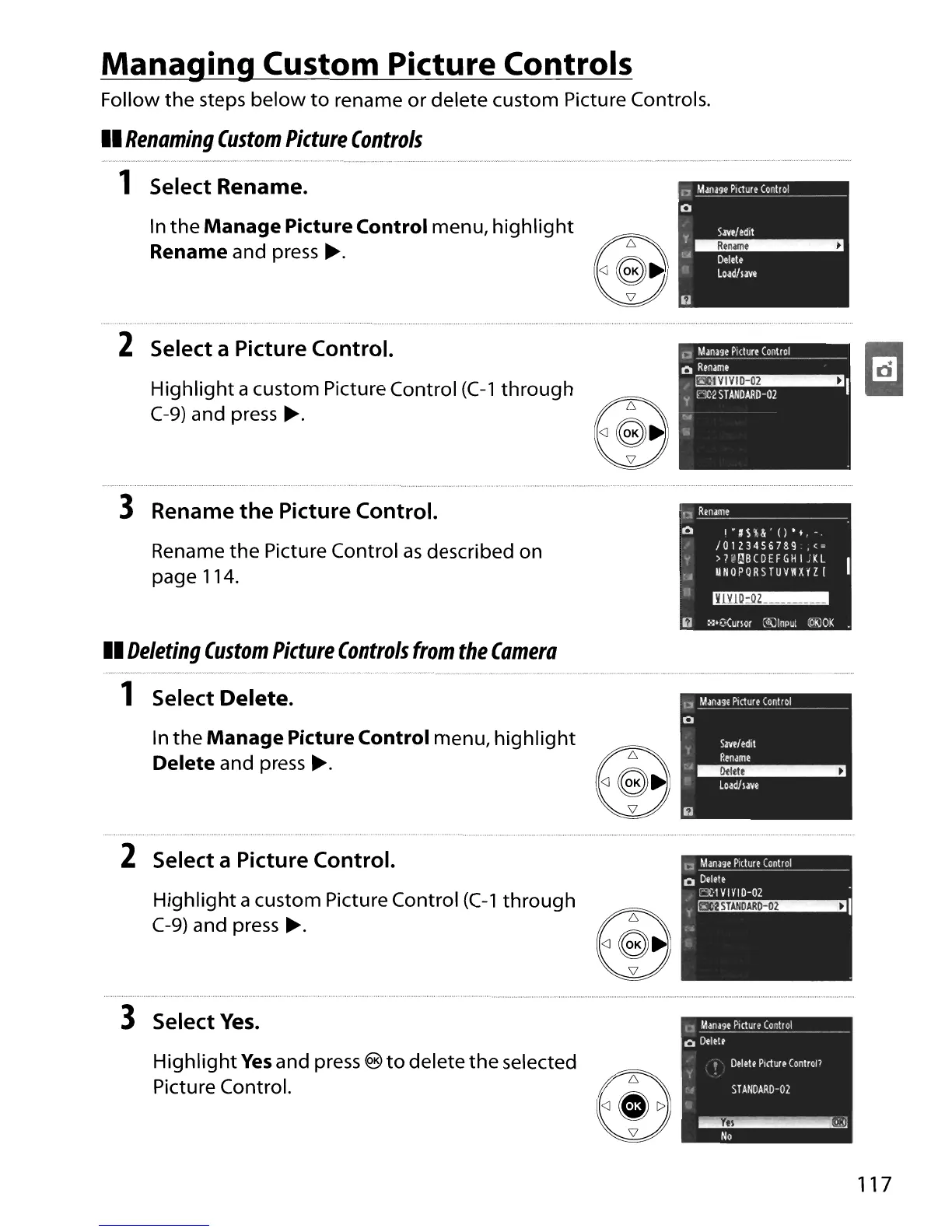
Managing Custom Picture Controls
Follow
the
steps
below
to
rename
or
delete custom Picture Controls.
II
Renaming
Custom
Picture
Controls
1 Select Rename.
In
the
Manage
Picture Control menu,
highlight
Rename and press
~.
2 Select a Picture Control.
Highlight
acustom Picture Control
(C-1
through
C-9)
and press
~.
3 Rename
the
Picture Control.
1:1
R!name~
__
..
_~~
__
~~
__
Rename
the
Picture Control
as
described on
page 114.
o
1'#SH'()'t,-
/0123456789
,<=
>H!ilBCDEFGH 1JKL
UrIOPQRSTUVW~YZ
I
Y1Y10:OZ
_
II
Deleting
Custom
Picture
Controls
from
the
Camera
1 Select Delete.
In
the
Manage
Picture Control menu,
highlight
Delete and press
~.
2 Select a Picture Control.
Highlight
a custom Picture Control
(C-1
through
C-9)
and press
~.
i)
:'l'~(urlor
C<1{)lnput
(0l\10K
IJI
ManHe
Picture
Conlrol
o
I
S.lVf
I
edit
Rename
:A~
Loadh.m
c
Manage
Pillur~
Control
o
Delete
EC·'
VIVIO-02
y~1
;
..
n
Manage
Picture
Conlrol
o
Delete
3 Select
Yes.
HighIig
ht
Yes
and press ®
to
delete
the
selected
Pictu
re
Control.
'0
Delete
Picture
ControP
STArIDARO-02
~N
,"
o
~j
117

Table of Contents

Other manuals for Nikon D90

Related product manuals