EasyManua.ls Logo

Nikon D90 - Deleting Unwanted Photographs

Nikon D90
359 pages
Print Icon
To Next Page IconTo Next Page
To Previous Page IconTo Previous Page
Loading...
Deleting Unwanted Phot09-@Phs
To
delete
the
photograph currently displayed in
the
monitor, press
the
un
button.
Note
that
photographs can
not
be recovered once deleted.
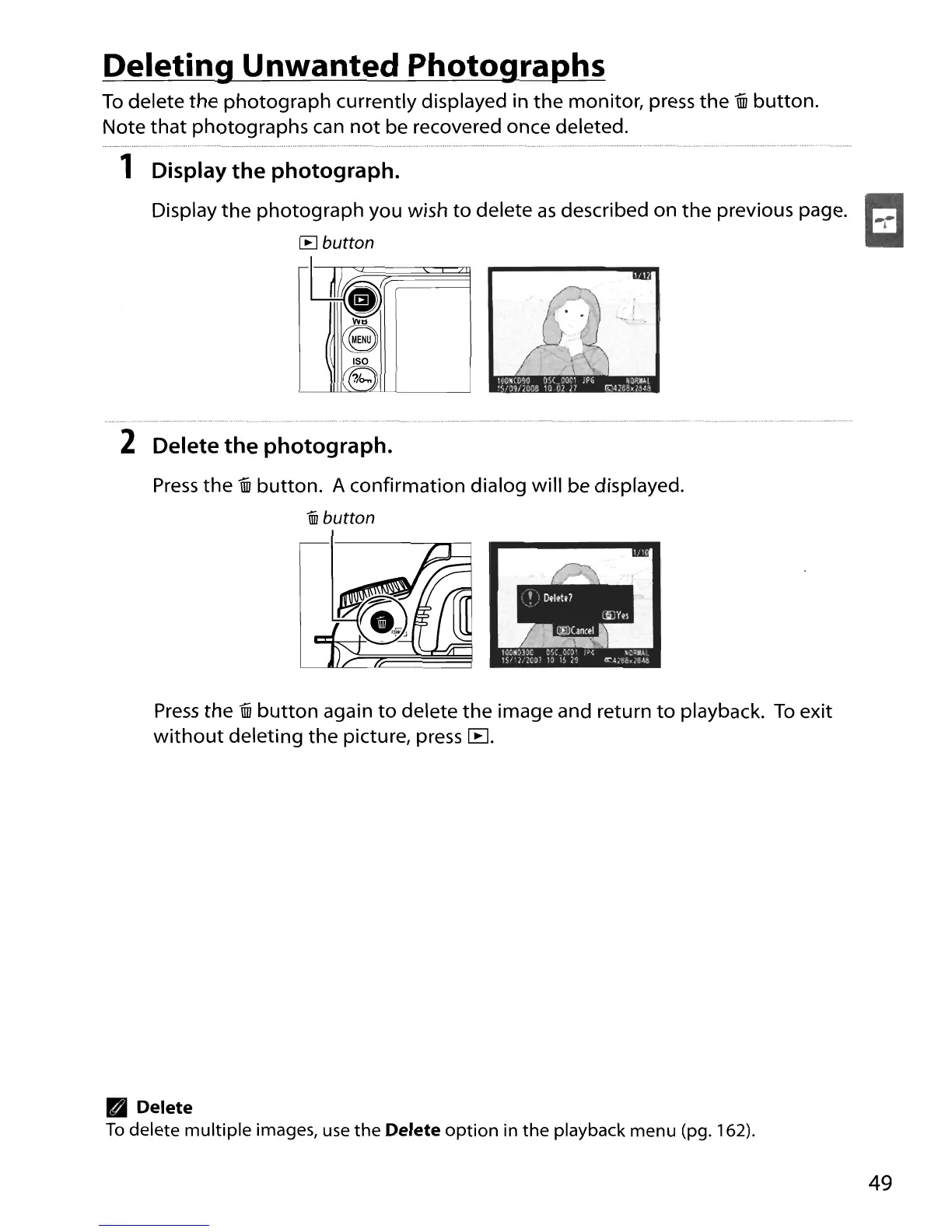
1 Display the photograph.
Display
the
photograph you wish
to
delete as described on
the
previous page.
1-:-1
[B
button
Ili~
IS~
ISO
?/e>..
'--'----
__
----.J
2 Delete the photograph.
Press
the
un
button. A confirmation dialog will be displayed.
iii!
button
Press
the
un
button
again
to
delete
the
image and return
to
playback.
To
exit
without
deleting
the
picture, press
[B
.
Delete
To
delete
multiple
images, use
the
Delete
option
in
the
playback menu (pg. 162).
49

Table of Contents

Other manuals for Nikon D90

Related product manuals