Flash
Mode
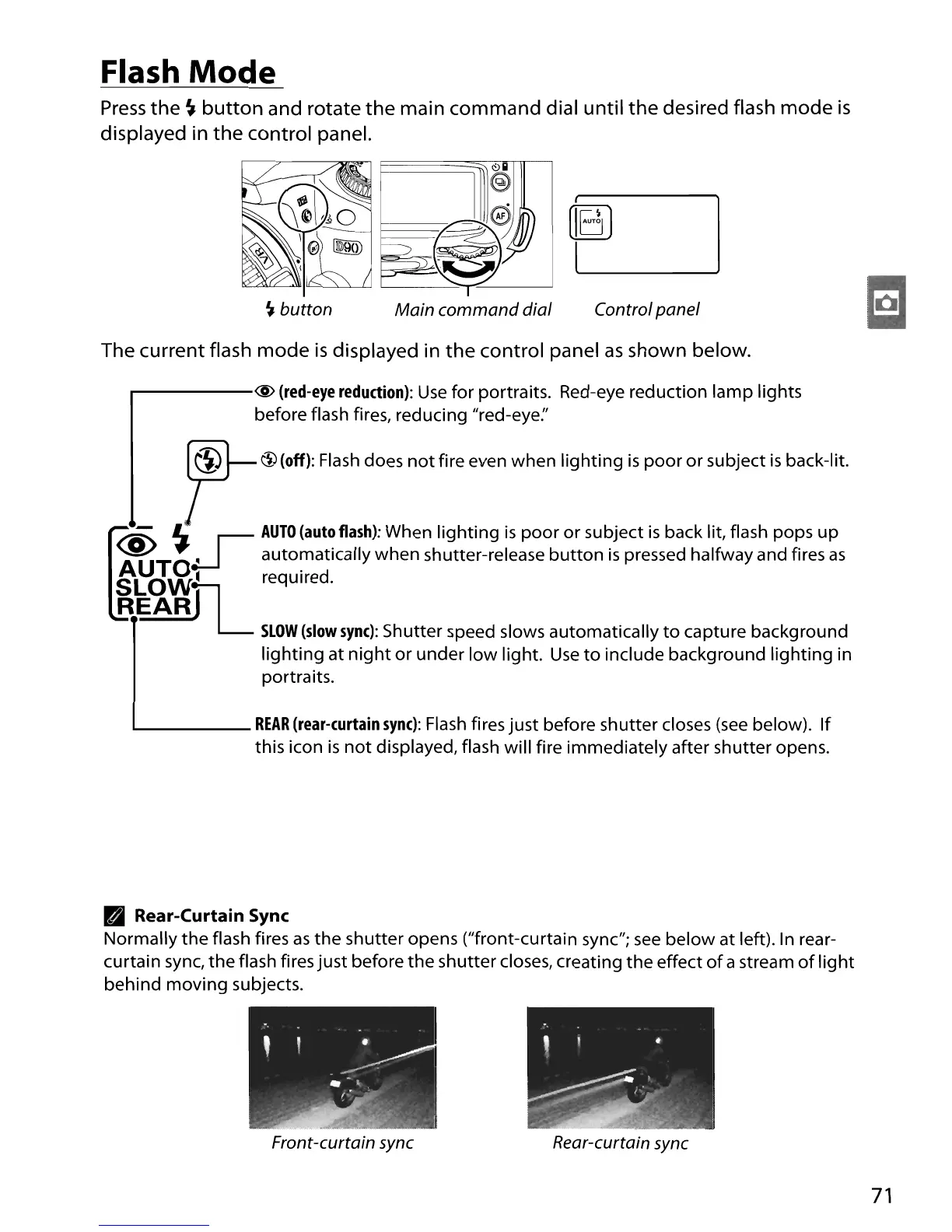
Press
the
~
button
and rotate
the
main command dial until
the
desired flash
mode
is
displayed in
the
control panel.
~
button
Control panel
The current flash
mode
is
displayed in
the
control panel
as
shown
below
.
....------@
(red-eye
reduction):
Use
for portraits. Red-eye reduction
lamp
lights
before flash fires, reducing "red-eye:'
7
f!i)
1
I$l
(offl:
Fla
sh
does
not
Ii
re
even when
Ii
9htin9
is
poor0 r
su
bject isback-lit.
~
~
~
I
AUTO
(auto
flash):
When
lighting
is
poor
or
subject
is
back lit, flash pops
up
'AU'TOeLJ
auto~atically
when shutter-release
button
is
pressed halfway and fires
as
SLOWTL-
required.
REARJ
SLOW
(slow
sync):
Shutter speed slows automatically
to
capture background
lighting
at
night
or
under
low
light.
Use
to
include background
lighting
in
portraits.
1....-
REAR
(rear-curtain
sync):
Flash
fires
just
before shutter closes
(see
below).
If
this icon
is
not
displayed, flash will fire immediately after shutter opens.
lBI
Rear-Curtain Sync
Normally
the
flash fires
as
the
shutter opens ("front-curtain sync";
see
below
at left).
In
rear-
curtain sync,
the
flash fires
just
before
the
shutter closes, creating
the
effect
of
a stream
of
light
behind
moving
subjects.
Front-curtain sync
Rear-curtain sync
71





 To Next Page