Error Messages
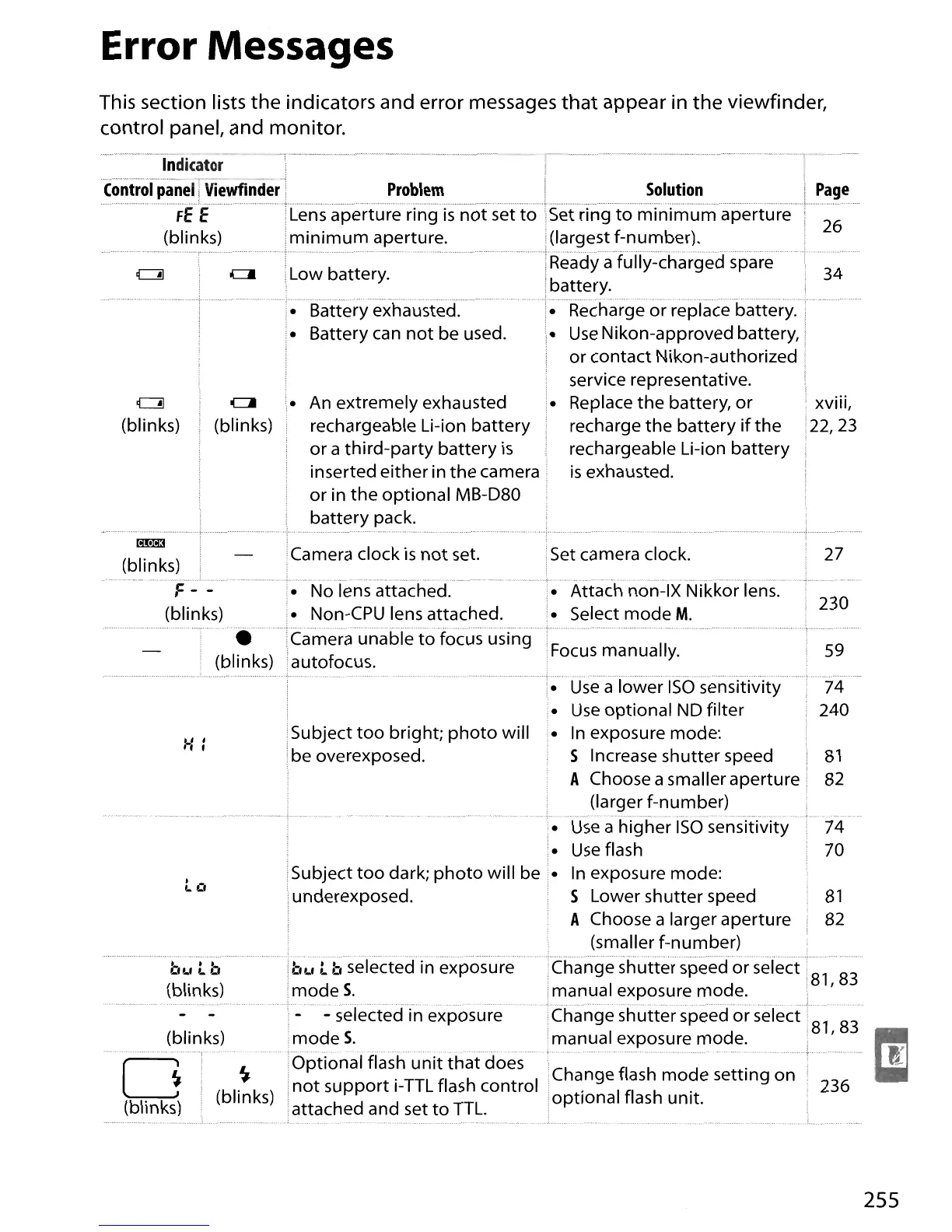
This section lists
the
indicators and error messages
that
appear in
the
viewfinder,
control pane" and monitor.
(blinks)
Low battery.
~"",._,-_
..
~
...
_
...
~._-~.~
Indicator
.......•...•.
"
,~
...•.....•
,,"-
-
Control
panel
Viewfinder
34
26
spare
Solution
Set ring
to
minimum
aperture
(largest f-number).
a
battery
.
•
Rechargeorrepla'cebattery:;"
•
Use
Nikon-approved battery, i
or
contact
Nikon-authorized !
service representative.
• Replace
the
battery,
or
xviii,
recharge
the
battery
if
the
22,23
rechargeable Li-ion
battery
is
exhausted.
ClI
(blinks)
..
+ , .
• Battery exhausted.
• Battery can
not
be
used.
Problem
Lens aperture ring
is
not
set
to
minimum
aperture.
..........................,...•..................................... ,
•...............
c::::::!I
(blinks)
(blinks)
(blinks)
Lltt:::\rh
non-IX Nikkor lens.
• Select
mode
M.
27
230
74
70
81
82
59
236
74
240
Change flash
mode
setting on
optional
flash unit.
Focus manually.
• a
ISO
sensitivity
•
Use
optional
ND filter
Subject
too
bright;
photo
will
• In exposure mode:
be overexposed. S Increase
shutter
speed
81
A Choose a smaller aperture 82
(larger f-number)
········f
..
·····
..
·-
. _ .
•
Use
a
higher
ISO
sensitivity
•
Use
flash
ISubject
too
dark;
photo
will be •
In
exposure mode:
.underexposed. S Lower
shutter
speed
A Choose a larger aperture
(smaller f-number) .
I
Ch
angeshutterspeedorselecti~183
manual exposure mode.
:'
...
).
nge
utter
speed or select:
81
83
manual exposure mode. "
..............•.............
;-t
t
Cu
..
, t b .
······l~,~,lbselected
in exposure
.mode
S.
,- - selected in exposure
mode
S.
~'OPtional
flash
unit
that
does
(blinks)
I
not
support
i-TTL flash
control
attached and set
to
TTL.
(blinks)
(blinks)
o
(blinks)
255





 To Next Page