EasyManua.ls Logo

Nikon D90 - Connecting the Camera

Nikon D90
359 pages
Print Icon
To Next Page IconTo Next Page
To Previous Page IconTo Previous Page
Loading...
Connecting
the
Camera
Connect
the
camera using
the
supplied
UC-E4
USB
cable.
1 Turn
the
camera off.
2 Turn
the
computer
on.
Turn
the
computer
on
and
wait
for
it
to
start up.
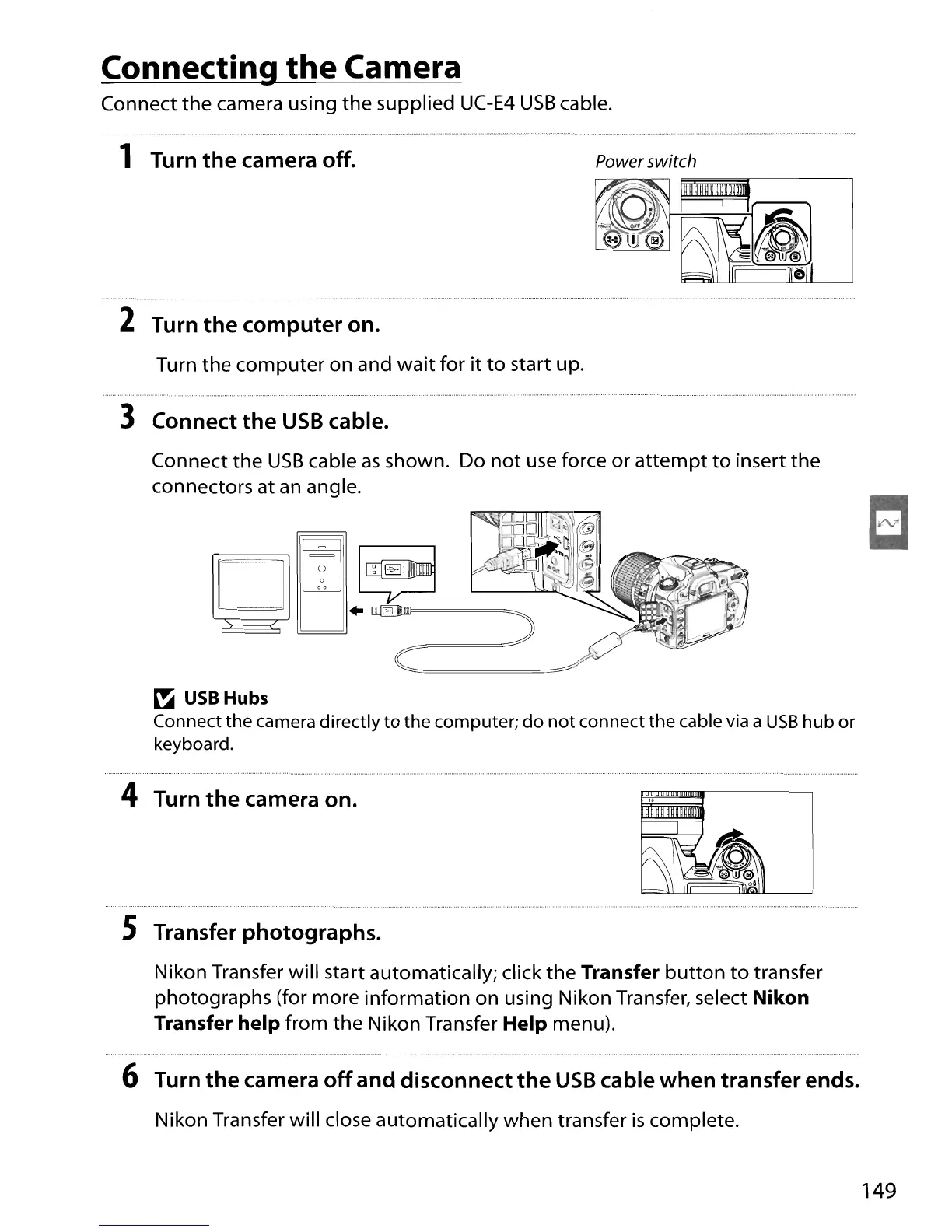
3 Connect
the
USB
cable.
Power switch
Connect
the
USB
cable
as
shown. Do
not
use force or
attempt
to
insert
the
connectors at an angle.
~
USB
Hubs
Connect
the
camera
directly
to
the
computer;
do
not
connect
the
cable via a
USB
hub
or
keyboard.
4 Turn
the
camera on.
S Transfer photographs.
Nikon Transfer will start automatically; click
the
Transfer
button
to
transfer
photographs (for more
information
on
using Nikon Transfer, select Nikon
Transfer help
from
the
Nikon Transfer Help menu).
...................... .
~_
.•..
,
..
_,
_ _ _
..
_ -
6 Turn
the
camera
off
and disconnect
the
USB
cable when transfer ends.
Nikon Transfer will close automatically when transfer
is
complete.
149

Table of Contents

Other manuals for Nikon D90

Related product manuals