Framing Pictures in
the
Monitor
(Live View)
Press
the
(bY]
button
to
frame pictures in
the
monitor.
1 Press
the
~
button.
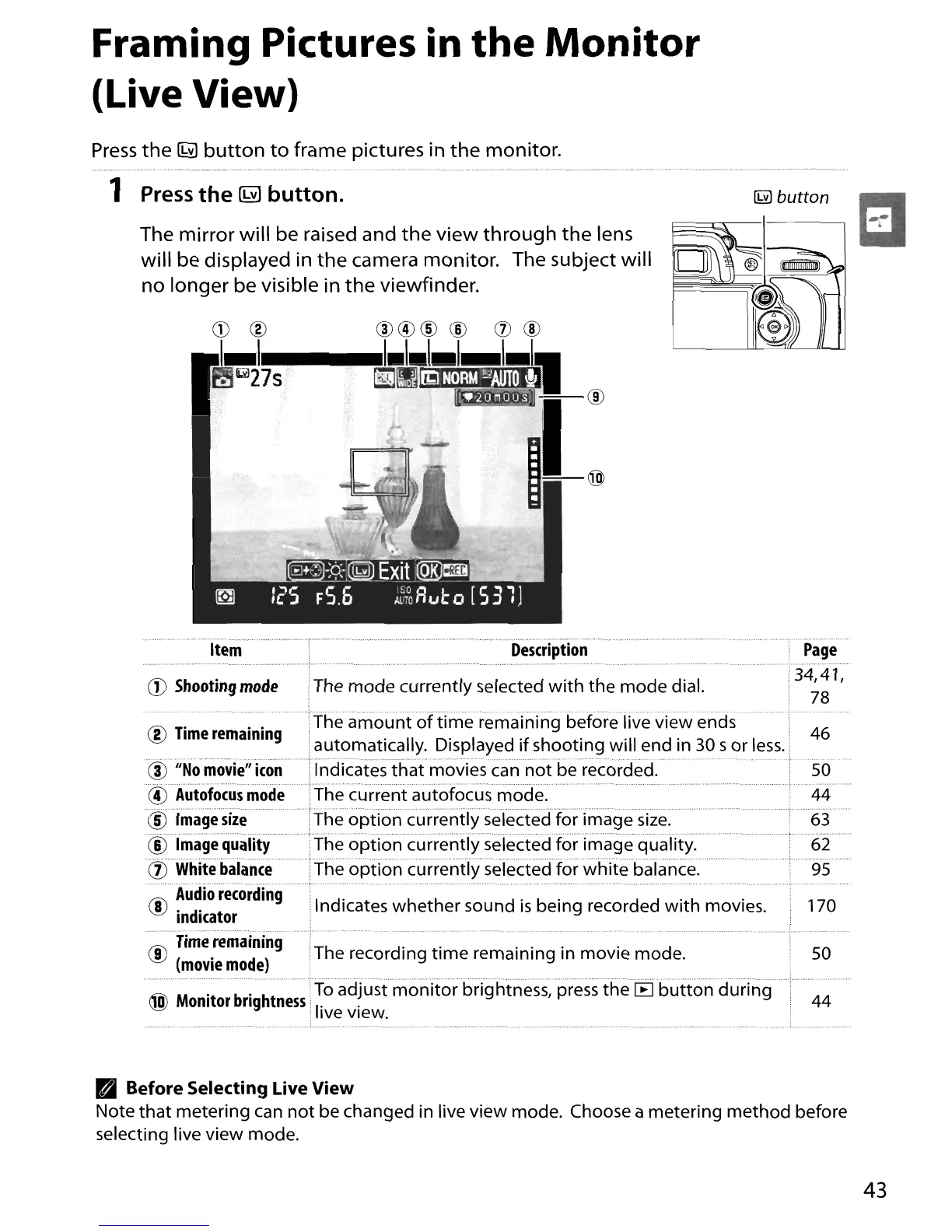
The mirror will be raised and
the
view
through
the
lens
will be displayed in
the
camera monitor. The subject will
no longer be visible in
the
viewfinder.
CD
@
~~7I111S")
--.
.............
".~"
.'
'--~""""----"-"'""
""~
_
..
_
..
_-,,...
..'
'
,,,,,
..•
_.,,
,,
.-
,
,.,,_
,
..
Item
Description
CD
Shooting
mode
IThe
mode
currently
selected
with
the
mode
dial.
Page
34,41,
78
50
44
170
...................•....
_
--
" .
®
Time
remaining
:The
amount
of
time
remaining before live
view
ends 46
iautomatically. Displayed
if
shooting
will
end in 30 s
or
less
.•
...
.;.
<~)IiNo·movie"Icon··
.Indicatesth'at
movies can n'ot be
recorded.'
50
~Autofocusmode
.The
current
autofocus mode.
.'
44
@Imagesiie
"The
option
currently
selected
for
image
size."
63
CiS
Tmagequality
The
option
currently
selected
for
image
quality. 62
.
(ljWhltebalance
············fheoptioncurrendyseiectedforwhitebalance.
. , .95
rti\
Audio
recording
~
, d' Indicates
whether
sound
is
being recorded
with
movies.
In
Icator
.··".········"···"·r···"'·
...
··,···,··_
..
·····
rti\
Time
remaining
~
•The recording
time
remaining in
movie
mode.
(movie
mode)
M\
M
't
b'
ht ITo adjust
monitor
brightness, press
the
[B
button
during
~
om
or
ng
ness.
I'
.
; Ive view.
Pall
Before Selecting Live View
Note
that
metering
can
not
be changed in live
view
mode. Choose a
metering
method
before
selecting live
view
mode.
43





 To Next Page