EasyManua.ls Logo

Nikon D90 - Page 152

Nikon D90
359 pages
Print Icon
To Next Page IconTo Next Page
To Previous Page IconTo Previous Page
Loading...
II
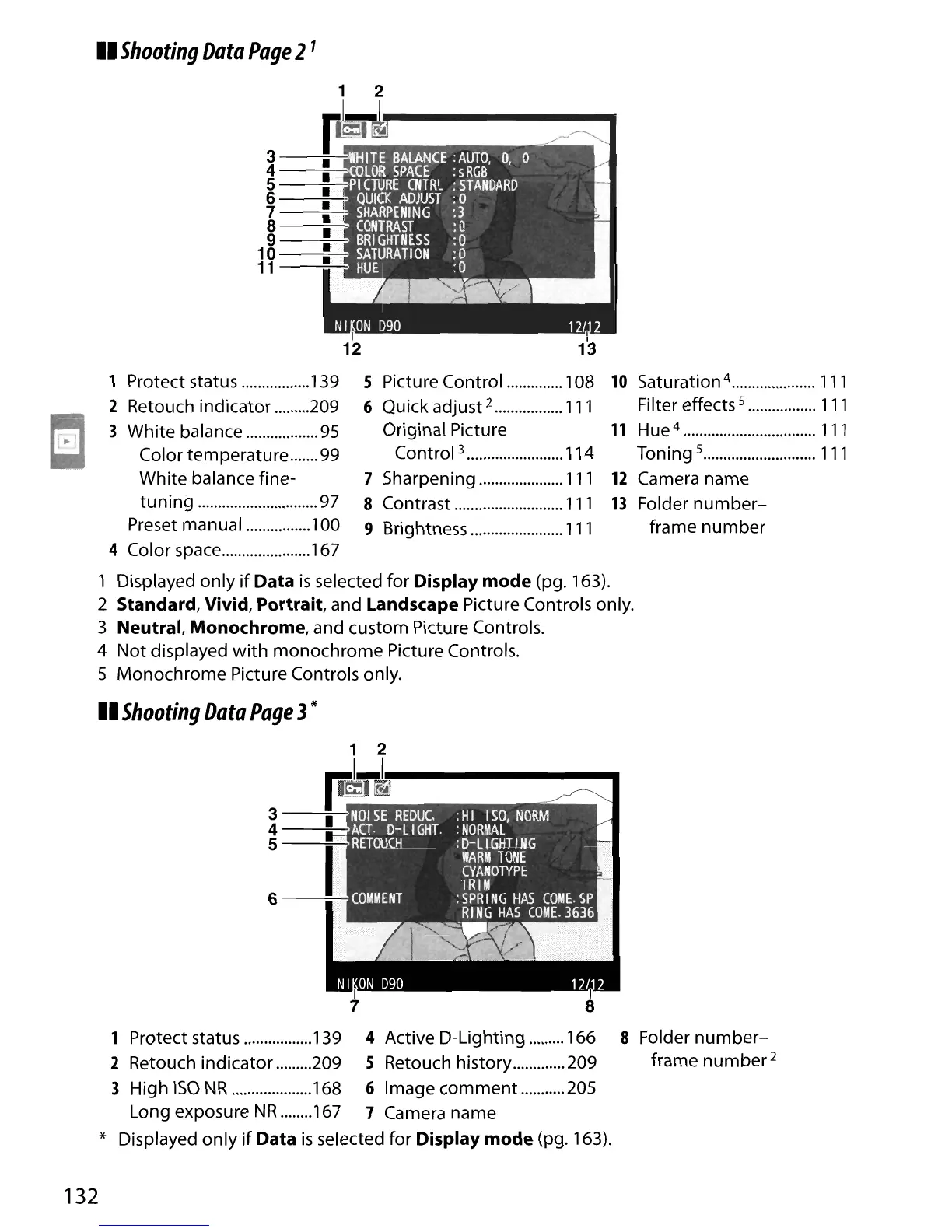
Shooting
Data
Page
21
1 2
pS~
3
----=.'----=:
4----;-:r.
5
1-.
6
7
8
9
10
11
10
Saturation 4
111
Filter effects 5
111
11
Hue
4
111
Toning 5
111
12
Camera
name
13
Folder
number-
frame
number
5 Picture
Control
108
6 Quick
adjust
2
111
Original Picture
Control
3 114
7 Sharpening
111
8 Contrast
111
9 Brightness
111
1 Protect status 139
2 Retouch
indicator
209
3
White
balance 95
Color
temperature
99
White
balance
fine-
tuning
97
Preset
manual
100
4 Color space 167
1 Displayed
only
if
Data
is
selected
for
Display mode (pg. 163).
2 Standard, Vivid, Portrait,
and
Landscape Picture Controls only.
3
Neutral, Monochrome, and
custom
Picture Controls.
4
Not
displayed
with
monochrome
Picture Controls.
5
Monochrome
Picture Controls only.
II
Shooting
Data
Page
3*
3
----=o--:JTfi'
4
----=;-:J~
5----='-
6
----=:--II
1 Protect status 139 4 Active
D-Lighting
166
2 Retouch
indicator
209
5 Retouch
history
209
3
HighISONR
168
6Imagecomment
205
Long exposure
NR
167 7 Camera
name
* Displayed
only
if
Data
is
selected
for
Display mode (pg. 163).
8 Folder
number-
frame
number
2
132

Table of Contents

Other manuals for Nikon D90

Related product manuals