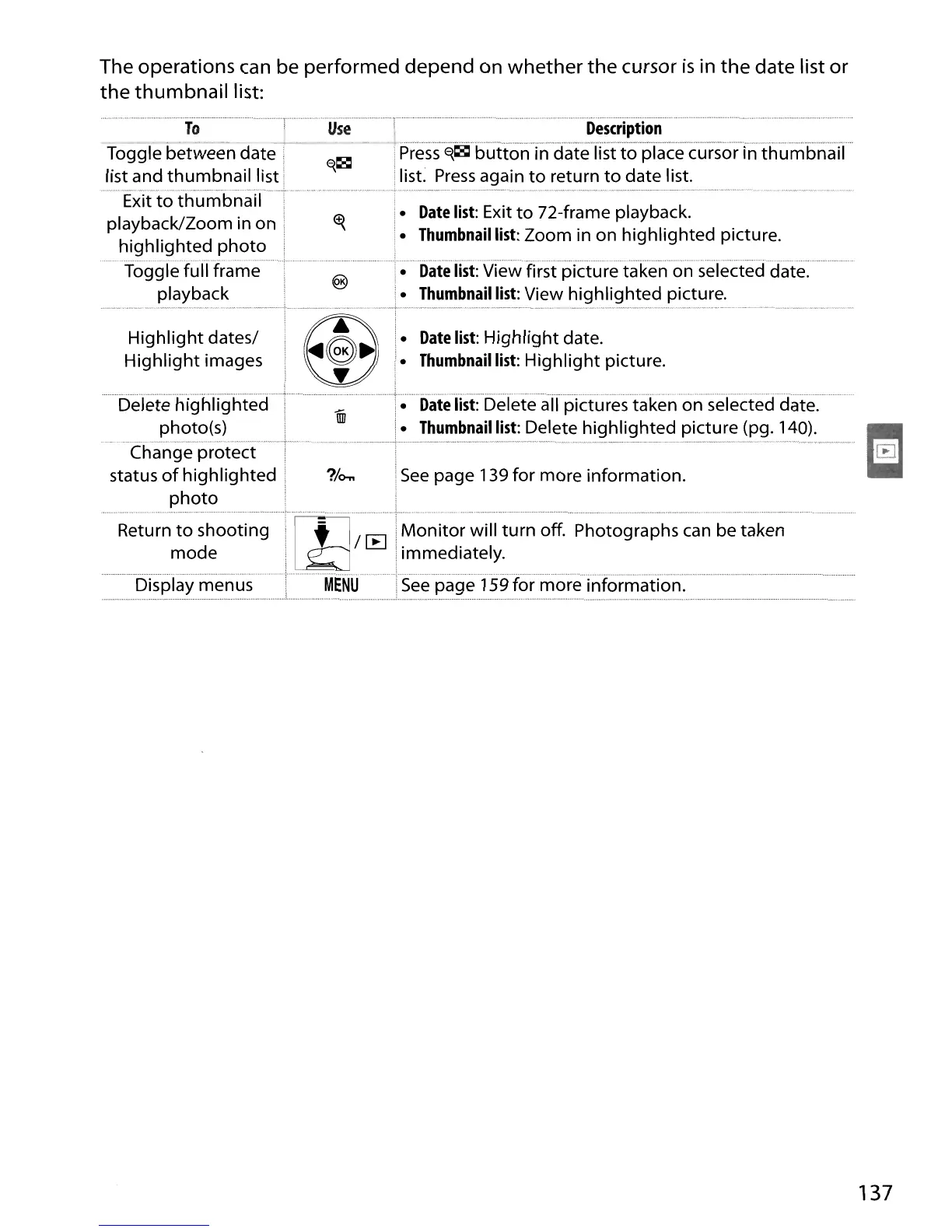
The operations can be performed depend on
whether
the
cursor
is
in
the
date list
or
the
thumbnail
list:
To
Toggle between
date:
list and
thumbnail
list :
,"
"·,,
........
_
..
_
..
'~"m,·"
Exit
to
thumbnail
playback/Zoom in on '
highlighted
photo
Toggle full frame
playback
Use
Description
;Pre'ss-'Ei~"button'i'n'''aate-n'st'to'-prace-curso'r''·j·n··th·u·m'bn·aiI····
'list.
Press
again
to
return
to
date list.
•
Date
list:
Exit
to
72-frame playback.
•
Thumbnail
list:
Zoom in on highlighted picture.
•
Date
list:
View first picture taken on selected date.
•
Thumbnail
list:
View highlighted picture.
Highlight
dates!
Highlight
images
I.
Date
list:
Highlight
date.
~.
Thumbnail
list:
Highlight
picture.
?/o-..
i
See
page 139 for more information.
Display menus
.......
Del'ete
h'ighiighted
UiJ'
~·······Date·Iist:belete··an···pkturestakenon·seiected·date:····
.
photo(s)
'.
Thumbnail
list:
Delete highlighted picture (pg. 140).
.....
"".
,·"'_
•.
·_
~·.
__
..
·~~
··" ,
..
""
"
..
""'
..
"""m··
_ + w...
..
__
_,,
__
. " _•..
__
~
..
-<
..
_
..
_._
••
,,_._
, _
Change protect :
status
of
highlighted I
photo
Returnmtoodsheooting:'",·,!.Tl1;
.~'
M~~it~~~illtur~~'ff:"Photographs
can
be taken
~
iimmediately.
MEN
.
See"page'iS9for
more
information."""
137





 To Next Page