EasyManua.ls Logo

Nikon D90 - Page 171

Nikon D90
359 pages
Print Icon
To Next Page IconTo Next Page
To Previous Page IconTo Previous Page
Loading...
II
Connecting
the
Printer
Connect
the
camera using
the
supplied
UC-E4
USB
cable.
, Turn
the
camera off.
2 Connect
the
USB
cable.
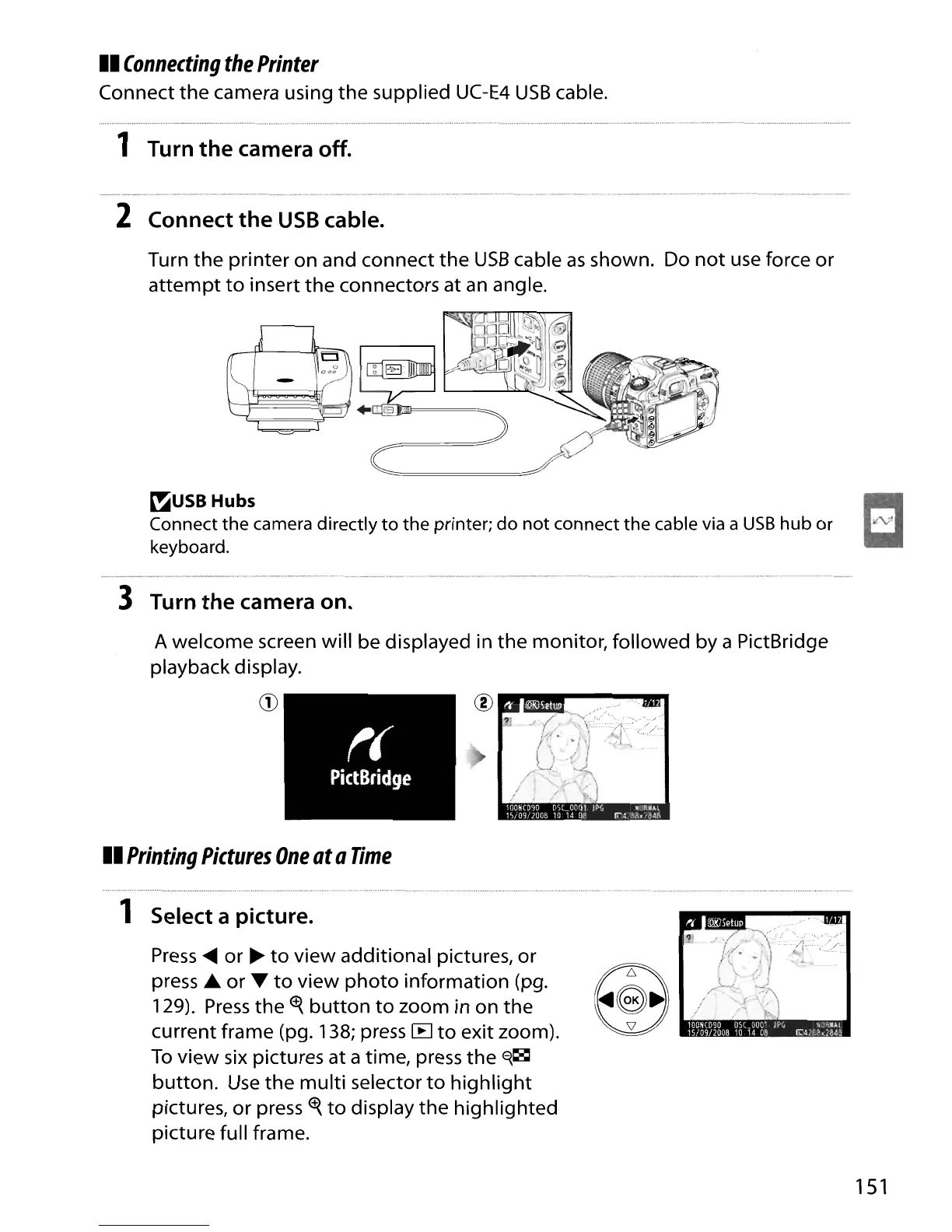
Turn
the
printer
on and connect
the
USB
cable
as
shown. Do
not
use force
or
attempt
to
insert
the
connectors at an angle.
~~~:c~t~~Scamera
directly
to
the
printer;
do
not
connect
the
cable via a
USB
hub
or
~"'"I
keyboard.
3 Turn
the
camera on.
A welcome screen will be displayed in
the
monitor, followed by a PictBridge
playback display.
CD
II
Printing
Pictures
One
ata
Time
, Select a picture.
Press
or
~
to
view
additional pictures, or
press
or
T
to
view
photo
information (pg.
129).
Press
the
<t{
button
to
zoom in on
the
current frame (pg. 138; press
[B
to
exit zoom).
To
view
six pictures at a time, press
the
E{~
button.
Use
the
multi
selector
to
highlight
pictures, or press
<t{
to
display
the
highlighted
picture full frame.
151

Table of Contents

Other manuals for Nikon D90

Related product manuals