Bracketing progress
indicator
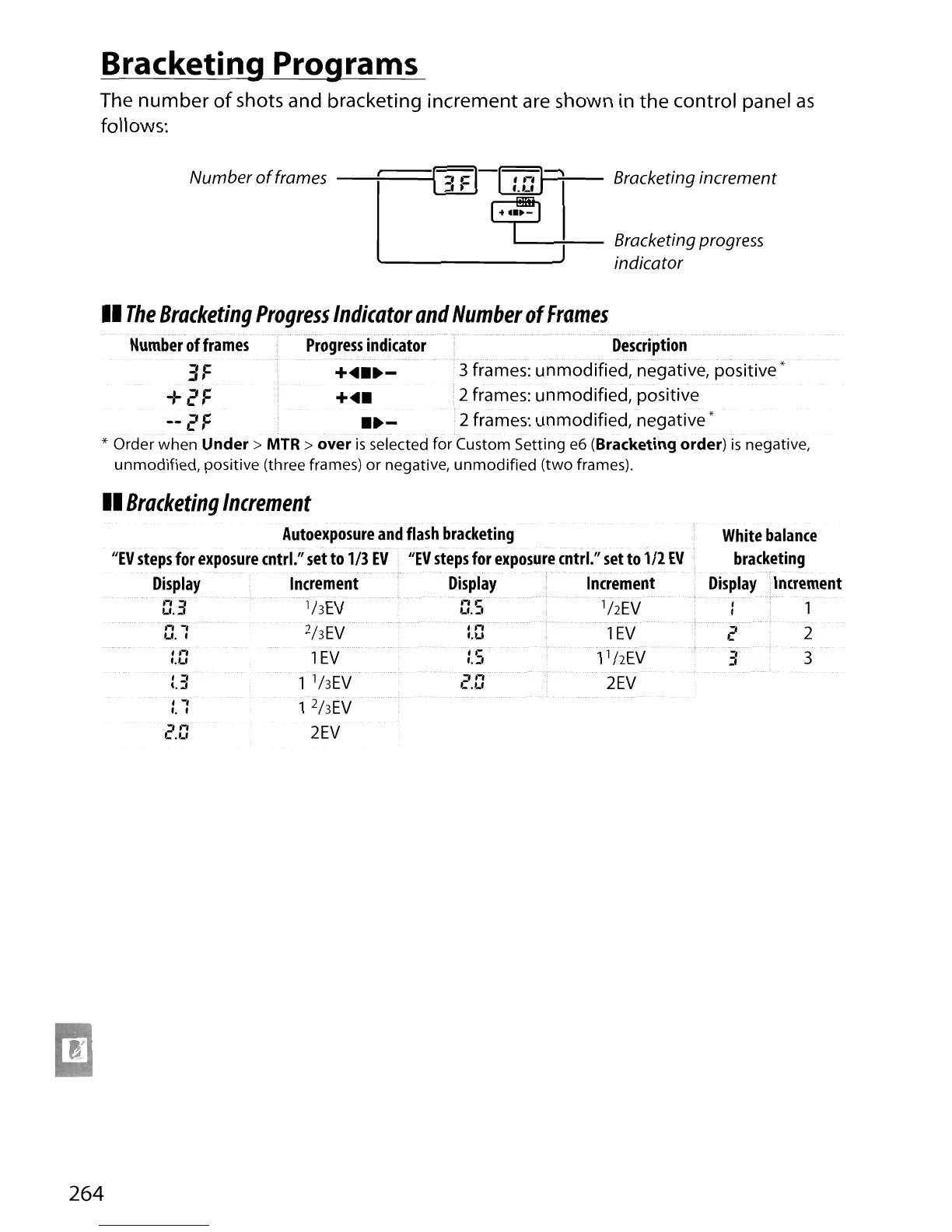
Bracketing Programs
The
number
of
shots and bracketing increment
are
shown in
the
control panel
as
follows:
Number
of
frames
----+====,~-I
,.-,
I~
Bracketing increment
l..d.l:...J
f.
Lf
G2----;-..-
II
The
Bracketing
Progress
Indicator
and
Number
of
Frames
Number
of
frames
Progress
indicator
Description
.::
F+4
••
- .
:3
frames: unmodified, negative, positive'
+2 F
+...'
2 frames: unmodified, positive
--
2 F
••
-'
2 frames: unmodified,
negative'
* Order when
Under>
MTR >
over
is
selected for Custom Setting
e6
(Bracketing
order)
is
negative,
unmodified, positive (three frames) or negative,
unmodified
(two frames).
II
Bracketing
Increment
Autoexposure
and
flash
bracketing
JlEV
steps
for
exposure
cntrl."
set
to
1/3
EV
JlEV
steps
for
exposure
cntrl."
set
to
1/2
EV
Display
Increment
Display·
Increment
d03ihEVd.S
ij2i:V
t:."'{
2hEVTd
1
EV
i.t:
1
EV
:.Sl
i
hEV
:.3
1 'hEV
c.t:
2EV
:.1
1
2
j/{V
2.0
2EV
1
2
..........
.,
..
:: 3
264





 To Next Page