Chapter 10 Preparation for Using Annotation Function and Measurement Function
126
Adding Annotations
and Measuring
Clearing overlay content
You can clear overlay content in one operation.
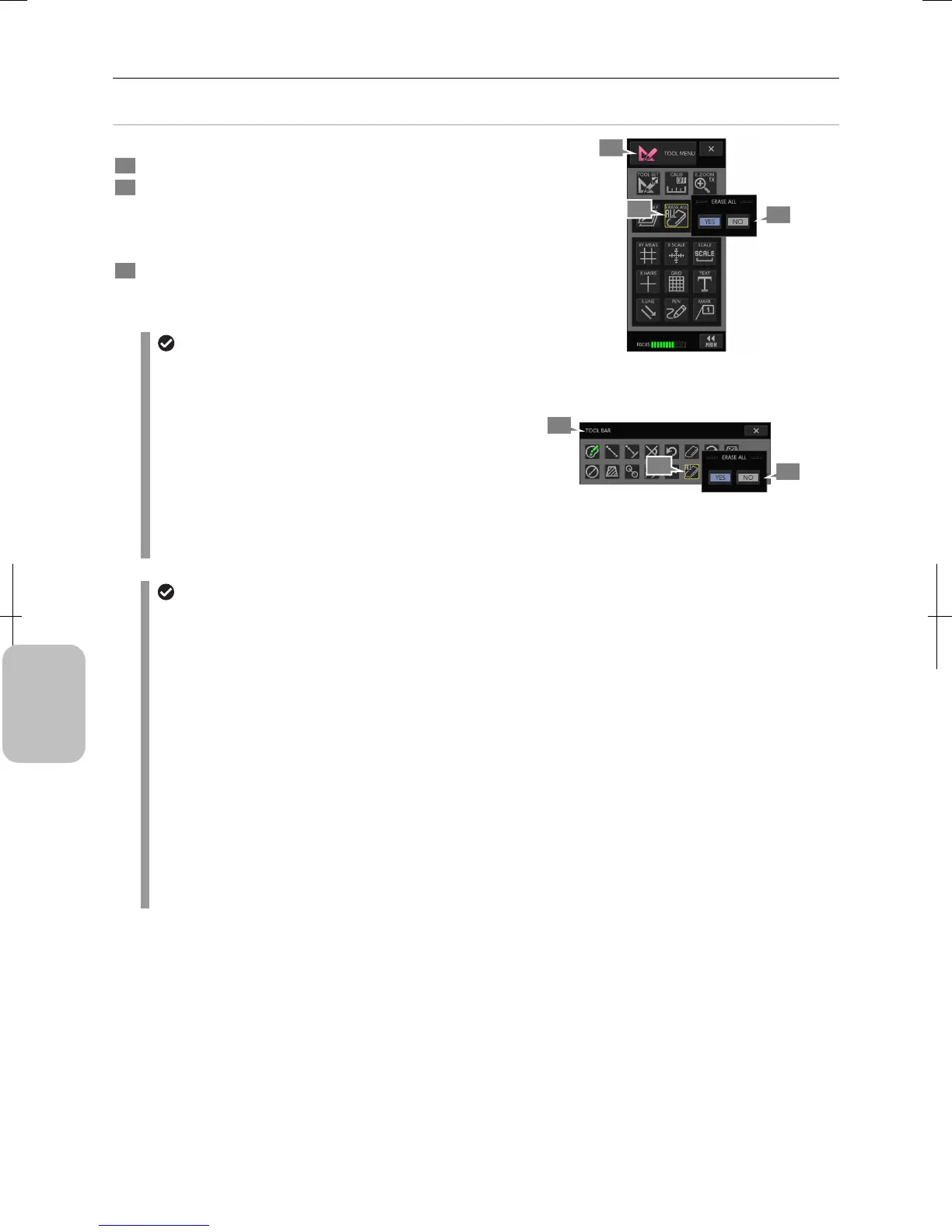
1 Display [TOOL MENU] or [TOOLBAR].
2 Press the [ERASE ALL] button.
A confirmation message appears.
Note: To erase all overlay contents from the [TOOLBAR],
press the [SHOW ALL] button to display all buttons.
3 Press the [YES] button to erase all or the [NO] button to
cancel the operation.
Information rendered in the overlay is cleared.
Clearing overlay
• The content will not be restored once cleared.
• The display/hide setting can be made for each item of
scales (XY measurement, X scale, scale, cross hairs,
and grid line). Therefore, these items cannot be
deleted by the erase-all operation.
• Pressing the [ERASE ALL] button completely erases
rendered contents of annotations and measurement
results. You cannot keep only a part of rendered
overlay contents. To erase rendered contents for each
overlay item (text, straight line, pen, and marker),
press the [ERASE] button in the menu of each item.
Clearing All Overlay Contents
(Using [TOOL MENU)
Clearing All Overlay Contents
(Using [TOOLBAR)
Automatically clearing displayed overlay contents
Displayed overlay contents (annotations and measurement results) are automatically cleared (erased) when the
following operations are performed.
• Changing image mode:
When [Image mode] is set to [ROI-L], [ROI-S], or [C.SCAN] in the [CAM MENU: CAMERA] long window, scales,
annotations, and measurement results are completely cleared.
• Playing back image:
When an image is played back by the [VIEW MENU], annotations and measurement results are cleared. The
same applies to when playback is complete.
• 2-window display:
When [2WIN] display is set to ON/OFF in the [VIEW MENU], annotations and measurement results are cleared.
• Switching calibration settings:
When calibration settings are changed by the [TOOL MENU] or [TOOLBAR], only measurement results are
cleared.
• All clear:
When [ERASE ALL] is performed by the [TOOL MENU] or [TOOLBAR], annotations and measurement results
are cleared.
2
1
3
2
1
3











 To Next Page