Chapter 13 Changing Settings
187
Changing
Settings
13.4.3
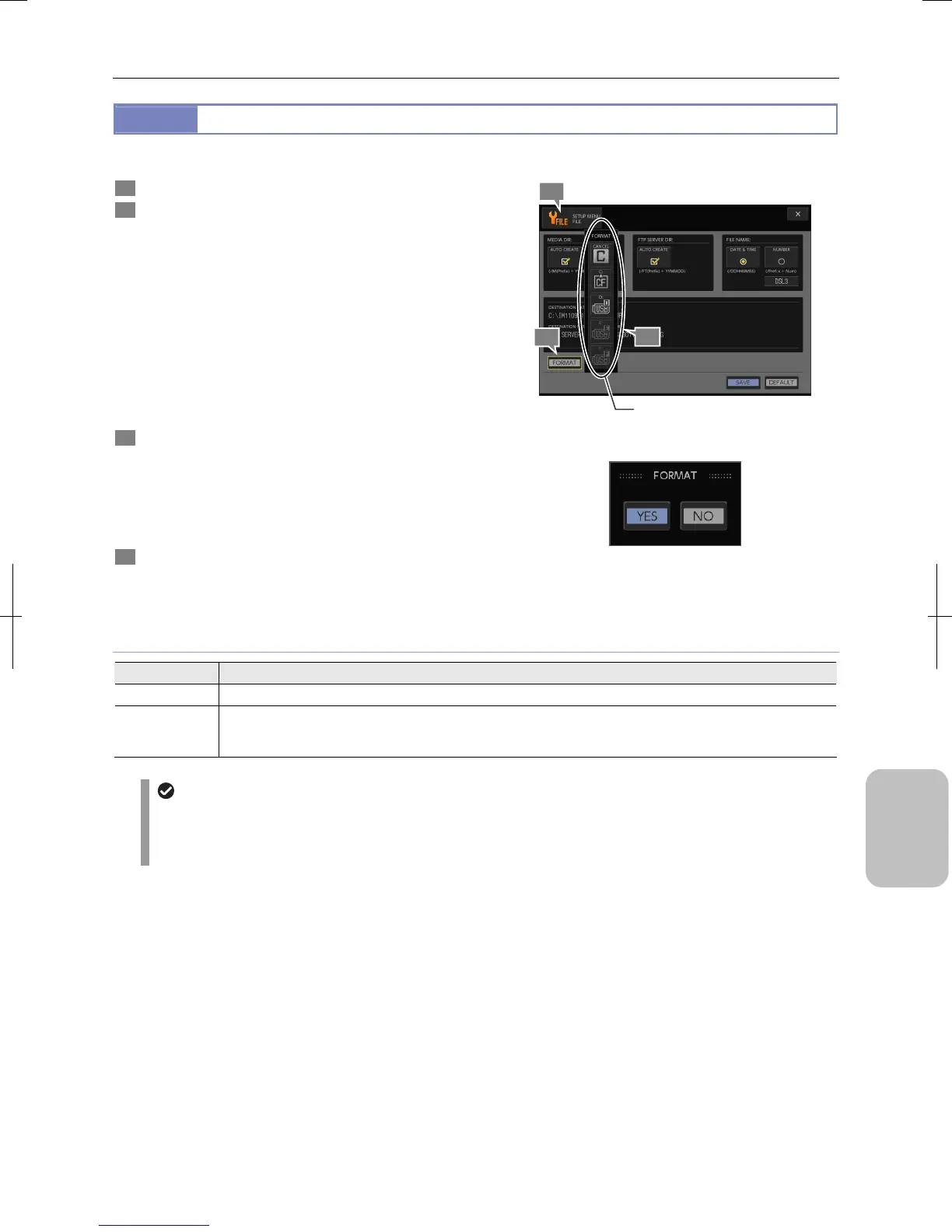
Initializing Recording Medium
You can initialize a recording medium using the [FORMAT] button.
1 Display the [SETUP MENU: FILE] screen.
2 Press the [FORMAT] button.
The [FORMAT] submenu appears and buttons [C] to [F]
(drives) and [CANCEL] are displayed.
Icons of initializable drives are displayed in white and icons
of disconnected drives are displayed in gray in the drive
buttons.
Note: Recording media connected to the DS-L3 are
identified by drive numbers C to F. A drive number C
is always assigned to a CF card, and drive numbers
D, E, and F are assigned to recording media
connected to the USB connectors in the order of
recognition.
3 Press a desired drive button (C to F) to initialize a
recording medium.
Pressing the [CANCEL] button closes the submenu.
When one of the drive buttons [C] to [F] is pressed, a
message to confirm recording medium initialization
appears.
4 Press [YES] if you want to initialize the medium, or [NO]
to cancel the operation.
If you select [YES], the specified medium is initialized.
Initializing Recording Medium
Confirming Initialization
Recording Media Initialization
Choice Setting
C Initializes the CF card inserted into the slot on the right side of the DS-L3.
D to F
Initializes recording media connected to the USB connectors of the DS-L3.
The DS-L3 assigns drive numbers D to F in the order of recognition. When two or more recording media are
connected, check the correspondence between drive numbers and connected media in advance.
In case of initialization failure
A recording medium with its write protect switch enabled cannot be initialized.
Initialization may fail if a recording medium has an error.
A warning message indicating a medium error is displayed in this case.
1
3
2
Select a medium.











 To Next Page