Chapter 16 Connecting to Network
232
Connecting to
PC, Printer, and
Network
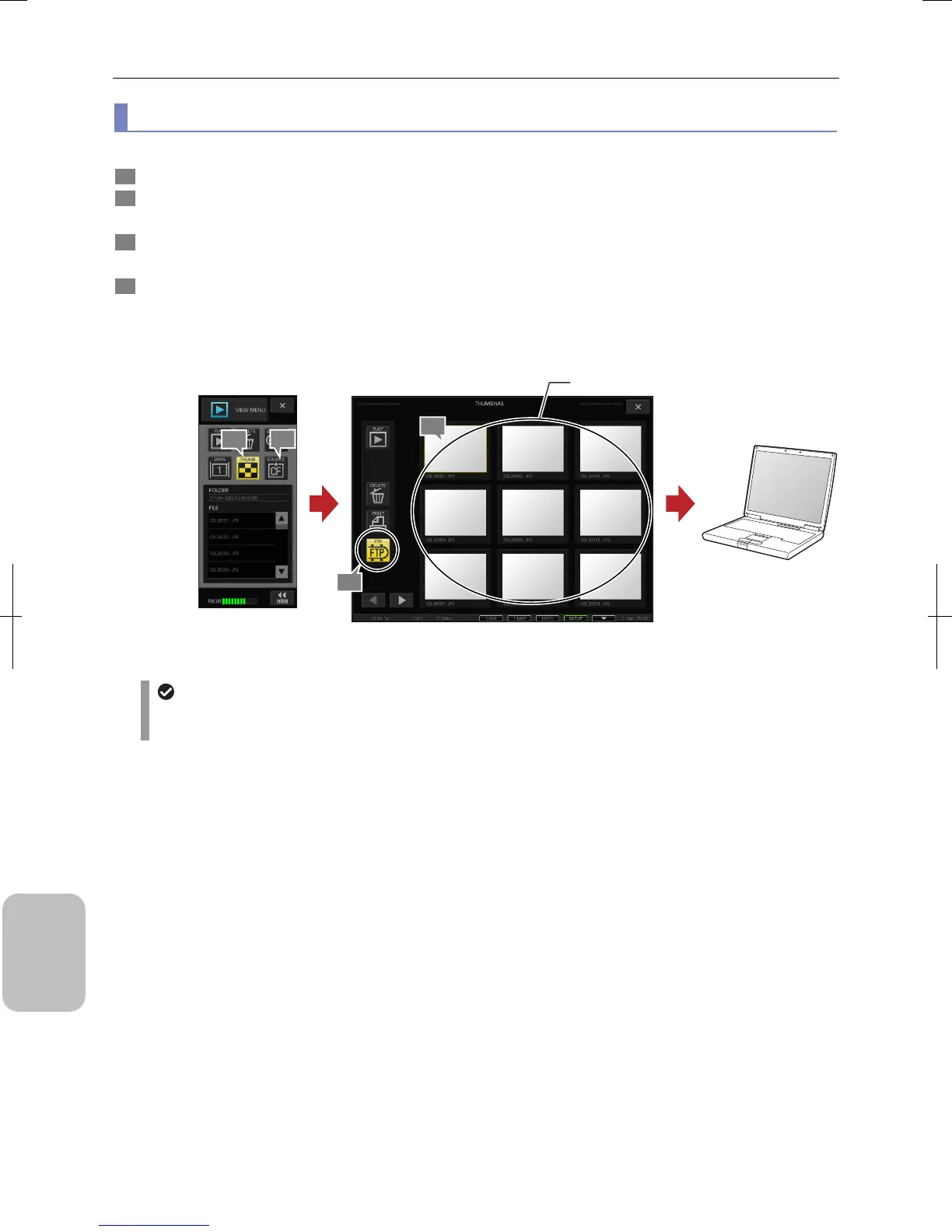
(2) Transferring stored image to FTP server
Images stored in a recording medium can be transferred to an FTP server by operation from the thumbnail window..
1 Press the [SOURCE] button in the [VIEW MENU] and select a desired folder by switching drives and folders.
2 Press the [THUMB] button in the [VIEW MENU].
The [THUMBNAIL] window opens and all image files in the selected folder are displayed
3 Select the desired image and press the [FTP] button.
The selected image is marked with a yellow frame.
4 Press the [FTP] button.
The selected image is sent to the FTP server.
Note: Multiple images displayed in the thumbnail on the current page can be selected and transferred to an FTP
server.
Transferring Stored Image
In case no image is saved on FTP server
Make sure you have configured the network settings of this system correctly and set correct user name and
password for logging into the FTP server.
1
4
Select an image.
FTP server
2
3











 To Next Page