Chapter 13 Changing Settings
189
Changing
Settings
13.5.1
Setting Date and Time
— [DATE/TIME SET] Area —
The [DATE/TIME SET] area allows you to set the current date and time.
Internal clock of the system
The date and time are displayed on the right side of the status bar.
The internal clock may fail to keep correct time if the DS-L3 is left for a few days without power supply. Set the date
and time immediately after the power is turned on. Set correct date and time especially when you use automatic
folder and file name generation since date and time are used for that feature.
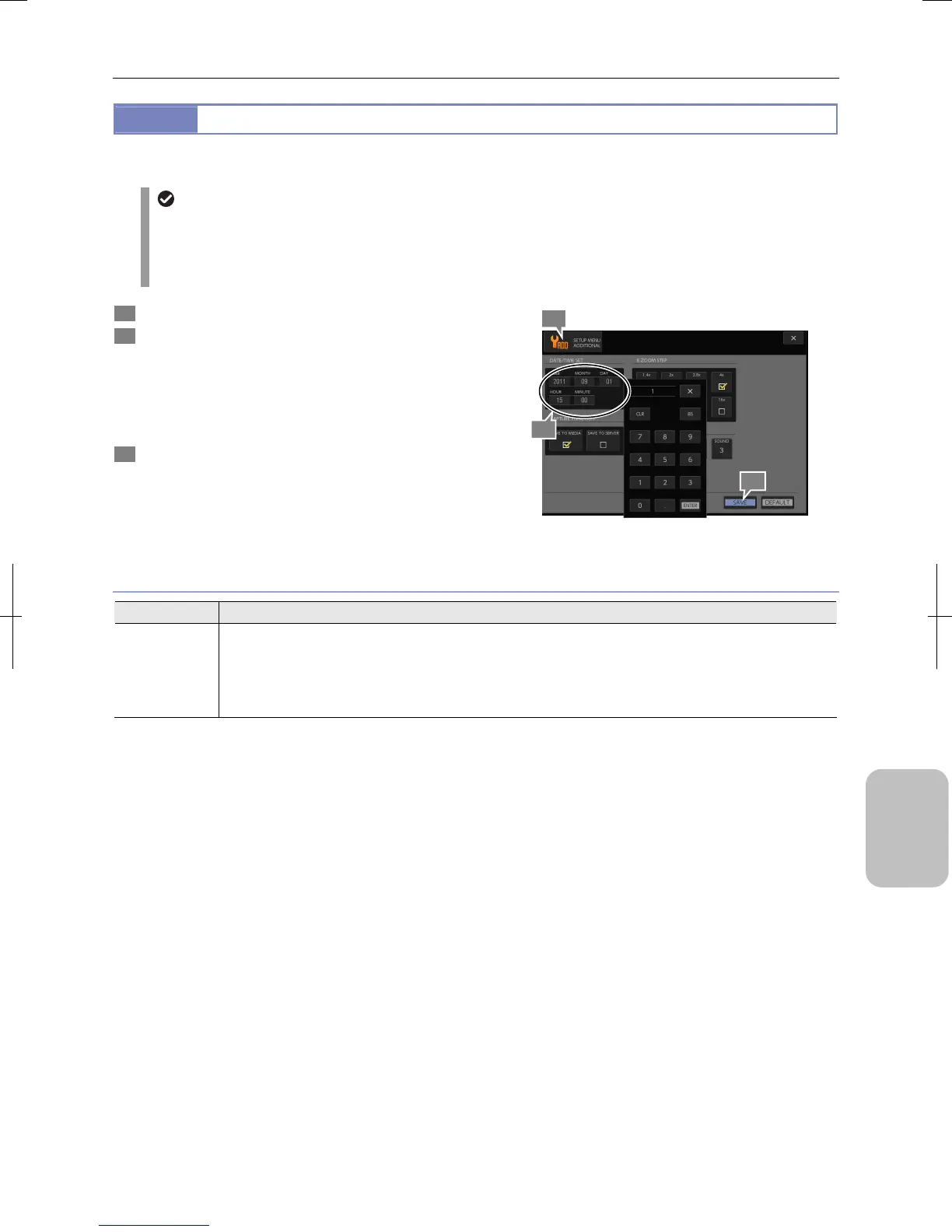
1 Display the [SETUP MENU: ADDITIONAL] screen.
2 Set date and time in the [DATE/TIME SET] area.
When you press each input field, a keypad appears. Press
the desired key to enter a correct value. Press [ENTER] to
commit the value.
Enter a 2-digit value for each item of date and time, and
enter lower two digits for year.
3 Press the [SAVE] button.
Setting Date and Time
Date/Time Setting
Item Setting
YEAR, MONTH,
DAY, HOUR,
MINUTE
• Year (00 to 99, lower two digits)
• Month (1 to 12)
• Day (1 to 31)
• Hour (0 to 23)
• Minute (0 to 59)
2
1
3











 To Next Page