Chapter 15 Performing Direct Printing
200
Connecting to
PC, Printer, and
Network
15
Performing Direct Printing
This chapter describes how to connect a PictBridge-compliant printer to the DS-L3 and output images to the printer.
PictBridge standard
PictBridge is a standard provided for digital camera and printer manufacturers to ensure interconnection, allowing
direct print of digital camera images with a printer without using a PC.
For details of the PictBridge standard, visit the PictBridge website “http://www.cipa.jp/pictbridge/”.
15.1
Connecting a Printer
Perform the following to make a connection between the DS-L3 and a printer with a USB cable.
Item Initial Setting See
Setting the USB (D) Connector Operating Mode [PTP] 15.1.1
Connecting the DS-L3 to a Printer with a USB Cable.
-
15.1.2
15.1.1
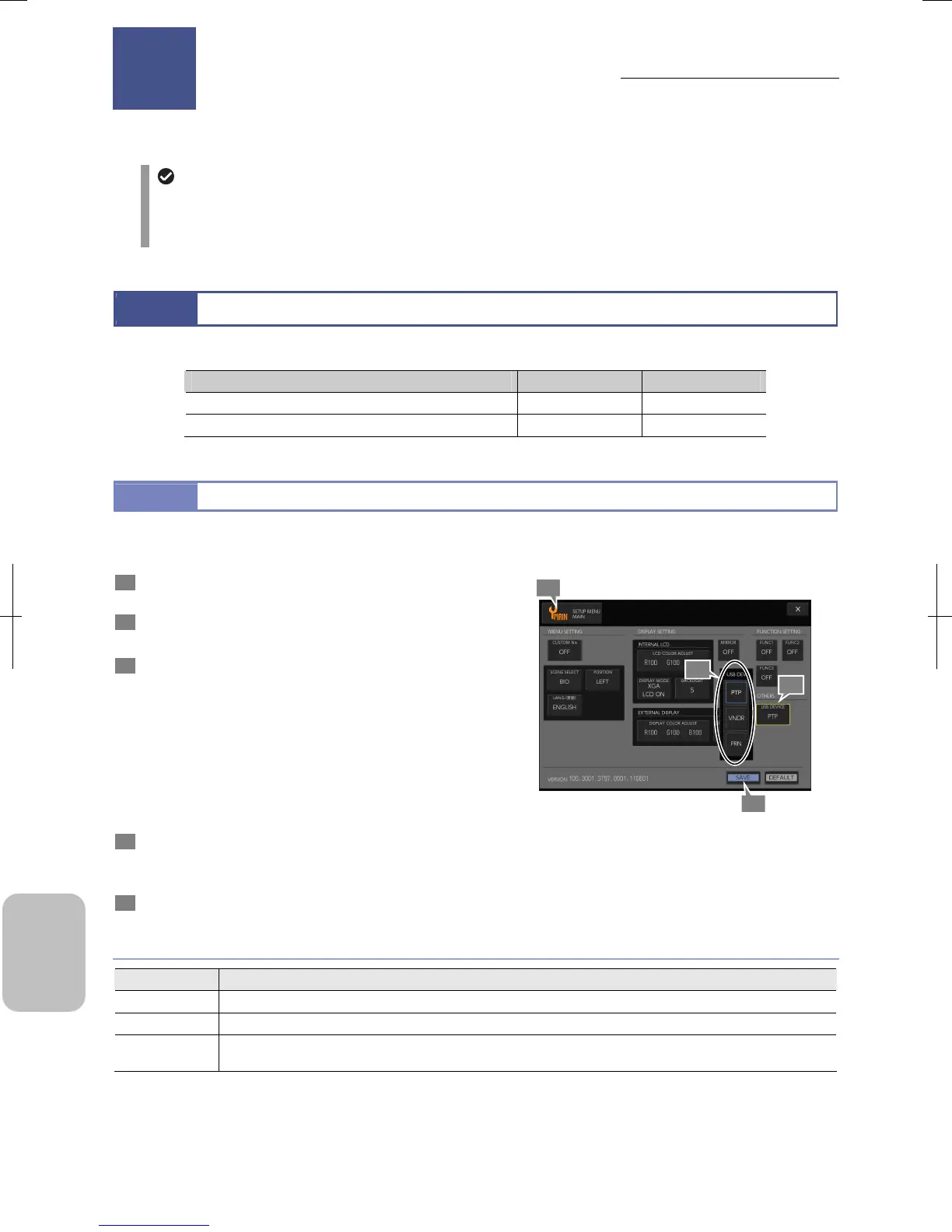
Setting the USB (D) Connector Operating Mode
The USB (D) connector operating mode (device mode) must be set according to equipment to connect and the purpose of
use.
1 Press [SETUP] on the task bar to open the [SETUP
MENU: MAIN] screen.
2 Press the [USB DEVICE] button in the [OTHERS] area.
The [USB DEV] submenu appears.
3 Select [PRN].
The [USB DEV] submenu has the following choice. For
details of the setting, see the table below.
• [PTP] (initial setting)
• [VNDR]
• [PRN]
When one of these has been selected, the submenu closes
and the selected content is displayed in the [USB DEVICE]
button.
4 Press the [SAVE] button.
If the setting is modified, a message to prompt restart of the
DS-L3 appears.
5 To change the setting, turn off and on the DS-L3.
Setting USB (D) Connector Operating Mode
USB Device Setting
Choice Setting
PTP Select this mode when using the DS-L3 as an external recording medium of the PC. (Initial setting)
VNDR Select this mode when accessing the DS-L3 using dedicated application “NIS-Elements” on the PC.
PRN
Select this mode when connecting a PictBridge-compliant printer to the DS-L3 to directly print images by
capture operation or operation from displayed thumbnail.
Performing Direct Printing
15
4
3
1
2
Chapter











 To Next Page