Chapter 5 Working with Touch Panel
31
Please
Read First
5.2
Navigating through Screen Menus
This section explains the composition of the DS-L3 operation menus, as well as some basics on how to use them.
5.2.1
Menu Configuration and Method of Displaying Menus
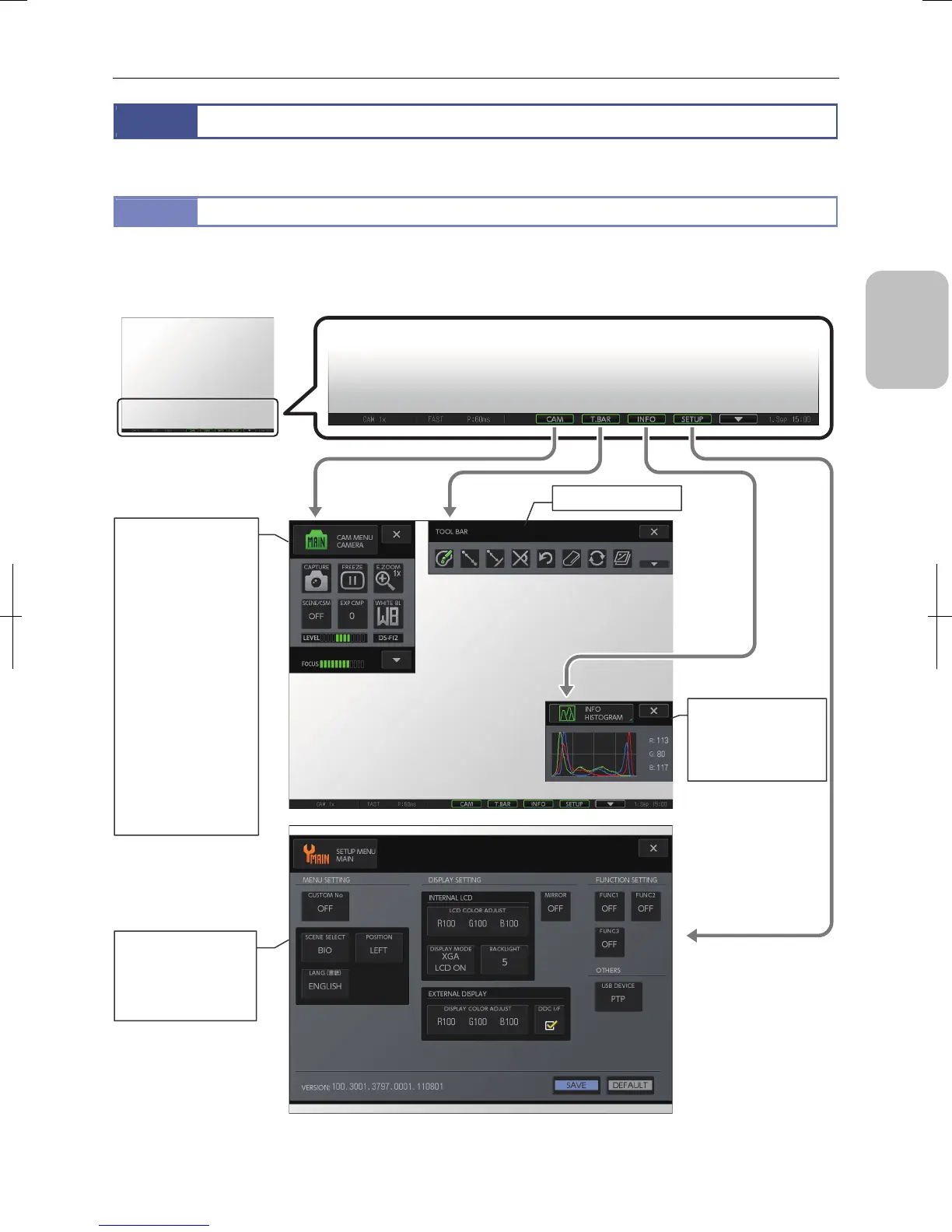
The composition of the DS-L3 operation menus is illustrated below.
Pressing a button on the task bar at the bottom of the screen displays a menu on the screen.
Operation menu composition and presentation
(1) Live image/replayed images
(2) Task bar
(3) [CAMERA MENU]
• [CAMERA] screen
Short/long
• [IMAGE] screen
• [NR/SD/SET] screen
• [SHOT/REC] screen
(4) [VIEW MENU]
• [PLAY] screen
• [THUMBNAIL] screen
(5) [TOOL MENU]
• [TOOL] screen
• [TOOL SET: MAIN]
screen
• [TOOL SET: X HAIRS]
screen
• [TOOL SET: GRID]
screen
• [TOOL SET:
CALIBRATION] screen
(8) [SETUP MENU]
• [MAIN] screen
• [NETWORK] screen
• [FILE] screen
• [ADDITIONAL] screen
(7) [INFO MENU]
• [HISTOGRAM] screen
• [MIC INFO] screen
(When a microscope is
connected)
(6) [Tool bar]





 To Next Page