Chapter 12 On-Screen Measurement
150
Adding Annotations
and Measuring
12.2.4
Measuring Diameter and Circumference of Circle
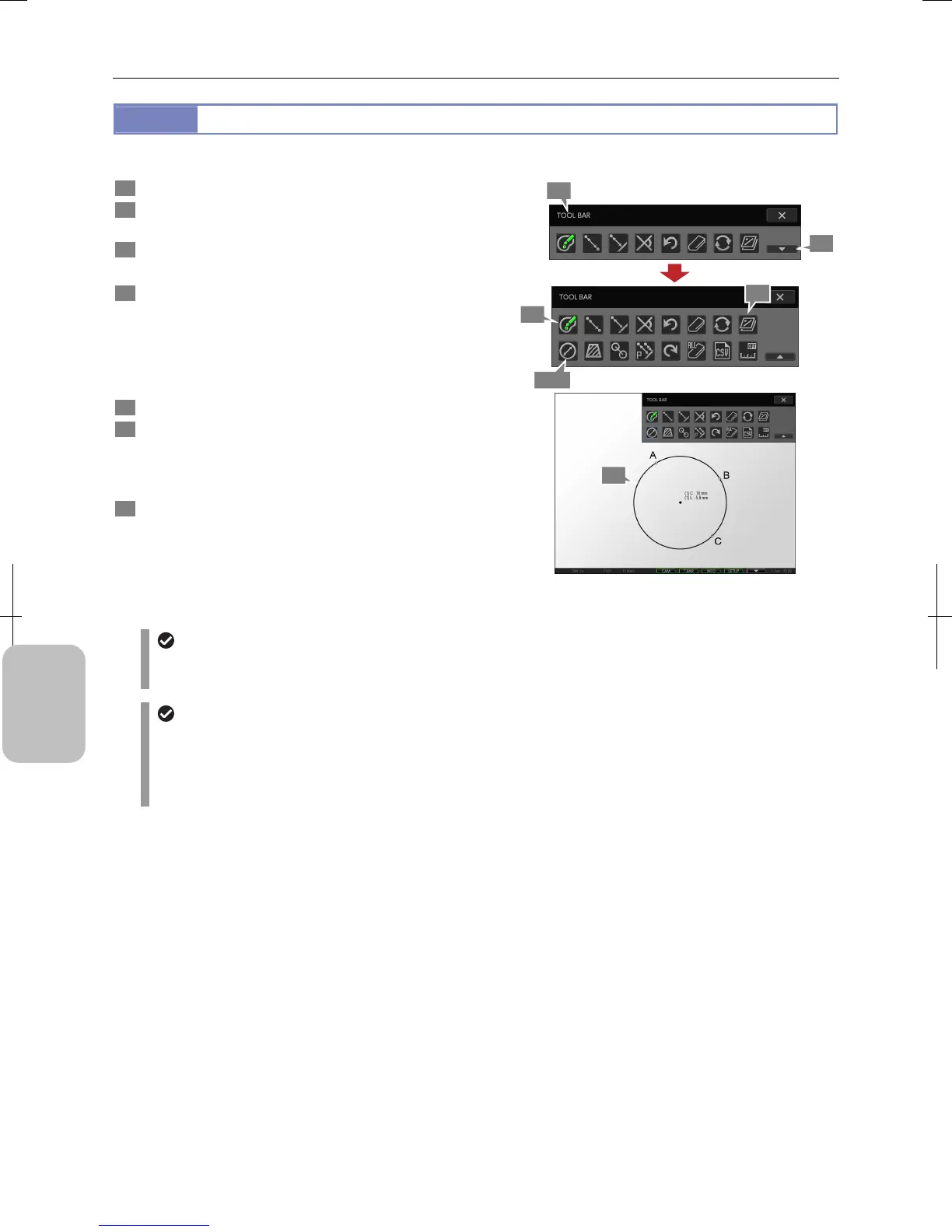
You can measure diameter and circumference of a circle drawn on the screen.
1 Display the toolbar and press the [SHOW ALL] button.
2 Press the [SELECT COLOR] button to select color of
measurement results.
3 Press the [CIRCULAR MEASUREMENT] button.
A blue frame appears around the button.
4 Specify three points (A, B and C on the figure) on
circumference of a circle you want to draw on the
screen.
A circle whose circumference passes on the three points is
drawn and its diameter and circumference values are shown
near the center of the circle.
5 Repeat step 4 to continue measuring another circle.
6 To display or hide the measured result, switch to
display or hide overlay.
You cannot selectively display or hide only the measured
result. Switch to display or hide the entire overlay.
7 To end measurement, press the [CIRCULAR
MEASUREMENT] button to deselect the tool.
Measuring Diameter and Circumference of Circle
Undoing and redoing measurement
You can cancel and redo measurement by pressing the [UNDO MEASUREMENT] or [REDO MEASUREMENT]
button respectively.
Measurement result display
• If setting of calibration is changed, all measured results are cleared.
• The line width and character size of measurement result can be changed on the [TOOL SET: MAIN] screen.
• When stylus operation is not easy or accurate positioning is required, mouse operation is recommended. Use a
commercially available USB mouse for operation.
2
3, 7
1
4
6
1
1











 To Next Page