Chapter 13 Changing Settings
174
Changing
Settings
13.3
Configuring Network Settings
— [SETUP MENU: NETWORK] Screen —
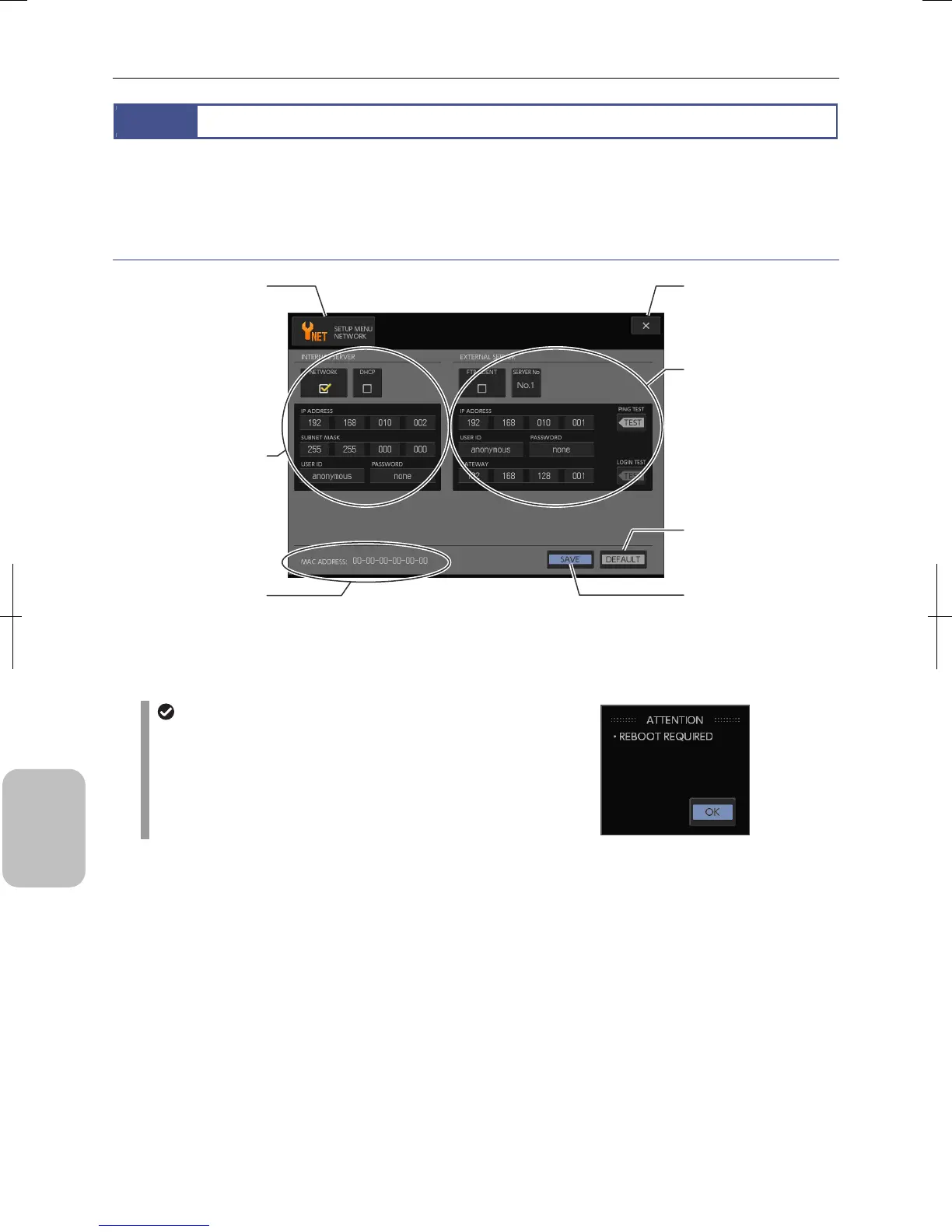
Select [NETWORK] using the [MENU SELECT] button in the [SETUP MENU] screen. The [SETUP MENU: NETWORK]
screen appears. In this screen, you can configure several settings for connecting this system to the network.
Items on the [SETUP MENU: NETWORK] screen
[SETUP MENU: NETWORK] Screen Items
Changing network settings
System power may have to be turned off and on to
enable changes to some network-related settings of this
system. In this case, an alert message of “REBOOT
REQUIRED” appears when you save the setting on the
[SETUP MENU: NETWORK] screen.
[X] (Close) button
Close the Setup Menu
screen.
[INTERNAL SERVER]
area
Configures basic network
settings and settings fo
using this system as an
HTTP server.
[EXTERNAL SERVER]
area
Configures settings for
connecting to an FTP serve
on the network and
performs connectivity test.
Up to five servers can be
registered.
[SAVE] button
Save settings of the screen.
[MENU SELECT] button
Screen name is displayed.
Display a submenu fo
switching menus.
[MAC ADDRESS]
Displays MAC address o
the system.
[DEFAULT] button
Restore settings of the
screen to initial values.











 To Next Page