Chapter 14 Connecting to a PC
197
Connecting to
PC, Printer, and
Network
14.1.2
Connecting the DS-L3 to a PC with a USB Cable
Use a commercially available USB 2.0 cable (AB type) for connection between DS-L3 and PC.
Note on connecting a USB cable
Be sure to connect a USB cable while the DS-L3 is turned off.
1 Confirm that the DS-L3 power is shut off.
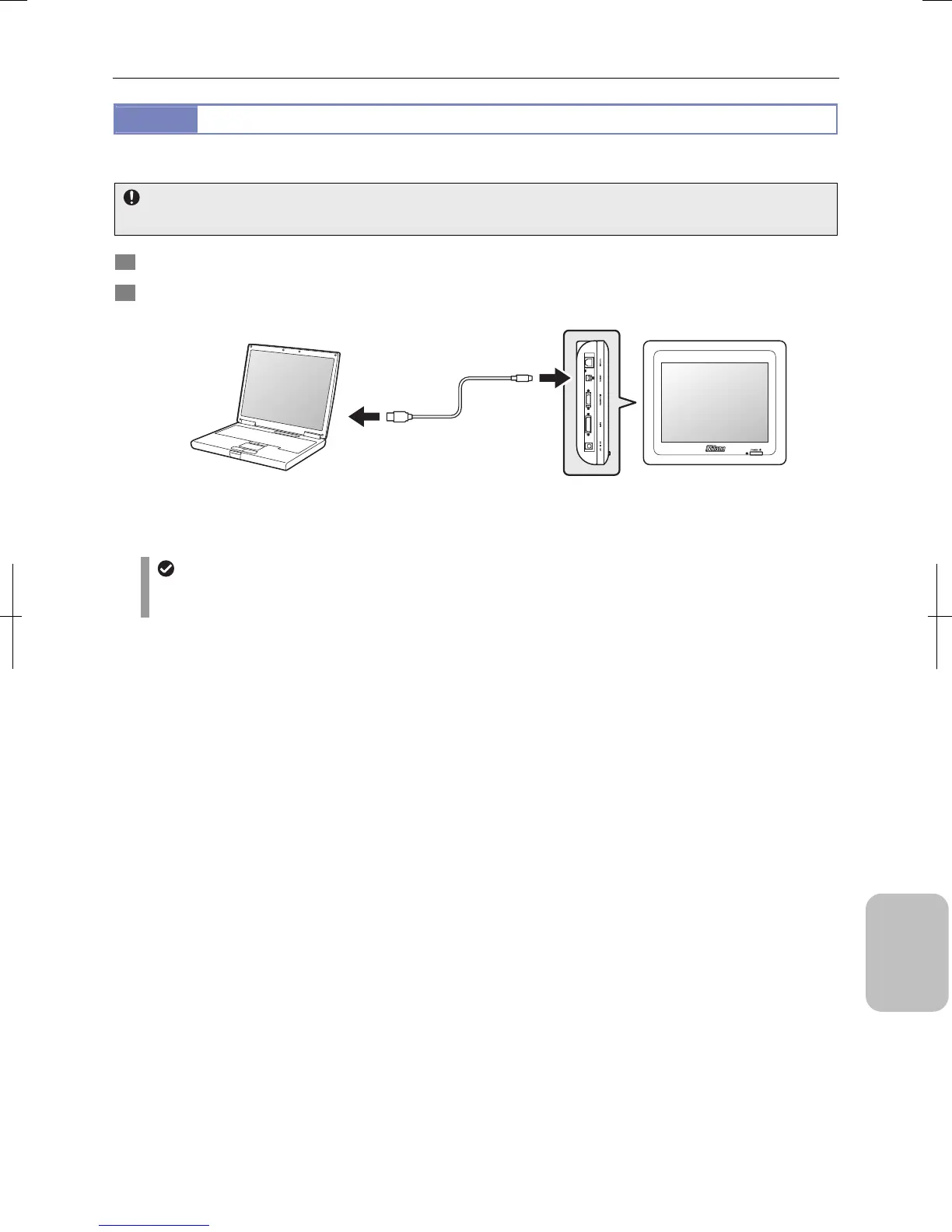
2 Connect a USB 2.0 cable (AB type) between the PC’s USB connector and the USB (D) connector of the DS-L3.
Connecting PC with a USB Cable
USB cables
Use a USB cable with ferrite core for stabilization of USB transfer, reduction of noise generated from the DS-L3 and
its peripherals, and satisfaction of EMC standards.
PC
DS-L3
USB 2.0 cable
(AB type)
Connect to the
USB connector.
Connect to
the USB (D)
connector.
Left side











 To Next Page