Chapter 13 Changing Settings
190
Changing
Settings
13.5.2
Configuring Capture Function
— [CAPTURE FUNCTION] Area —
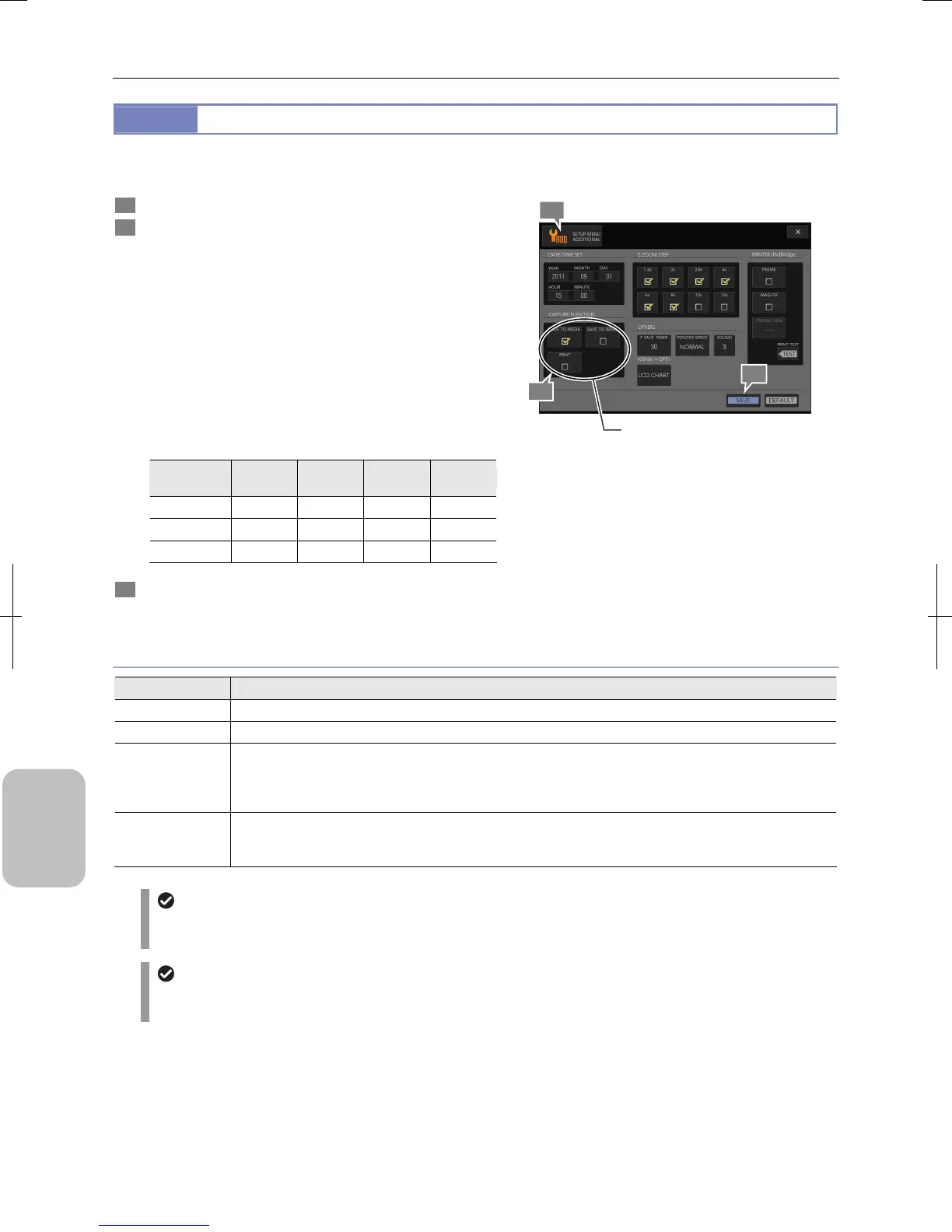
Specify a DS-L3 action when you capture an image.
1 Display the [SETUP MENU: ADDITIONAL] screen.
2 Specify an action performed when an image is captured
in the [CAPTURE FUNCTION] area.
Select an action with the following checkboxes. Two or more
actions are selectable.
For details of the setting, see the table below.
• [SAVE TO MEDIA] (Initial setting)
• [SAVE TO SERVER]
• [SAVE TO PC]
Note
• [PRINT]
Note
Note: Display items vary depending on the [USB DEVICE]
setting on the [SETUP MENU: MAIN] screen (see
the table below).
USB devise
setting
SAVE TO
MEDIA
SAVE TO
SERVER
SAVE TO
PC
PRINT
PTP – –
Vender –
Printer –
3 Press the [SAVE] button.
The action setting is saved.
Configuring an Action when Capturing an Image
Action Setting for Capturing an Image
Item Setting
SAVE TO MEDIA Saves an image file in a recording medium connected to the DS-L3. (Initial setting)
SAVE TO SERVER Saves an image file in the specified FTP server.
SAVE TO PC
Saves an image file in an arbitrary folder in a PC connected to the DS-L3.
When [SAVE TO PC] is selected, other items are grayed out and can no longer be selected.
Note: This item is selectable only when [USB DEVICE] of the DS-L3 is set to [VNDR]. The save destination
on the PC is specified by the application NIS-Elements.
PRINT
Outputs images to a printer connected to the DS-L3. This setting is not applied to consecutive capture with
interval timer.
Note: This item is selectable only when [USB DEVICE] of the DS-L3 is set to [PRN].
If no action is selected for capturing an image
If all the checkboxes in the [CAPTURE FUNCTION] area are cleared, an alert message appears at the time of
capturing.
Print setting
The [PRINT] checkbox setting is disabled for consecutive capture with interval timer. The image by consecutive
capture is not printed.
2
1
3
Configure an action to be performed
when captu
ing an image.











 To Next Page