Chapter 13 Changing Settings
191
Changing
Settings
13.5.3
Configuring Electronic Zoom Factor
— [E ZOOM STEP] Area —
The [E.ZOOM STEP] area allows you to set zooming levels of the electronic zoom used to enlarge or shrink a live or
playback image.
The electronic zoom can be operated by a [E ZOOM] button found on [CAM MENU], [PLAY MENU] or [TOOL MENU].
Electronic zoom
Electronic zoom is a function to enlarge a real image using digital processing.
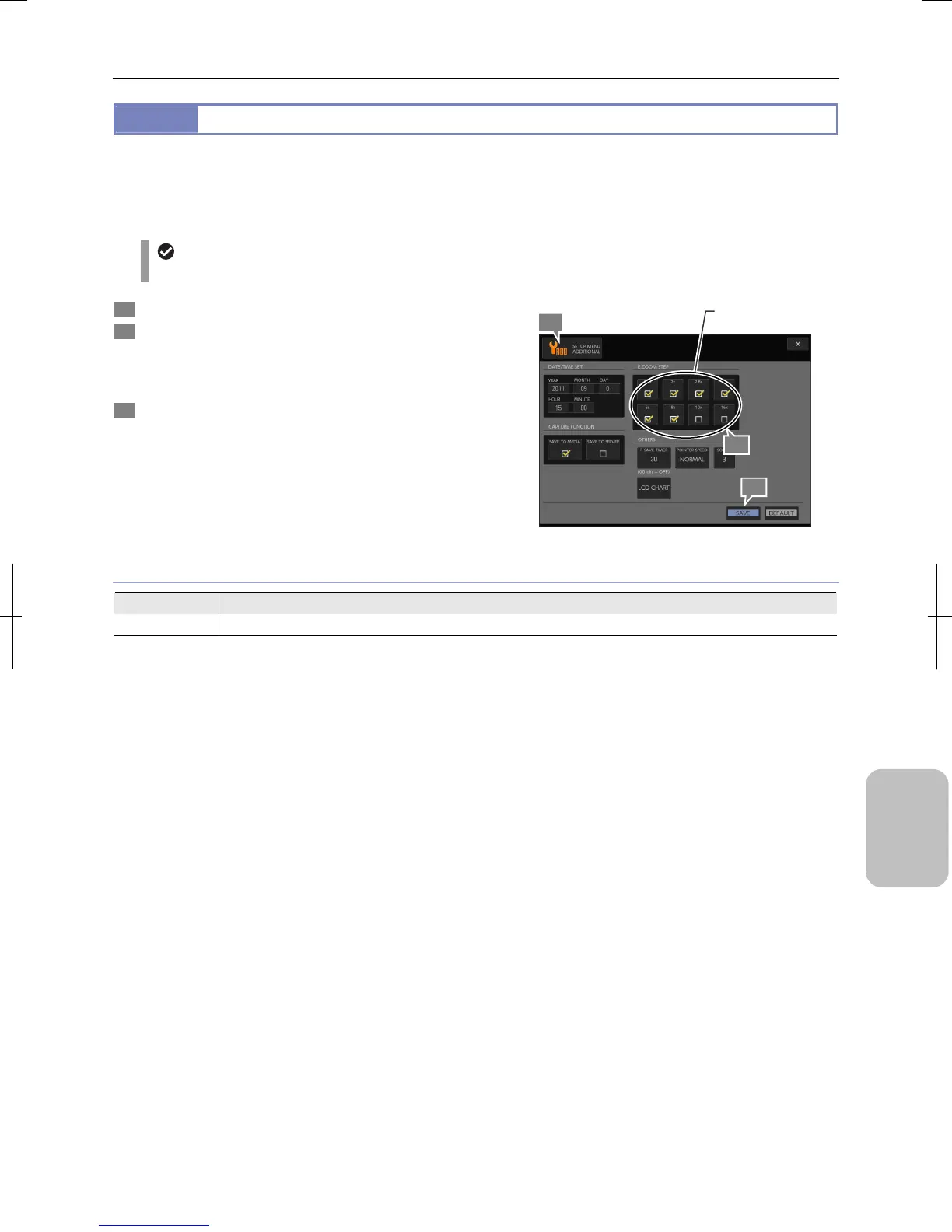
1 Display the [SETUP MENU: ADDITIONAL] screen.
2 In the [E.ZOOM STEP] area, select zooming levels you
want to make available by marking the relevant
checkboxes.
• 1.4x, 2x, 2.8x, 4x, 6x, 8x, 10x, 16x
3 Press the [SAVE] button.
Configuring Electronic Zoom Magnification
Electronic Zoom Step Setting
Item Setting
E.ZOOM STEP 1.4x, 2x, 2.8x, 4x, 6x, 8x, 10x, 16x (Initial setting: 1.4x to 8x selected)
2
1
Set electronic zoom
factors.
3











 To Next Page