Chapter 13 Changing Settings
170
Changing
Settings
13.2.3
Configuring Function Buttons
— [FUNCTION SETTING] area —
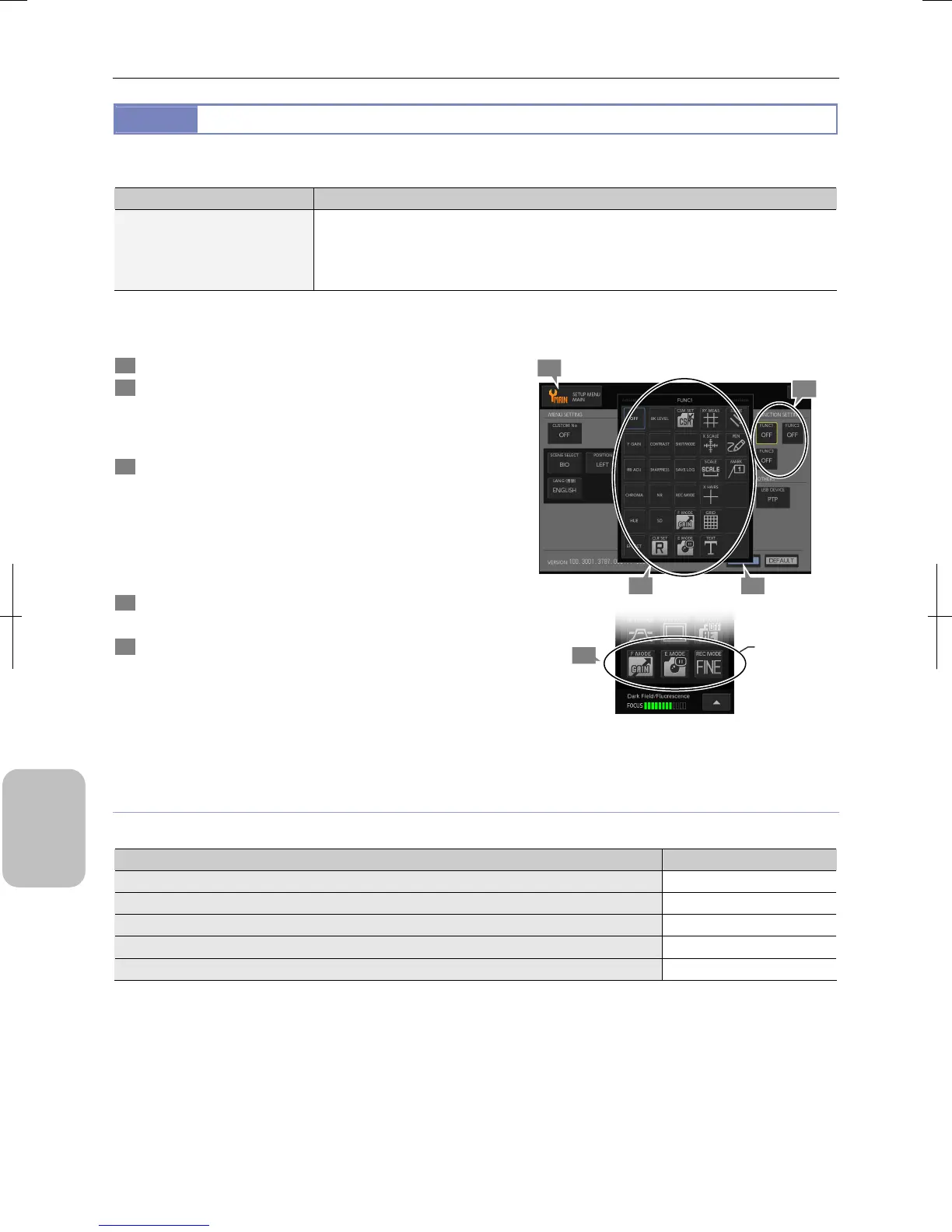
Configure the following setings in the [FUNCTION SETTING] area of the [SETUP MENU: MAIN] screen.
Item Choice
Setting functions for function
buttons 1 to 3
Brightness, RB adjustment, chroma, hue, color effect, black level, contrast, sharpness, NR,
SD, setting clear, custom setting (registration) , continuous shooting mode, log save,
recording mode, F mode (focus assist mode) , E mode (exposure assist mode) , XY
measurement, X scale (cross scale) , scale, cross hairs, grid, text, straight line, pen, marker,
OFF (no setting)
Three function buttons are located at the lower part of the [CAM MENU: CAMERA] long window. These buttons are
frequently used and can be operated from the [CAM MENU].
1 Display the [SETUP MENU: MAIN] screen.
2 Press the [FUNC1], [FUNC2] or [FUNC3] button in the
[FUNCTION SETTING] area.
The submenu appears and functions assignable to the
selected button are displayed.
3 Press the desired buttons to assign functions.
The selected functions are displayed in the [FUNC1] to
[FUNC3] buttons. If you use no function button, select
[OFF].
Note: Assigned buttons are grayed out and can no longer
be assigned. One function cannot be assigned to two
or more buttons.
4 Press the [SAVE] button.
The function button setting is saved.
5 Display the [CAM MENU: CAMERA] long window and
confirm that the function buttons have been set
correctly.
[CAM MENU]
Configuring Function Buttons
Functions Assignable to Function Buttons
The following functions can be assigned to the function buttons.
Function ( Button) Screen
Brightness, RB adjustment, chroma, hue, color effect, black level, contrast, sharpness [CAM MENU: IMAGE]
NR, SD, setting clear, custom setting (registration) [CAM MENU: NR/SD/SET]
Continuous shooting mode, log save, recording mode [CAM MENU: SHOT/REC]
F mode (focus assist mode) , E mode (exposure assist mode)
-
XY measurement, X scale (cross scale) , scale, cross hairs, grid, text, straight line, pen, marker [TOOL MENU]
4
3
1
2
5
ssigned
buttons are
displayed.











 To Next Page