Chapter 13 Changing Settings
169
Changing
Settings
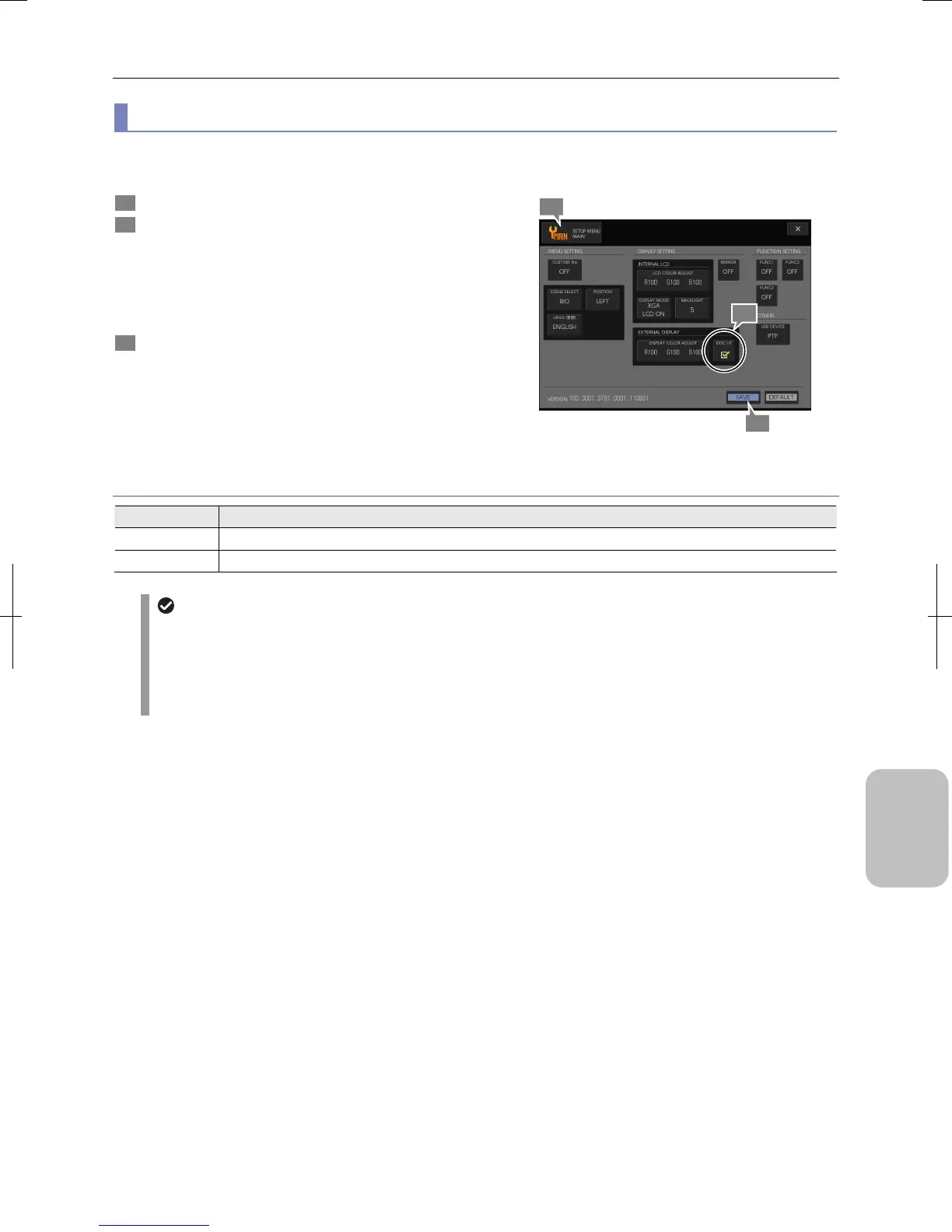
(6) Configuring the DDC interface
The DS-L3 is provided with the plug and play function for external monitor conforming to the DDC IF (VESA DDC-2B). You
can set the checkbox to select whether to use the plug and play function.
1 Display the [SETUP MENU: MAIN] screen.
2 Set the [DDC I/F] checkbox in the [DISPLAY SETTING] -
[EXTERNAL DISPLAY] area in accordance with the
external monitor to be used.
Set the checkbox correctly in accordance with the external
monitor to be used.
• ON/OFF (Initial setting: ON)
3 Press the [SAVE] button.
The DDC interface setting is saved.
Configuring DDC Interface
DDC I/F Checkbox Setting
Choice Setting
ON Select this checkbox when using an external monitor conforming to the DDC interface. (Initial setting)
OFF Clear this checkbox when using an external monitor that does not conform to the DDC interface.
When the [DDC I/F] checkbox is selected:
When the [DDC I/F] checkbox is selected, the following function is enabled.
• When no external monitor is connected, data is automatically displayed on the internal LCD (when [SXGA / LCD
OFF] or [XGA / LCD OFF] is selected).
• When an external monitor that does not conform to SXGA is connected, the resolution is automatically changed
to XGA and display data is output to the external monitor (when [SXGA / LCD OFF] is selected).
3
2
1











 To Next Page