Chapter 13 Changing Settings
183
Changing
Settings
13.4
Changing Image File Settings
— [SETUP MENU: FILE] Screen —
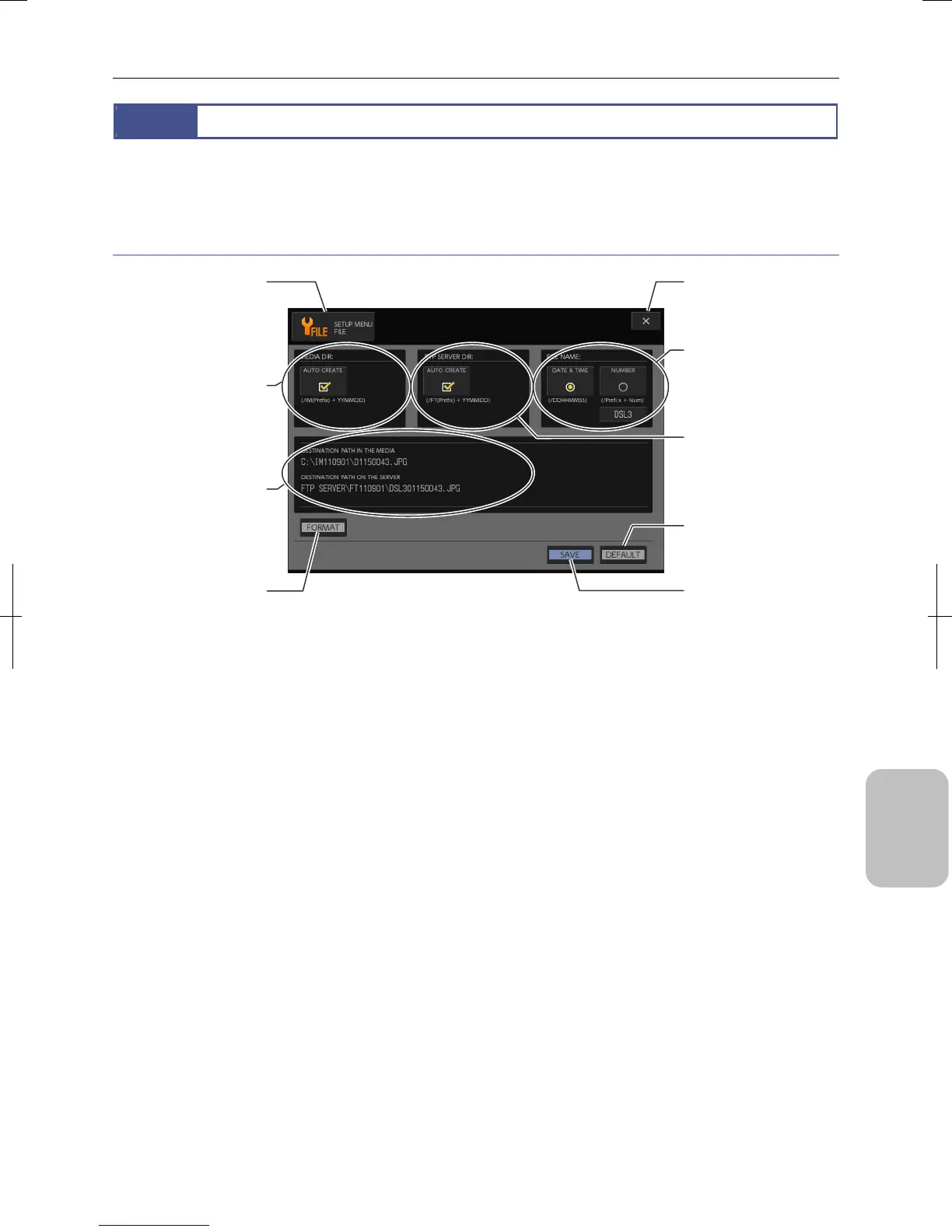
Select [FILE] using the [MENU SELECT] button in the [SETUP MENU] screen. The [SETUP MENU: FILE] screen appears. In
this screen, you can direct automatic creation of a folder for saving an image file and setting of the file name.
Items on [SETUP MENU: FILE] screen
[SETUP MENU: FILE] Screen Items
[X] (Close) button
Closes Setup Menu screen.
[MEDIA DIR] area
Specifies whether to
automatically create a folde
on a targeted recording
medium.
[FILE NAME] area
Selects file name
convention and specifies a
prefix.
[SAVE] button
Save settings of the screen.
[MENU SELECT] button
Screen name is displayed.
Pressing the button displays
a submenu for switching
menus.
[DEFAULT] button
Restores settings of the
screen to initial values
Path Information area
Shows a sample o
recording medium, storage
folder in the FTP server, and
file name.
[FTP SERVER DIR] area
Specifies whether to
automatically create a folder
on a targeted FTP server.
[FORMAT] button
Formats (initializes) a
recording medium.











 To Next Page