Chapter 11 Adding Lines and Annotations to an Image
134
Adding Annotations
and Measuring
When [MANUAL] is selected
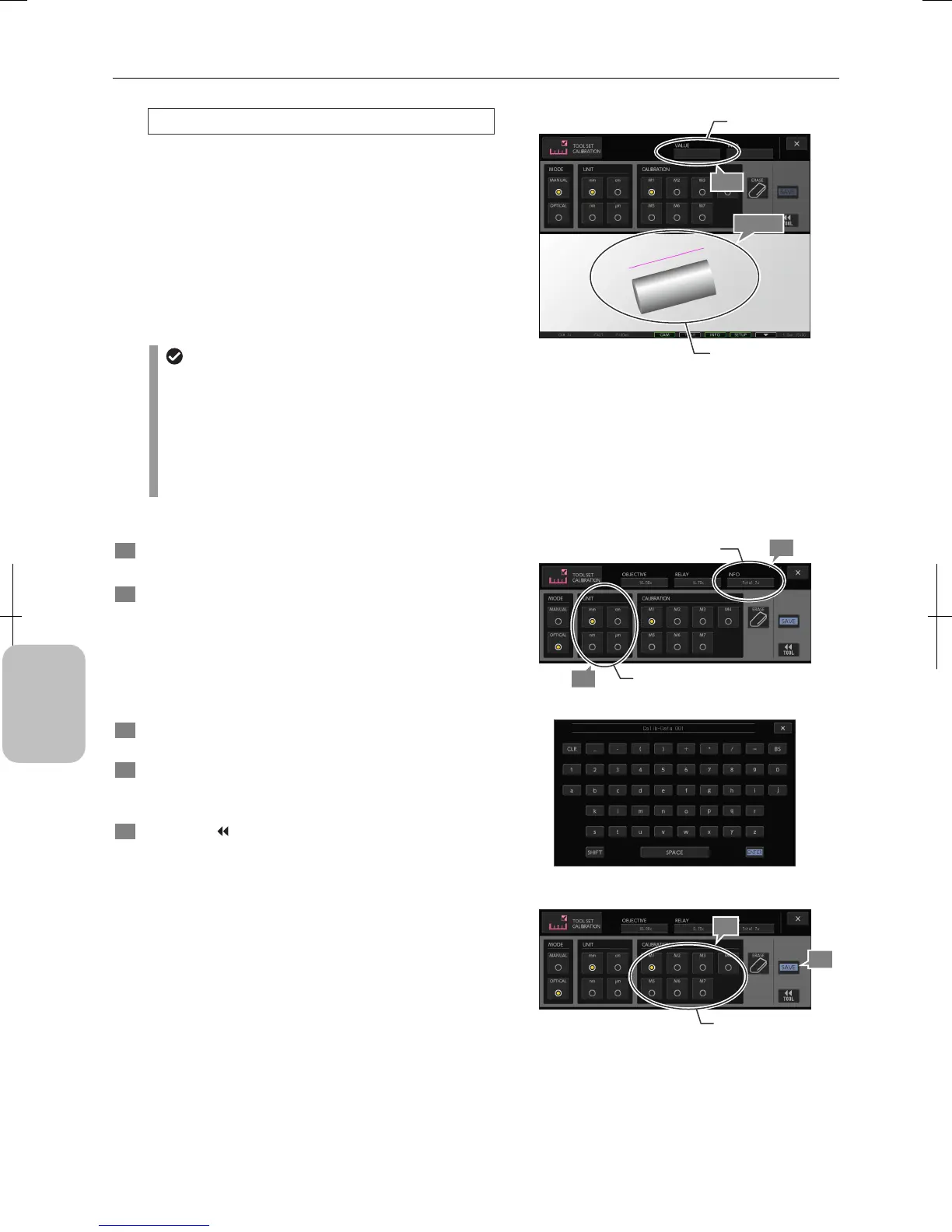
1. Project an object of known length on the screen.
2. Draw a calibration line (between (A) and (B) in the
figure) on the screen according to the object to be a
reference.
Note: Use the mouse to draw the line accurately.
Specify the starting and ending points. A line is drawn
between them. To retry, press the [ERASE] button and
redraw the line.
3. Enter the length of the object in the input field of the
[VALUE] area.
Entering values
When you select the input field, a keypad appears.
Press the numerical keys to enter a desired value and
then press the [ENTER] button.
To erase the entered value, press the [CLR] button. To
go back to the previous character, press the [BS]
button. Pressing the [X] button closes the keypad
without modifying values.
Note: To erase entered values and calibration lines, use
the [ERASE] button.
[MANUAL] mode
Entering Values for Each Mode
4 Set the unit of the length in the [UNIT] area.
Select a unit from [nm], [μm], [mm], and [cm] radio buttons.
5 Enter a comment (maximum 11 characters) into the
input field of the [INFO] area as required.
When you press the input field, the keypad appears. Press
keys to enter information and press [ENTER] to finish input.
The entered comment is displayed in the information area o
the [TOOL MENU] when one of [M1] to [M7] is selected for
calibration.
6 Press one of [M1] to [M7] in the [CALIBRATION] area to
select the number of registration destination.
7 Register the settings using the [SAVE] button.
If required values are not entered, this save operation is
disabled.
8 Press the [
TOOL] button to return to the [TOOL
MENU]. Press the [X] button to close the [TOOL SET:
CALIB] screen.
The settings are discarded if calibration values are not
saved.
Selecting a Unit and Entering a Comment
Keypad for Entering Comment
Registering Calibration Settings
4
Select a unit.
5
Enter a comment.
6
Select the number of
registration destination.
7
(A)
(B)
3-3
Draw a
calibration line.
3-1, 2
Enter a length.











 To Next Page