Chapter 11 Adding Lines and Annotations to an Image
139
Adding Annotations
and Measuring
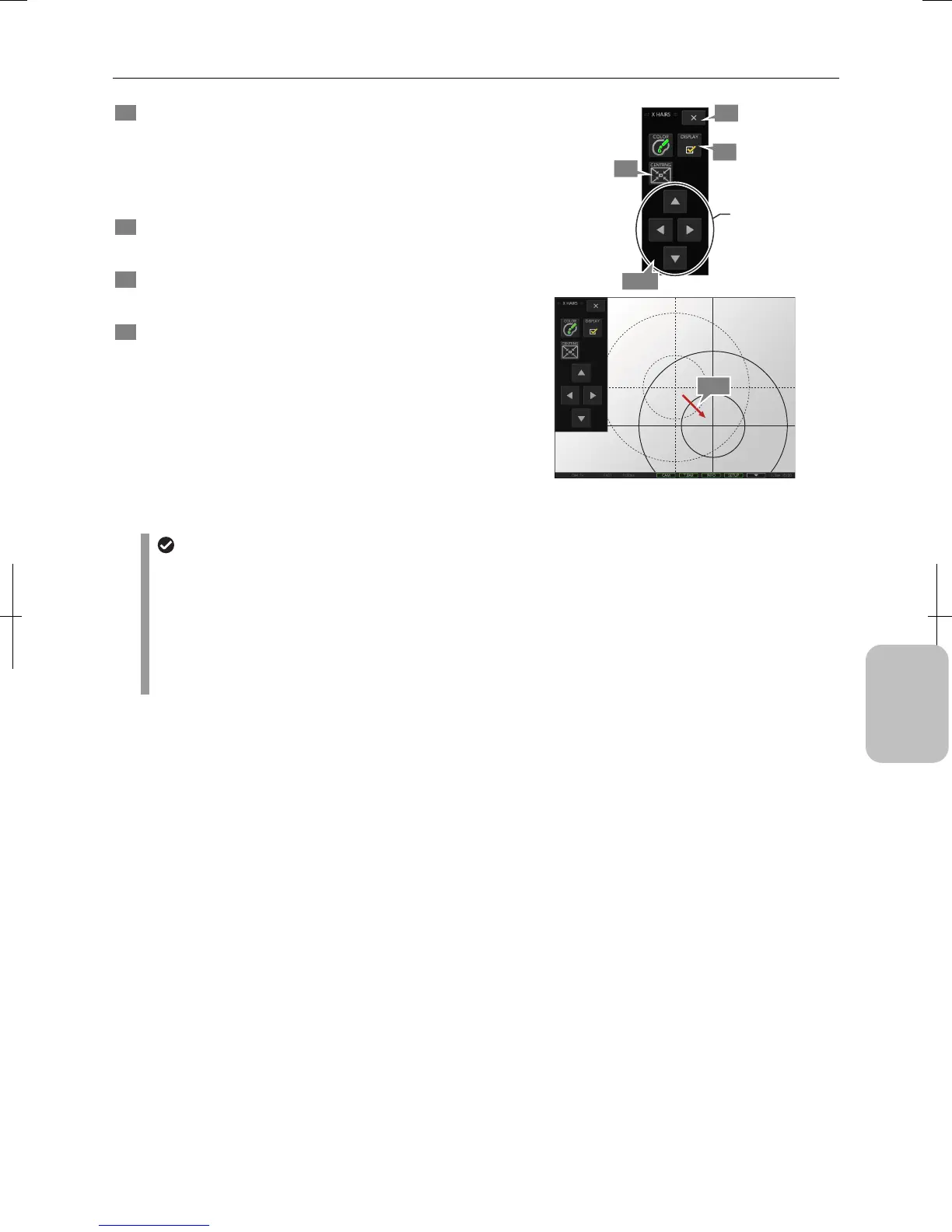
5 Use either of the following methods to move cross
hairs.
1. Press movement buttons of the [X HAIRS] menu.
2. Use the stylus (like dragging by mouse) to move the
intersection of the cross hairs on the screen.
6 Press the [CENTRNG] button to restore the cross hairs
to the center of the screen.
7 To display or hide cross hairs and circles, use the
[DISPLAY] checkbox on the [X HAIRS] menu.
8 To return to the [TOOL MENU], press the [X] button on
the [X HAIRS] menu.
Moving Cross Hairs and Concentric Circles
Cross-hairs and concentric circle display
• The display of the concentric circle is coupled with unit and calibration settings. If you change the settings, the
size of the concentric circles changes. The cross-hair display does not change.
• The line width of the concentric circle and cross hairs can be changed on the [TOOL SET: MAIN] screen.
• The ON/OFF setting of the cross hairs (concentric circle) remains when the power is turned off. If you turn the
power off with the cross hairs being displayed, they appear automatically when you turn the power on again.
• When stylus operation is not easy or accurate positioning is required, mouse operation is recommended. Use a
commercially available USB mouse for operation.
5-2
6
5-1
7
8
Move cross hairs.











 To Next Page