Chapter 8 Capturing Images with Advanced Setting Menu
77
Photographing and
Playing Images
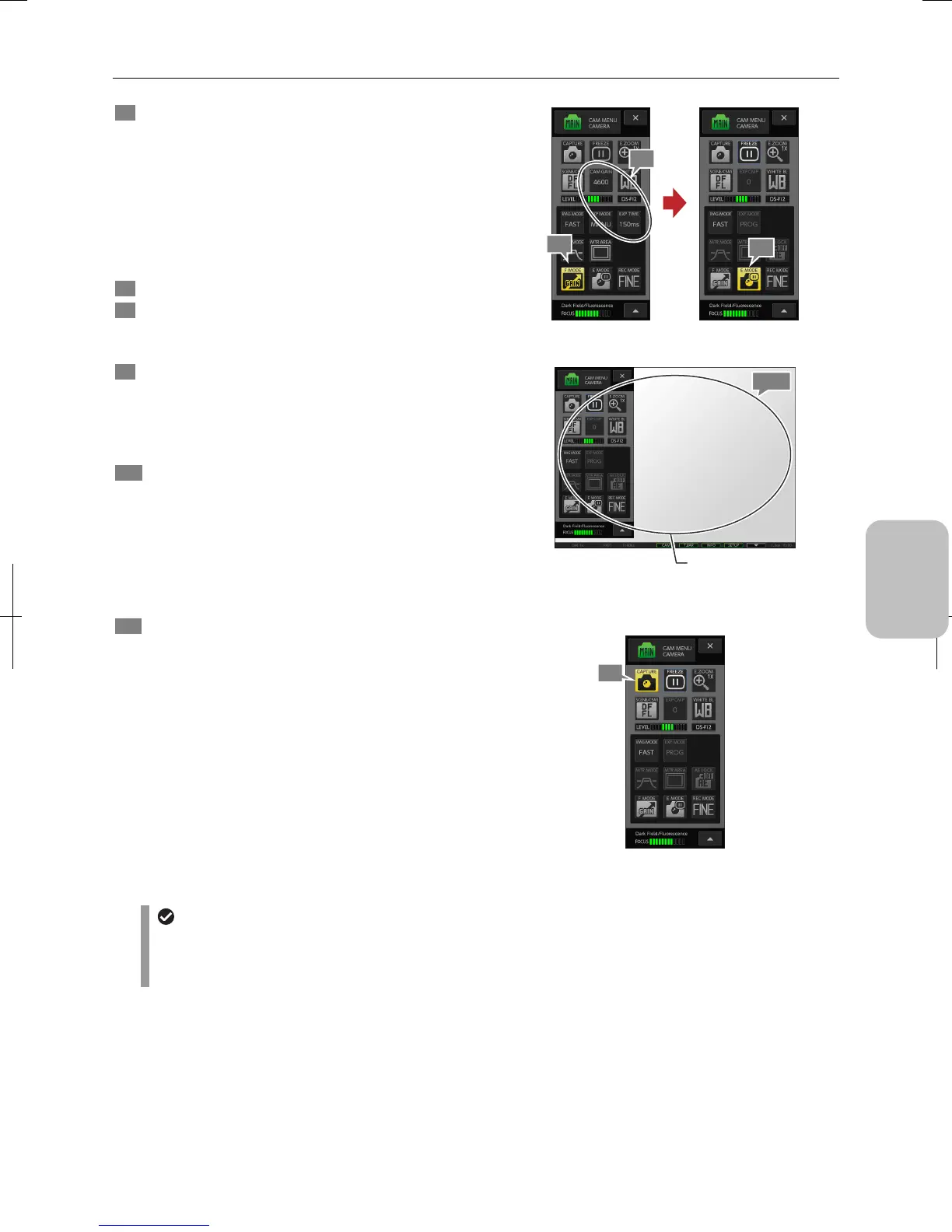
6 Press the [F MODE] button.
[EXP MODE] is changed to [MANU] and the exposure is
adjusted raising the camera gain so that the exposure time
will not be long.
This high-camera-gain exposure condition is maintained for
the live image display; adjust the brightness with the camera
gain and exposure time as necessary.
Note: A higher camera gain will lead to more noises for a
dark subject.
7 Focus the camera on the subject.
8 Adjust [CAM GAIN] and [EXP TIME] to get the desired
exposure.
Make exposure adjustment if you are not using [F MODE].
9 Press the [E MODE] button.
DS-L3 makes an exposure setting of low camera gain and
low noise for still image capturing.
A blue frame appears around the [FREEZE] button, and the
still image is displayed on the screen.
10 Check the condition of the captured still image.
If the exposure result of the [E MODE] button is not
satisfactory, close the still image by the [FREEZE] button,
adjust the brightness by camera gain and exposure time
while checking the live image, and then press the [E MODE]
button to do exposure again.
Note: Adjust the exposure, or adjust the contrast and hue
on the [CAM MENU: IMAGE] screen as necessary.
11 To save the image, press the [CAPTURE] button.
You hear the capture sound, and the image is captured
according to the setting and is saved in the storage folder.
A different pointer shape shows on the touch panel LCD
monitor while the image is saved. The task bar shows
[SAVED 1/1] indicating that the image has been saved.
Using [F MODE] button and [E MODE] button
Focusing and checking the image
Capturing an image
Finishing the [DF/FL] scene mode
• When you finish the DF/FL scene mode, select some other scene mode or a custom setting.
• To cancel the pause set by the [E MODE] button, press the [FREEZE] button to close the still image and display
the live image.
6
8
9
7, 10
Focus on the subject using
[F MODE] and check the
image status by [E MODE]
11











 To Next Page