prw2101a0600p_01
24 / 105
5.1. STEPS OF PROGRAMMING
Programming can be done using the 6 buttons with the help of the 128x64 point graphic screen. There are three different kinds of images.
Measurement / operation images
(marked with capital letters in the upper right corner
(Appendix 5):
Measurement, see 5.10 Measurement mode
Bargraph image (output range)
User image, see 5.4 MultiCONT configuration
Relay assignment table
Current output assignment table
Error list, see 6. Error codes
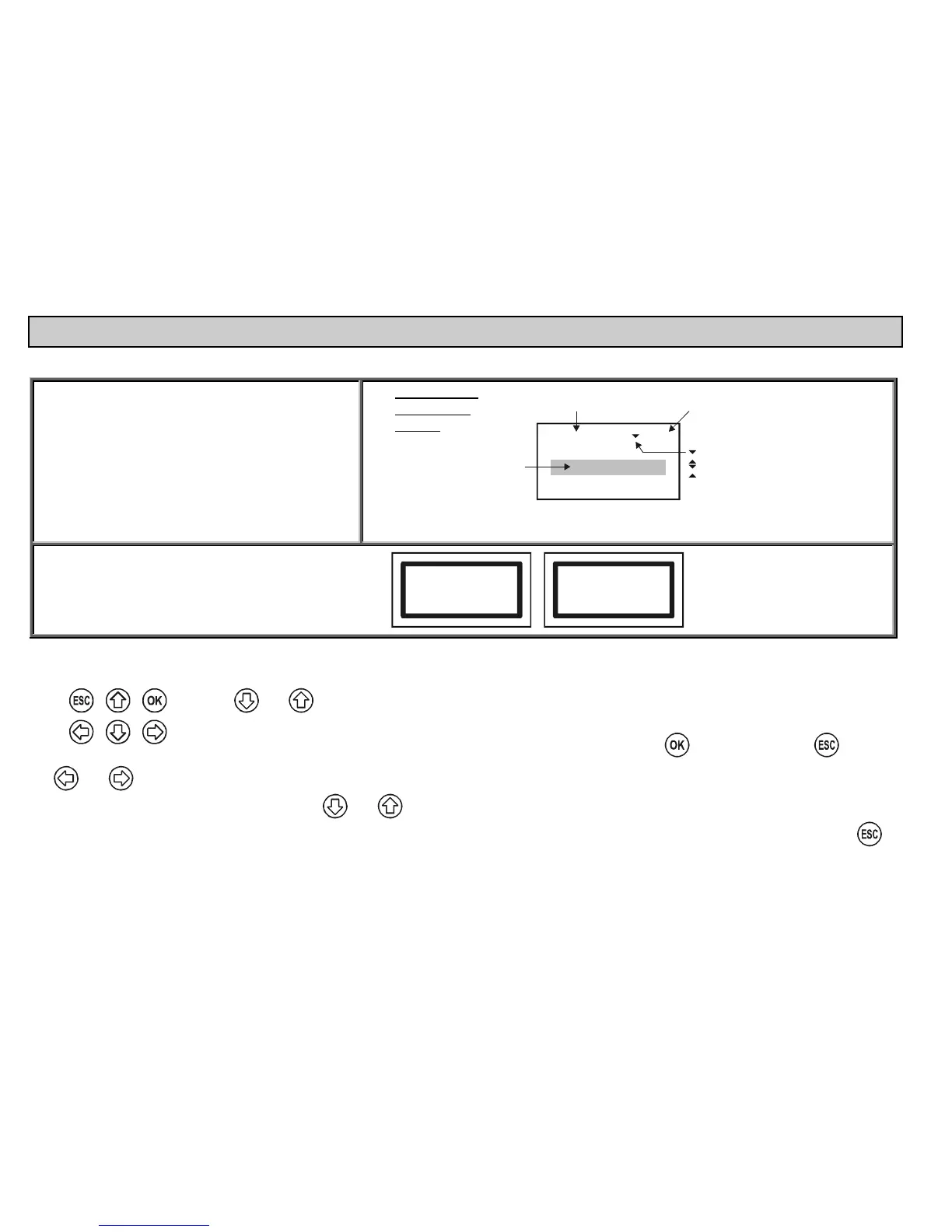
Programming /
configuration
images:
Main menu
05
Current generators
Devices
Relays
Number of
menu table
Name
of the menu
Selected
menu
point
No further menu points
Further menu points down the line
Further menu points up and down the line
Further menu points up the line
Box messages / warnings indicate steps taken by the
unit or those to be performed
Scanning HART line
Device: 3
HART logical error
Click OK
See a summary of the programming below. A complete menu system is in Appendix 2. The relevant menu item and the value or character to be edited appears in a
highlighted form.
and are used to select options within the menu. The buttons are repetitive i.e. steadily pressing the button results in
continuous stepping (the menu repeats at the end).
Programming mode can be entered and a menu item can be selected by pressing
and exited by pressing .
The and buttons are used for editing parameters with numbers or text, selection of local values or for character positioning and for selection in some sub-
menus (e.g. Relay functions). Repeating function keys
and are used for scrolling numbers and characters when editing parameters with numbers or text.
(These two buttons are dual-functional - steady pressing results in continuous stepping up-down and in jumping to the beginning at the end). Use
to
acknowledge (quit) error messages (deletion of the error list).


 To Next Page