prw2101a0600p_01
25 / 105
5.1.1. Scrolling and selecting menu items
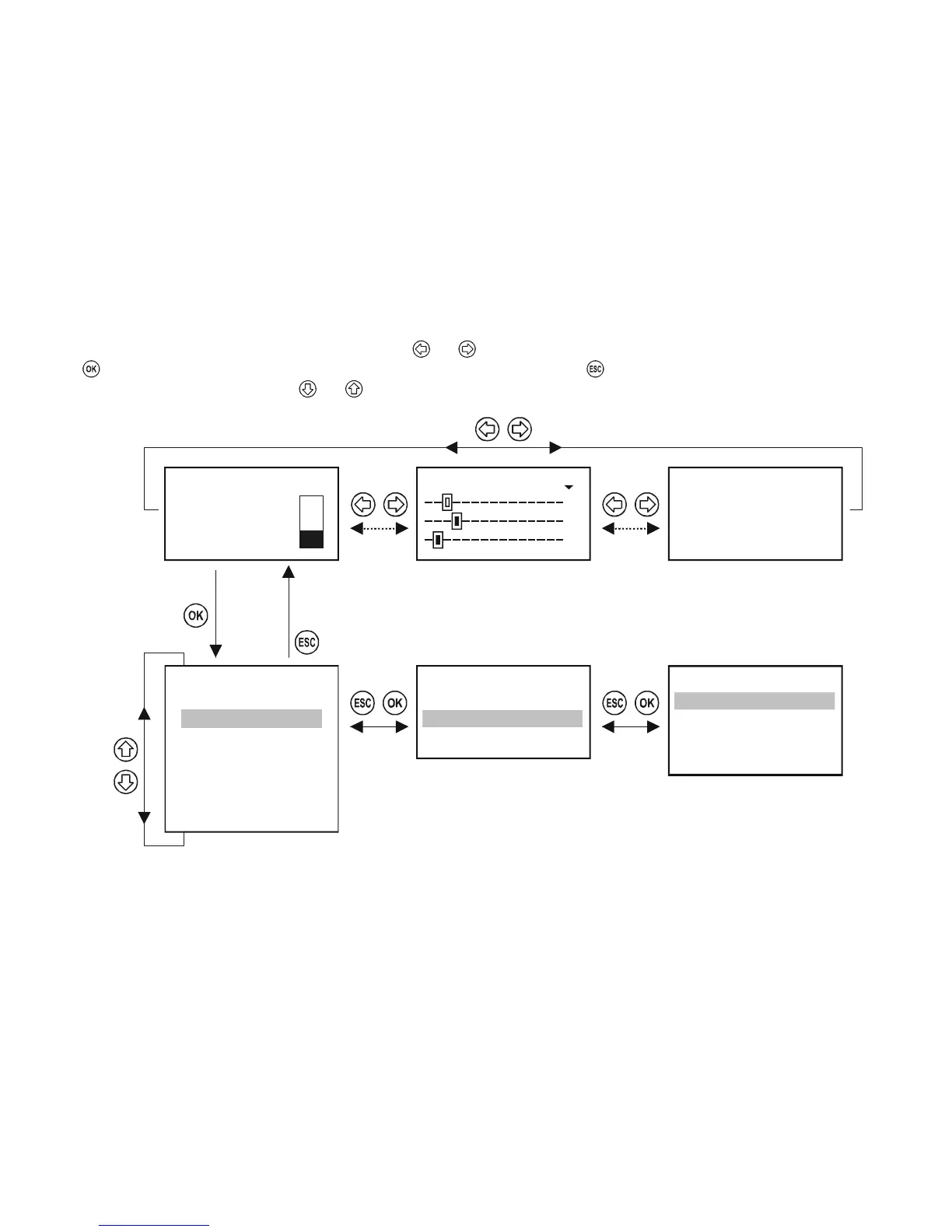
The various display modes (M, B, U, R, C, E) can be selected using and buttons.
With button can enter into the Programming Mode or the selected menu point and can return with button.
The desired menu item can be selected using and (repetitive functioning i.e. steady pressing results continuous stepping and jumping to the beginning at the
end).
1: SE300-1 M
2: Errors: 2
3.125 m
Relays
18
02: R_IN_2
03: R_IN_3
01: R_IN_1
Main menu
05
Current outs
Devices
Relays
Error report
E
02: SE300-2: Sensor
01: SE300-1: Reply
123456789ABDCDEF R
R1
R2
R3
01: R_IN_1
19
Info
Programming
:
:
Default config
Restart
Short TAG
ID


 To Next Page