prw2101a0600p_01
28 / 105
5.1.4. Entering parameter values
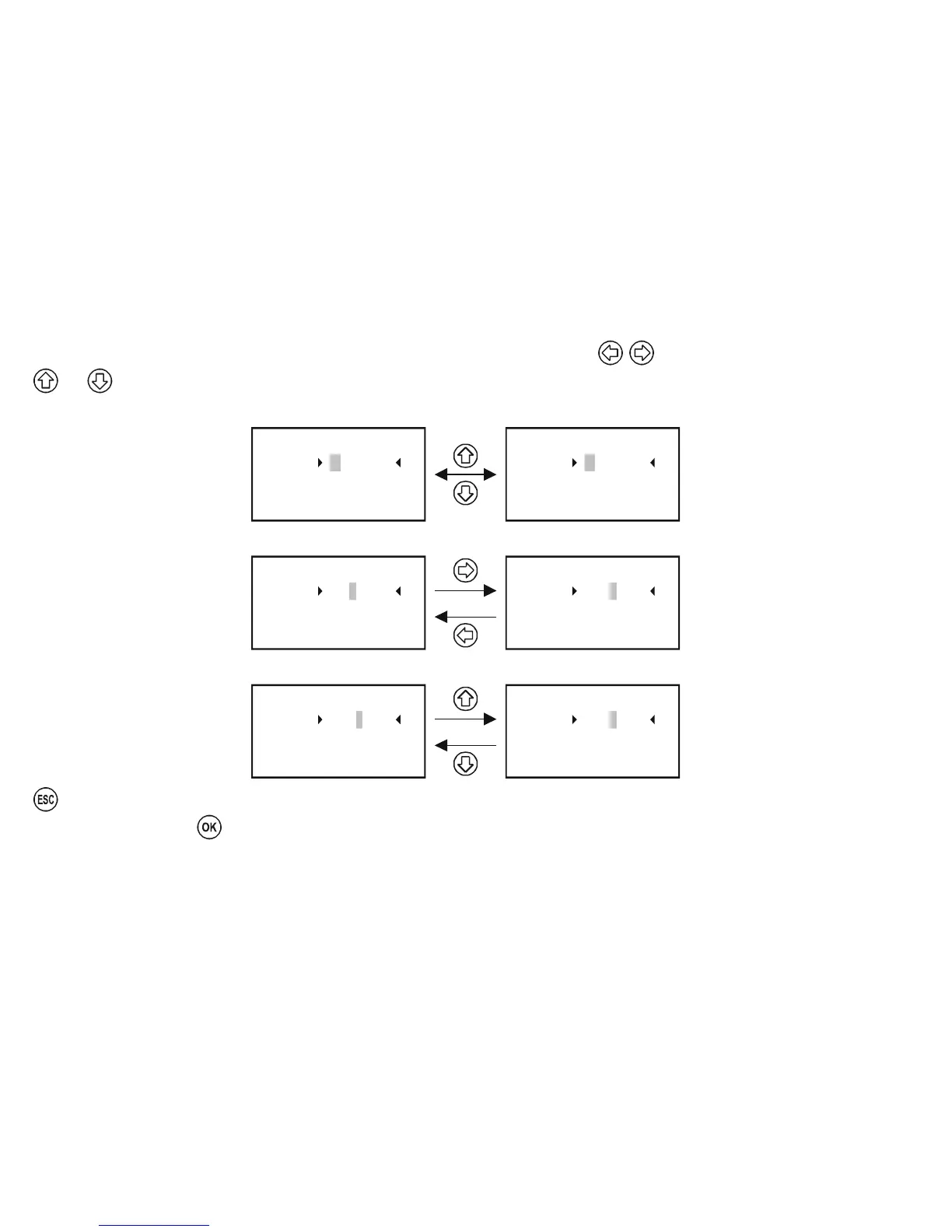
Parameters have signs and absolute values. Positioning the cursor to the sign and digits can be done using .
and are for modifying the value of either the sign or the digit.
Switching between the (+) and (-) signs
RP3 = 0
RP2 = 0.000
Parameter 23
RP1 = + 0000.000
RP3 = 0
RP2 = 0.000
Parameter 23
RP1 = – 0000.000
Changing cursor position
RP3 = 0
RP2 = 0.000
Parameter 23
RP1 = 0000.000
+
RP3 = 0
RP2 = 0.000
Parameter 23
RP1 = + 0000.000
Modifying the value of the digit (no carry-over)
RP3 = 0
RP2 = 0.000
Parameter 23
RP1 = 0010.000
+
RP3 = 0
RP2 = 0.000
Parameter 23
RP1 = + 0000.000
can be used to quit without saving.
To save the parameters, press
after RP3.


 To Next Page