6 Handling Network printer
© Nortec Electronics 2018 29
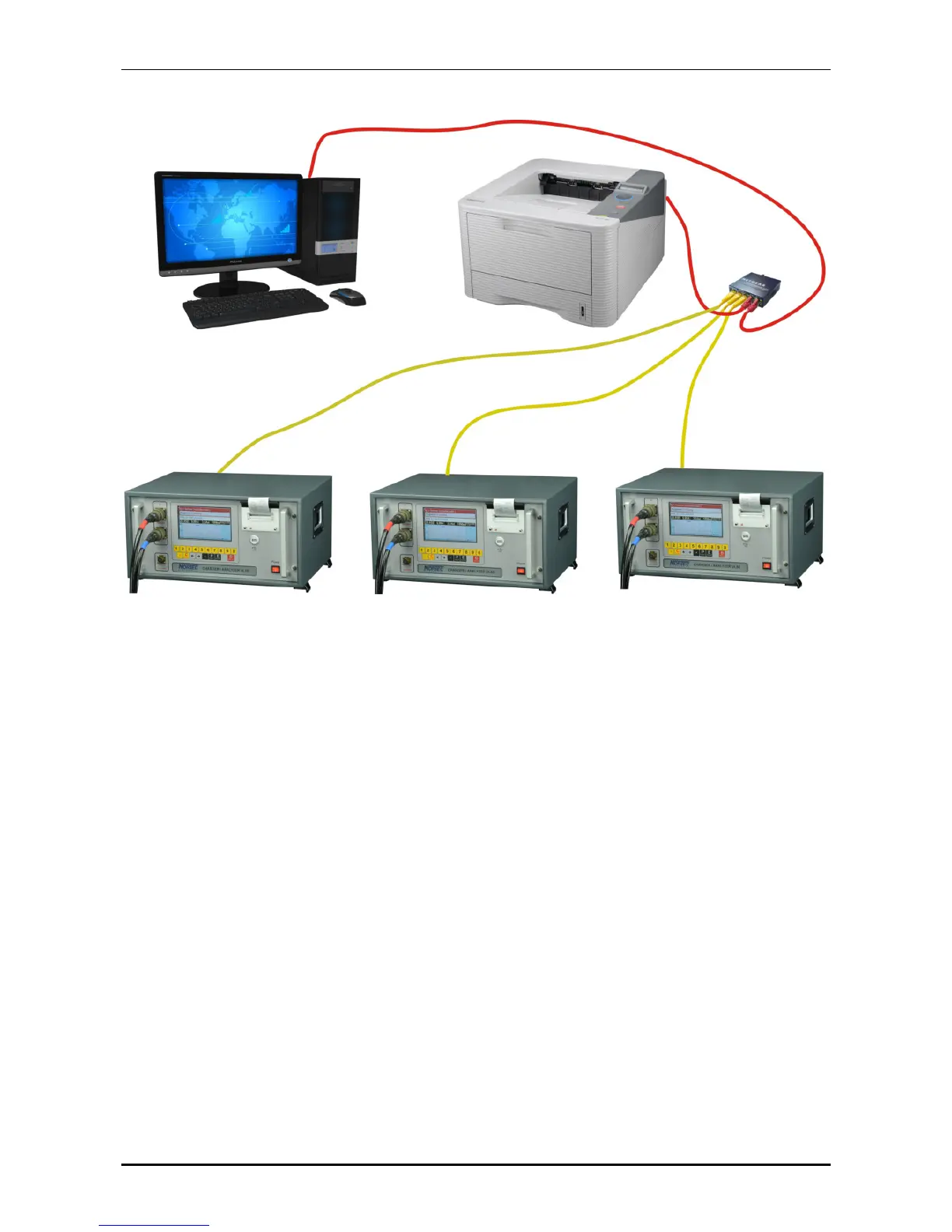
Example: several UL60 conected to one HP Laserjet M402n:
Example configuration:
1. UL60: IP: 192.168.1.101
2. UL60: IP: 192.168.1.102
3. UL60: IP: 192.168.1.103
etc.
Printer: IP: 192.168.1.30
PC: IP: 192.168.1.40
In case the devices are not connected to another network, it doesn´t matter which address will be
used. If the devices are integrated to another network, these addresses have to be used.
System preferences of the UL60: see page 31
et seq.
.
Configuration of the Printer, Example HP Laserjet M402n:
Menu Setup => Network Setup => IPv4-Configaration => Manual =>
IP-Adress: 192.168.1.30 (change due arrows, continue with OK)
Confirm
Mask: 255.255.255.0
Confirm
Std.-Gateway: 192.168.1.1
Confirm
Save
switch


 To Next Page