7 System preferences Adjust Ethernet IP-address
34 © Nortec Electronics 2018
7.2 Adjust Ethernet IP-address
Under „enter Ethernet IP-address“ all relevant parameter for the ethernet interface are shown.
7.2.1 Enter IP-address
System preferences
Enter Ethernet IP-address
IP-address 192.168.226.030
At first enter IP-address. All UL60 devices must have a different IP-address. Usually the address
starts as follows 192.168. Quite often it will be 192.168.0.xxx. Ask your network administrator for a
free IP-number in your network.
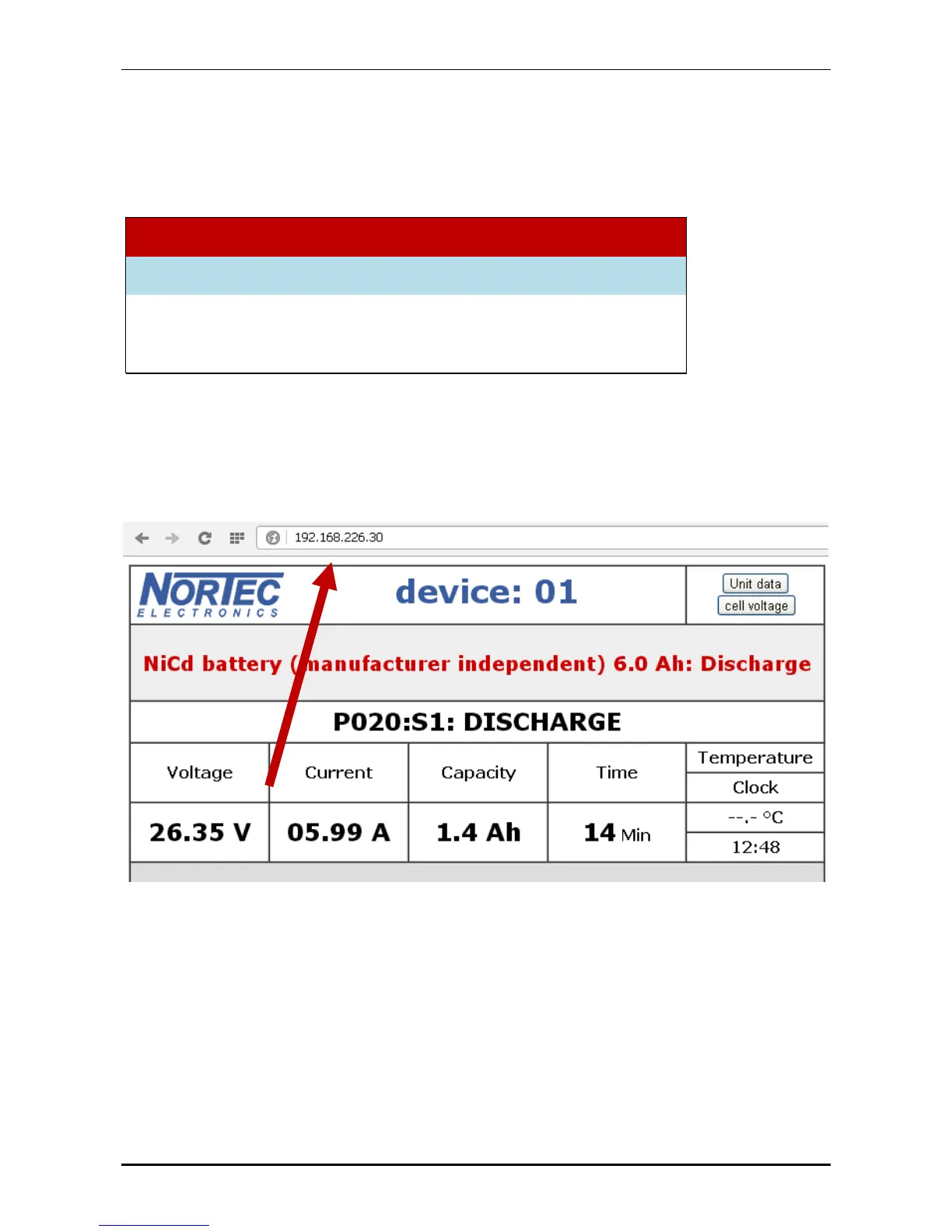
The UL60 only works with IPs, not with DHCP. The IP has to be registered in the browser in order
to receive the data for the UL60:
7.2.2 Enter subnet mask
After entering the Ethernet IP-address fill in the netmask. Usually this is 255.255.255.0.


 To Next Page