DP23-AOU/DP28-AOU
75
Press the button.
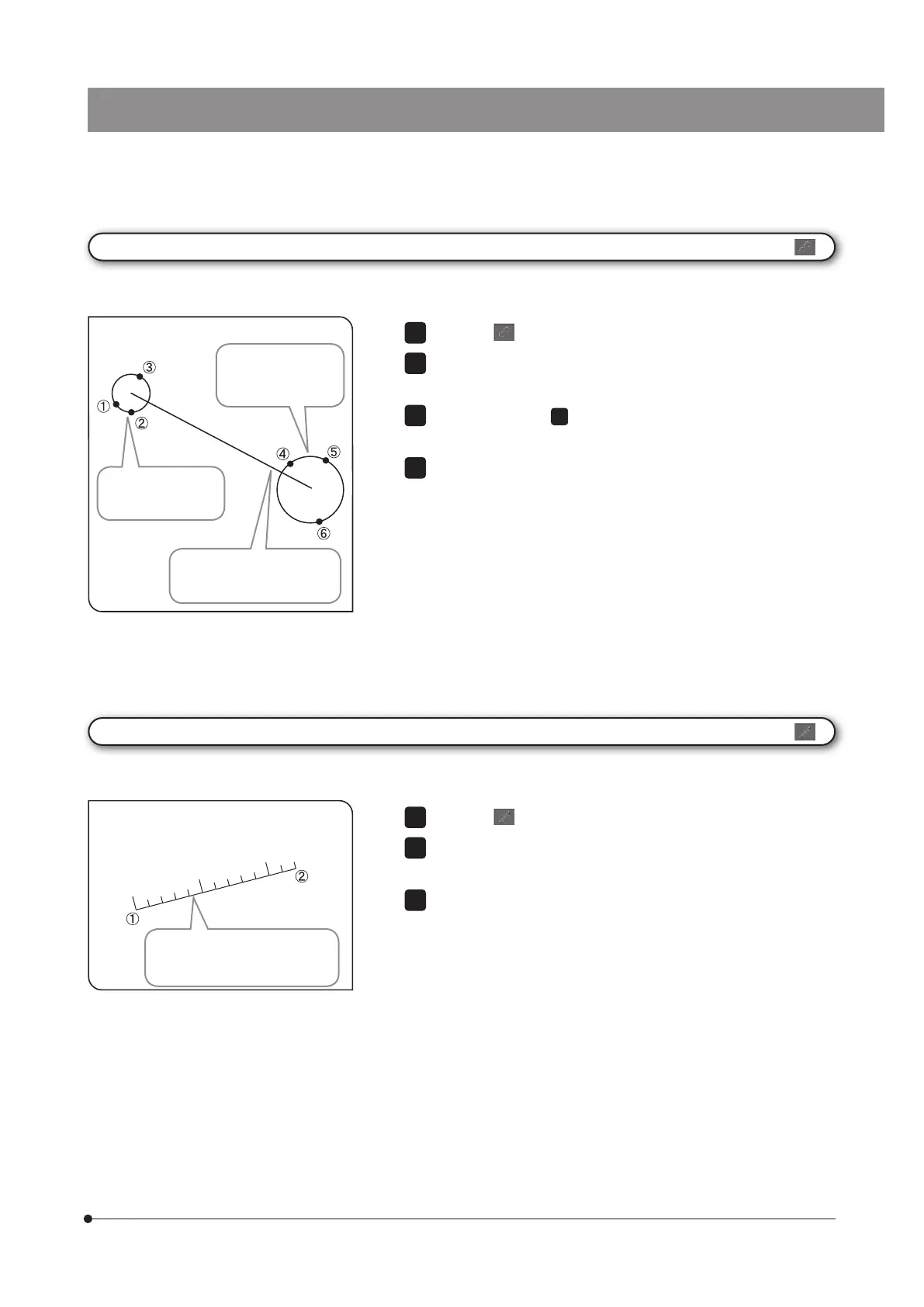
Specify the start point of the position you want to measure using the
circle. Click the mouse to specify 3 points that will be the circumference.
In the same way as
, specify the end point of the position you want
to measure using the circle.
You can measure another position continuously. Right-click the mouse
on the screen to finish measurement.
1
2
3
4
[Circle to Circle]
2 circles are created (by inputting 3 points) on the image, and you can measure the length between centers of 2 circles.
A line connecting the centers
of 2 circles is drawn and its
length is displayed.
A circle is drawn from
the specified 3 point
positions.
In the same way, the
circle is drawn from
the specified 3 point
positions.
Press the button.
Click the mouse to specify the start point and the end point of the
position you want to draw.
You can draw another line ruler continuously. Right-click the mouse
on the screen to finish measurement.
1
2
[Linear Ruler]
You can draw the linear ruler on the image.
The linear ruler and its length
are drawn in the direction from
1
to
2
.



 To Next Page