SECTION 2: GETTING STARTED
17 REI OSC-5000E
Exercise 1b. – Listen to a radio station using OSCOR frequency controls.
This exercise assumes that the OSCOR is again turned OFF.
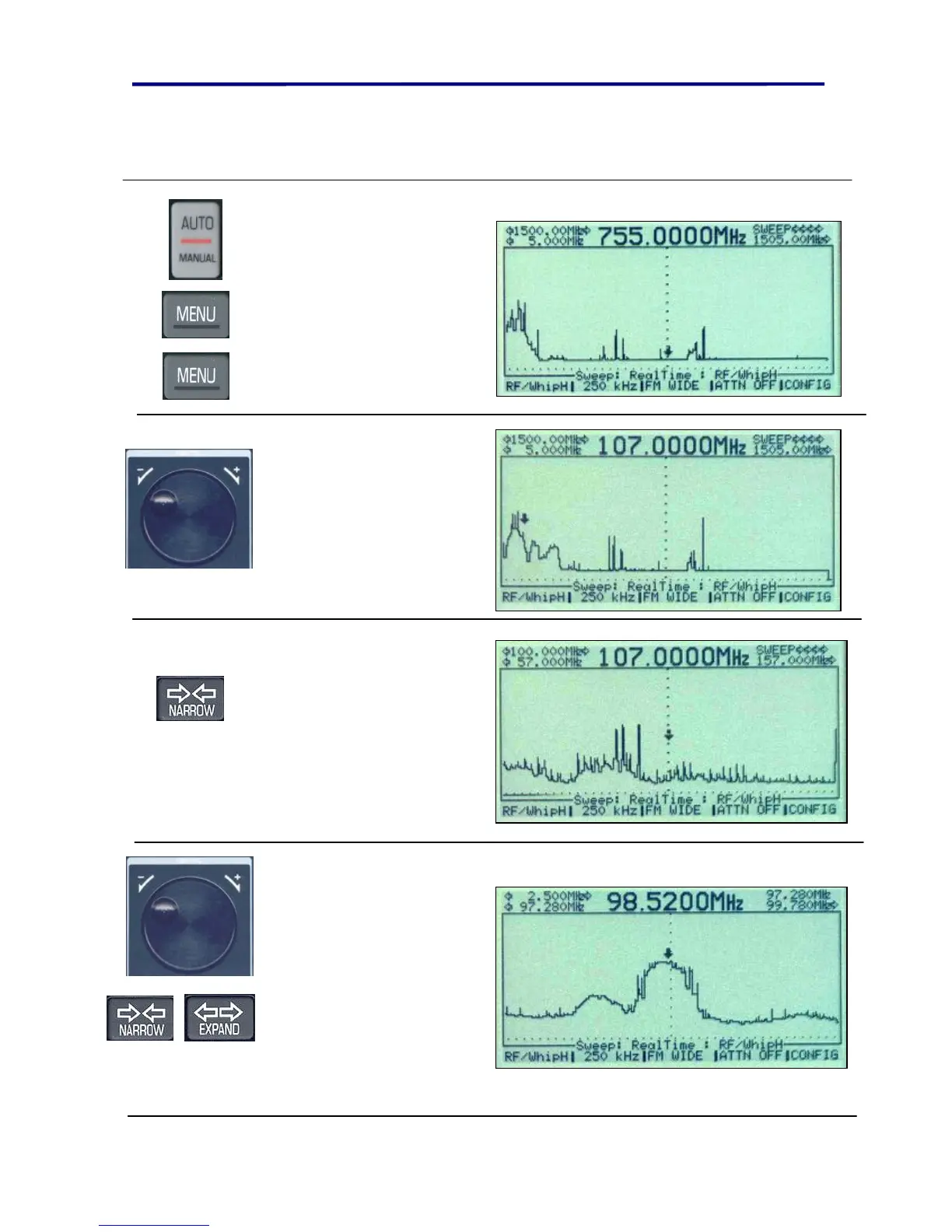
Press the
AUTO/MANUAL button
to turn on the unit.
Press the MENU button
twice to skip set up
screens and go directly to
the default whip Hi
antenna (5 MHz to 1505
MHz).
Use the rotary dial and
move the cursor near 100
MHz. (Do not try to get it
exactly, anywhere from
85 to 115 is fine.)
Press the NARROW button 5
times or until the screen is
similar to the one shown.
With each press, you should
see the screen zoom in to
the center of the cursor.
Use the rotary dial to select
the desired radio station
frequency, and then press
the NARROW button further
to zoom in. Repeat until the
signal fills most of the
screen. To zoom out, simply
use the EXPAND button.



 To Next Page