SECTION 2: GETTING STARTED
REI OSC-5000E 24
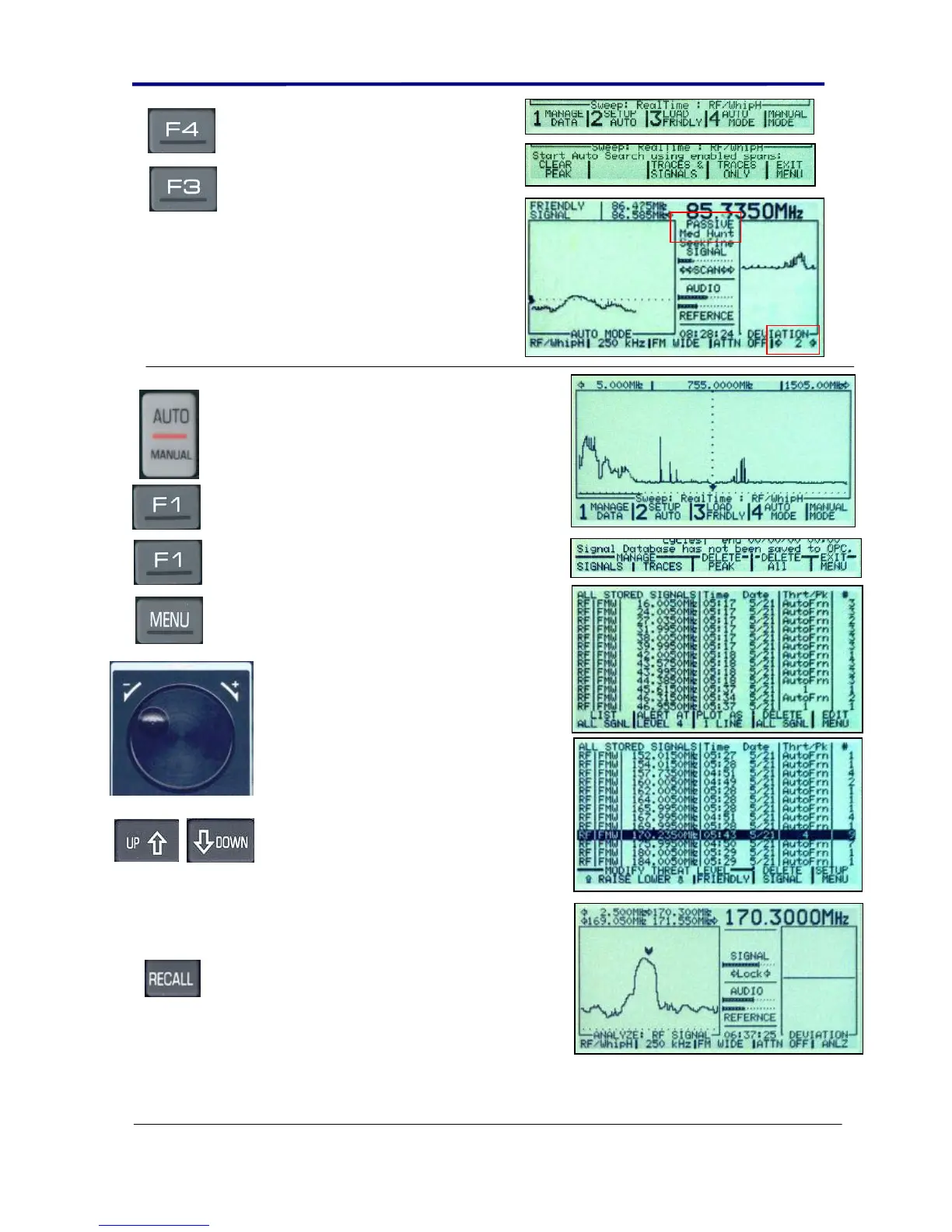
Press the F4 button to start the
automatic mode searching process.
Press the F3 button labeled
“TRACES & SIGNALS” to start the
process.
Allow the unit to run for at least 2
complete cycles. This may take 30
minutes to one hour depending on
the local RF environment.
Press the AUTO/MANUAL button to
stop the automatic process.
Press the F1 button to select the
MEMORY & DATA MANAGE”.
Press the F1 button to Manage the
Signals Database.
Press the MENU button to select the
“EDIT MENU”.
Use the UP and DOWN keys and the
rotary dial to select and listen to the
different signals.
The column labeled “Thrt/Pk” lists the
detected Threat Level. Friendly Signals
will be labeled “AUTOFRND” and
newly detected signals in the building
will be listed with a threat number. By
scrolling through this list, you should be
able to find the threat signal. If the
signal had good correlation, the threat
level should be at least 3 or 4.
Highlight the signal using the UP or
DOWN buttons.
Press the RECALL button to view the
signal.
Adjust the volume and
listen to the signal. As the volume
is increased, you should hear
feedback.
At this point you can utilize other OSCOR functions such as CORR or SPECT to further analyze
the signal.



 To Next Page