Appendix C. Programming with PanaView
114 DigitalFlow™ DF868 Multipurpose Ultrasonic Liquid Flowmeter Programming Manual (2-Channel)
C.4.1 Setting up Ethernet Communications
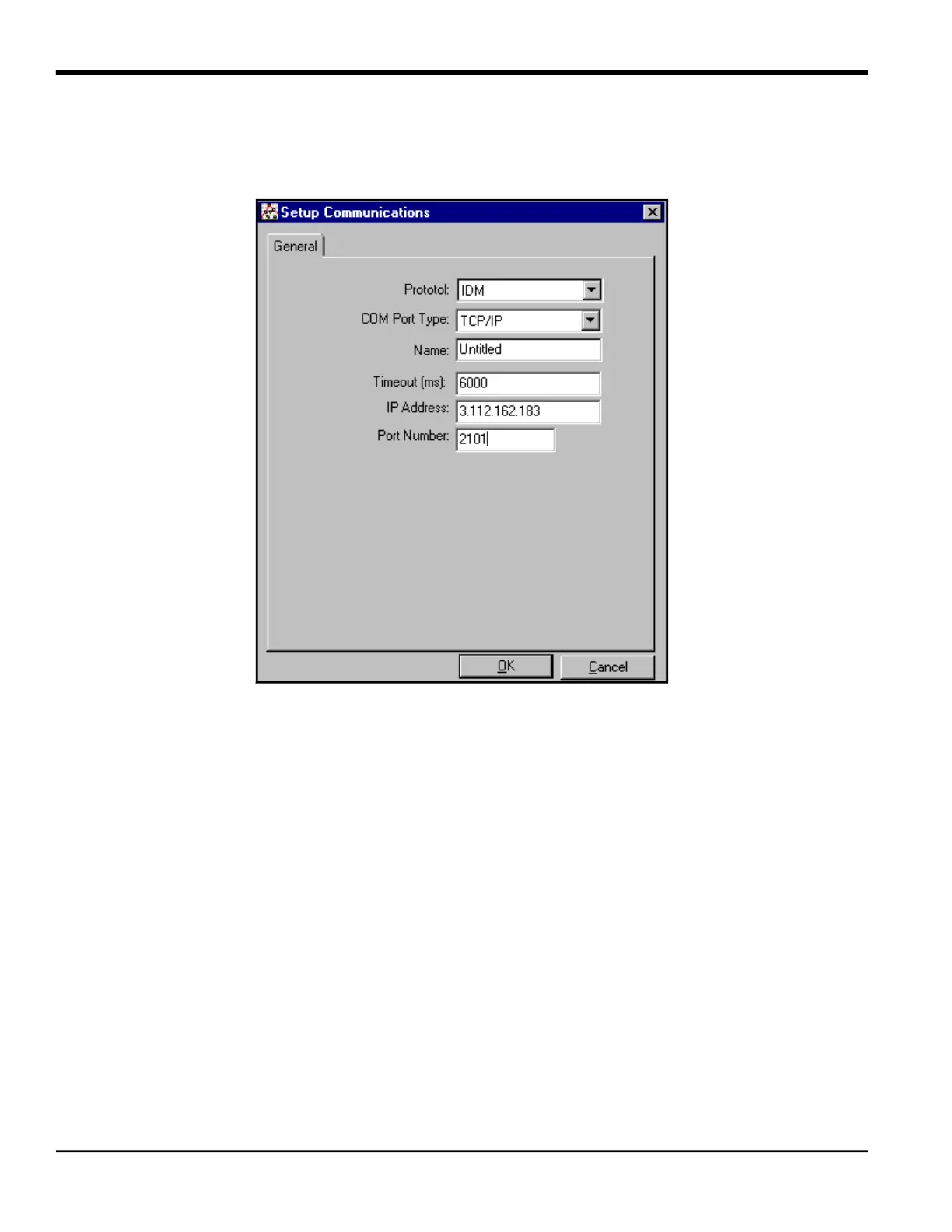
If you have selected TCP/IP in step 6 on the previous page, the Setup Communications window appears similar to
Figure 20.
Figure 20: Setup Communications for TCP/IP
1. Type in the desired Name and Timeout (in milliseconds).
2. In the IP Address text box, enter the IP address. If the IP address is unknown, run the Device Discovery software
utility. All units found will be identified by their MAC address and the assigned IP address. In the Port Number box,
enter 2101 (the default value).
3. Click [OK] to complete data entry.
IMPORTANT: If you are using Ethernet communications, be sure the DF868 is set up with the default
communications parameters: 9600 baud, no parity, no handshaking, 8 data bits and 1 stop bit. The
port number must match the “Enable Raw TCP access using TCP Port” assignment shown under the
Device Discovery “TCP Server Settings” menu (Configuration>Serial Ports>Port).





 To Next Page