Appendix C. Programming with PanaView
122 DigitalFlow™ DF868 Multipurpose Ultrasonic Liquid Flowmeter Programming Manual (2-Channel)
C.6.5 Handling Site Files
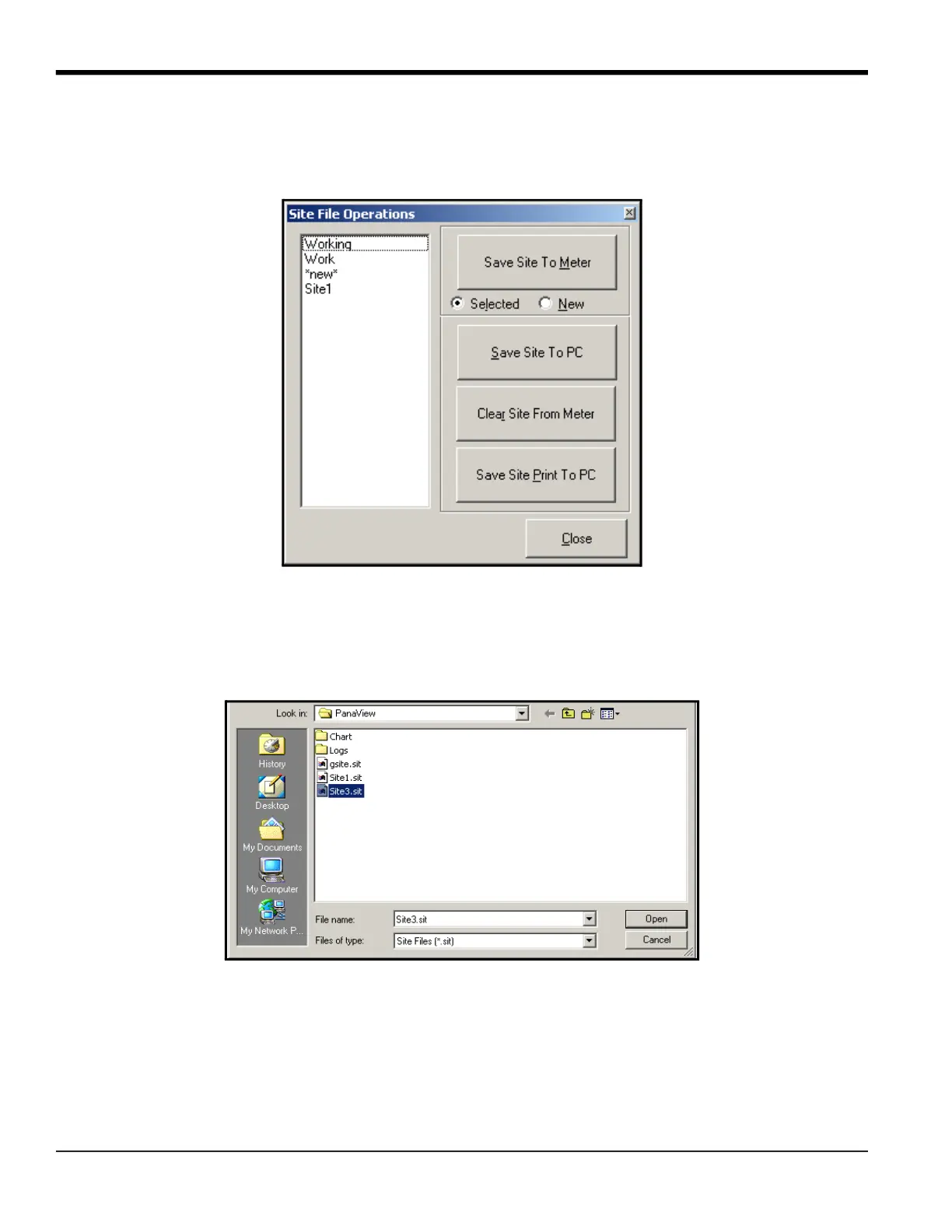
To access site files, click on the Site Files button in the Properties window. The Site File Operations window (shown in
Figure 31) opens.
Figure 31: Site File Operations Window
C.6.5.1 Saving an Existing Site to the Meter
To save an existing site to the meter:
1. Select the radio button for Selected and highlight an existing site in the left pane.
2. Then click on the Save Site to Meter button. A screen opens similar to Figure 32.
Figure 32: Site File Selection
3. Highlight the desired site and click Open. PanaView sends the site to the meter.
C.6.5.2 Saving a New Site to the Meter
To save a new site to the meter:
1. Select the radio button for New and click on the Save Site to Meter button.
2. A window opens similar to Figure 33. Enter the desired name, and click [OK].











 To Next Page