PCS D200 Dash Logger User Guide
Page 12
Ph: 804.227.3023
10511 Old Ridge Rd. Ashland, VA 23005
v 2.0
5 Confi guring/Using the Software
5.1 Overview
The software provides two main functions to the user. Its primary function is for editing the dash calibration fi le and
retrieving data logs. Its secondary function is for fi rmware upgrading the dash.
The dash calibration fi le contains all the user adjustable settings such as input devices, input functions, backlight settings,
gauge placement, etc. The dash fi rmware fi le is the code that runs the dash.
Some settings can be set from the touchscreen and the software, while others can only be changed from the touchscreen
or the software. Even though only certain items can be changed from the software, when the software uploads the
calibration fi le from the dash it contains ALL the calibration information. If a calibration fi le was uploaded from a dash and
then downloaded to a different dash, the second dash would appear identical to the fi rst.
5.2 Online vs. Offl ine Mode
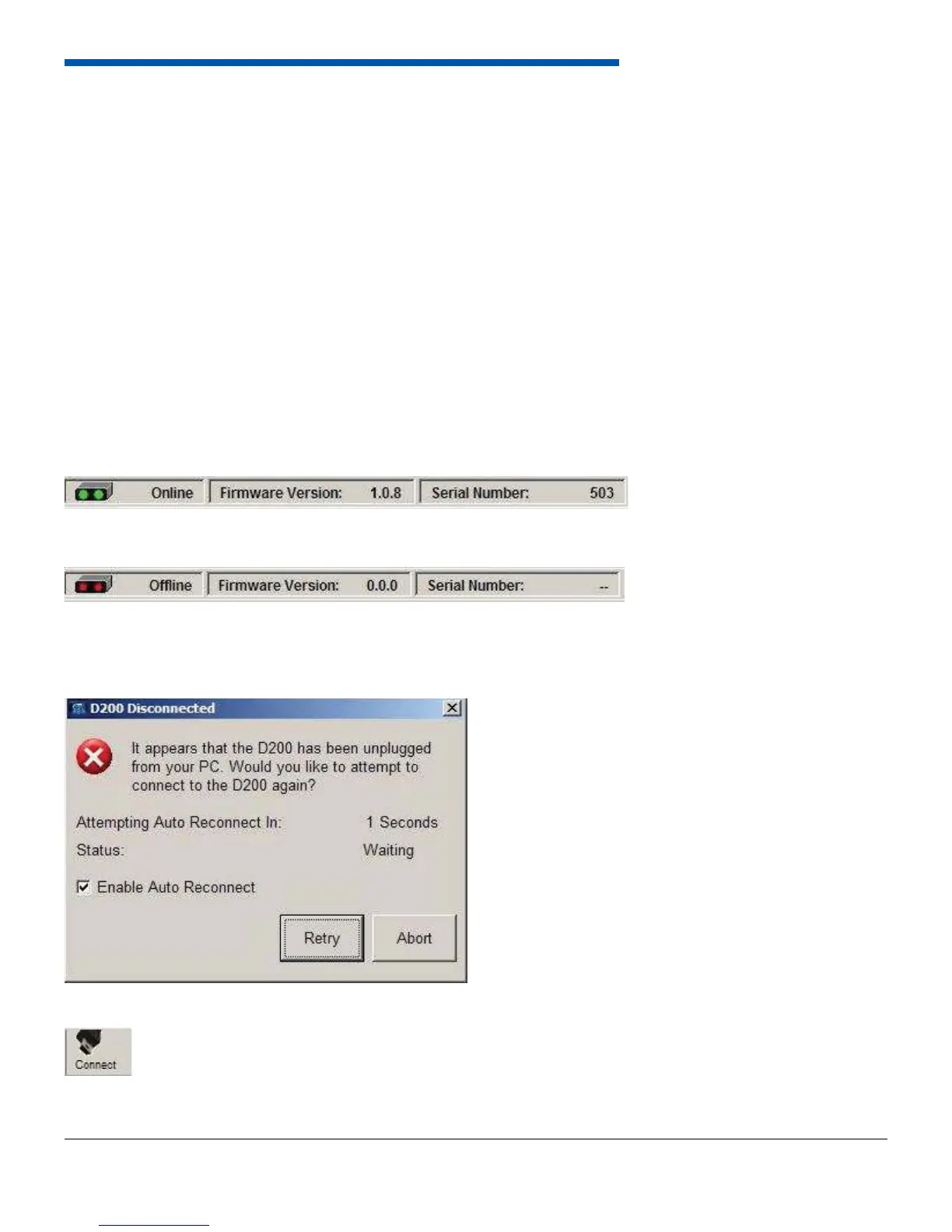
The dash software has two basic modes, online and offl ine. Online mode is when the dash is
connected and communicating using the USB port. Online mode is indicated in the software by a
blue background screen and the word Online in the lower left hand corner.
If the dash is online, and then goes offl ine, a screen will appear to indicate the software has lost communication with the
dash. It will automatically try to reconnect to the dash every 5 seconds, or when the Retry button is pressed. To stop the
Retry click Abort.
To toggle between online and offl ine mode click the Connect button on the top tool bar.
Offl ine mode is indicated by black background and the word Offl ine in the lower left hand corner.


 To Next Page