PCS D200 Dash Logger User Guide
Page 36
Ph: 804.227.3023
10511 Old Ridge Rd. Ashland, VA 23005
v 2.0
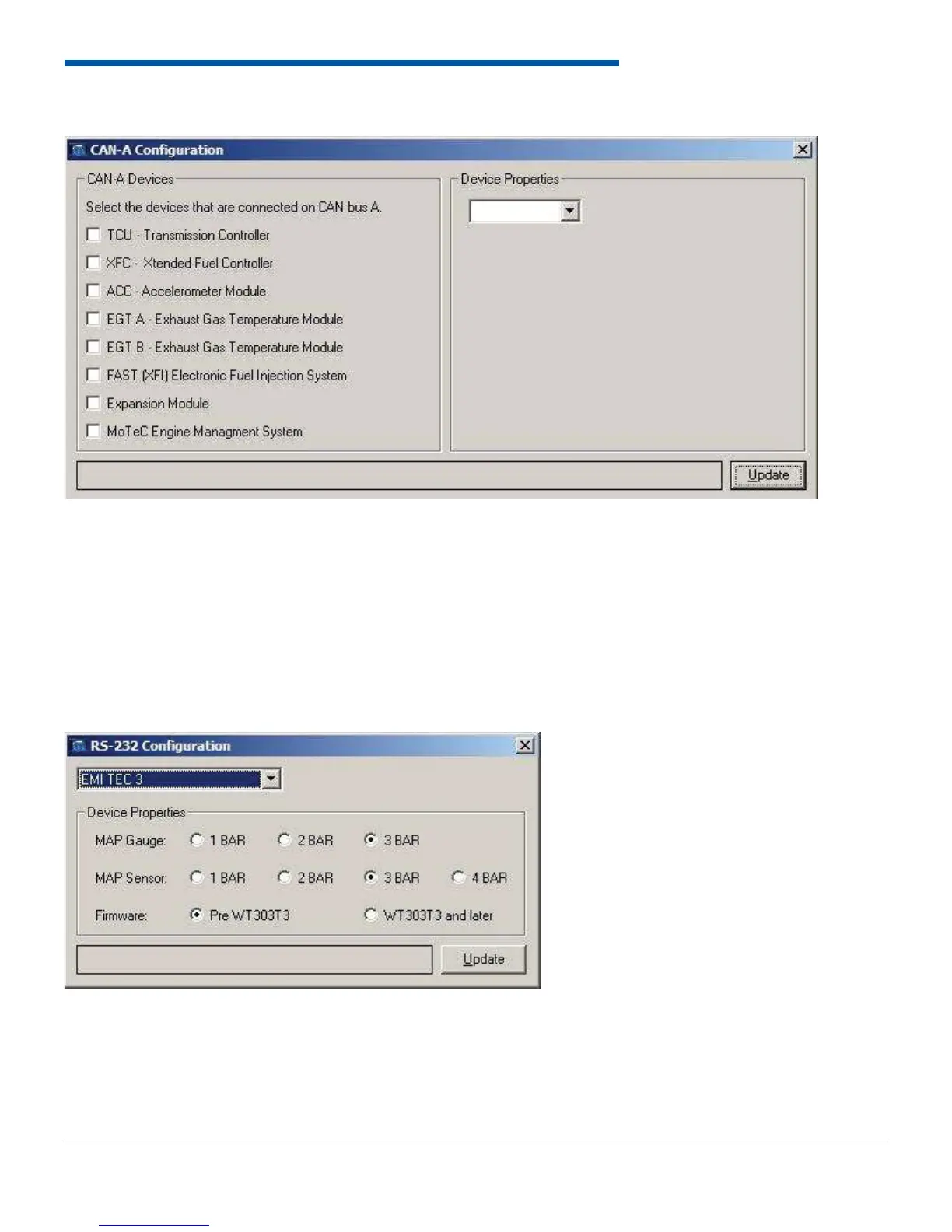
The CAN A confi guration form displays all devices that can be connected through the CAN interface. More than one
device can be received over can as long as they transmit at the same speed. The software and touchscreen interfaces
will not allow devices with different speeds to be selected on the same CAN interface. After selecting a device its name
will appear in the drop down menu to the right. If the device has any confi gurable properties select it in the drop down to
view the device properties. When done the update button must be pressed to write the information to the dash logger.
6.14.2 Can B
The CAN B form has the same layout and operations as CAN A
6.14.3 RS-232
Only one device can be selected to communicate over RS-232. After the device is selected if there are any confi gurable
properties they will appear under the drop down menu. When properties have been confi gured click update to set the
communication device in the controller.
6.14.1 CAN A


 To Next Page