PCS D200 Dash Logger User Guide
Page 34
Ph: 804.227.3023
10511 Old Ridge Rd. Ashland, VA 23005
v 2.0
The Datalog Sources form consists of two tabs Onboard Inputs and Dash Data / Other Devices. The Onboard Inputs
tab logging rates for each input connected directly to the dash are selectable. Dash Data / Other devices contains the
selections for all devices connected through CAN or RS-232. To set the logging rates select either onboard inputs or
communication inputs and choose the desired rate for the device a press the update button. The columns are listed with
headings of Hz (Hertz) or times per second where a selection of 10Hz indicates a logging rate of 10 times per second. A
rate of 0 Hz indicates that channel will not be logged.
6.12.1 Erase All (Data Logs)
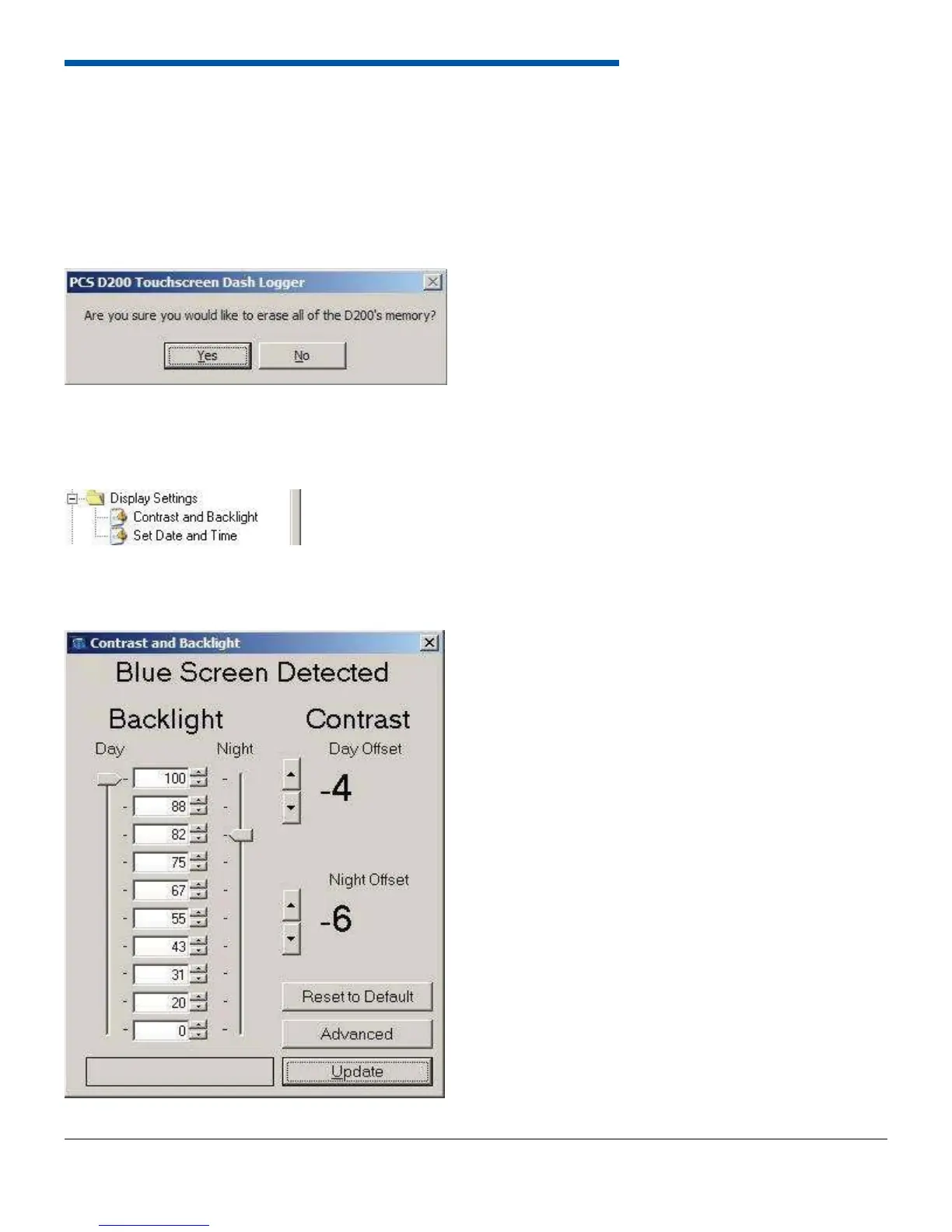
This erases all data logs currently stored on the Dash Logger. A message box will appear to confi rm that all data logs are
about to be erased from the unit.
6.13 Display Settings
The Display Settings group contains the forms to control and adjust the dash contrast and backlight.
6.13.1 Contrast and Backlight


 To Next Page