Page 31
Ph: 804.227.3023
10511 Old Ridge Rd. Ashland, VA 23005
v 2.0
Powertrain Control Solutions
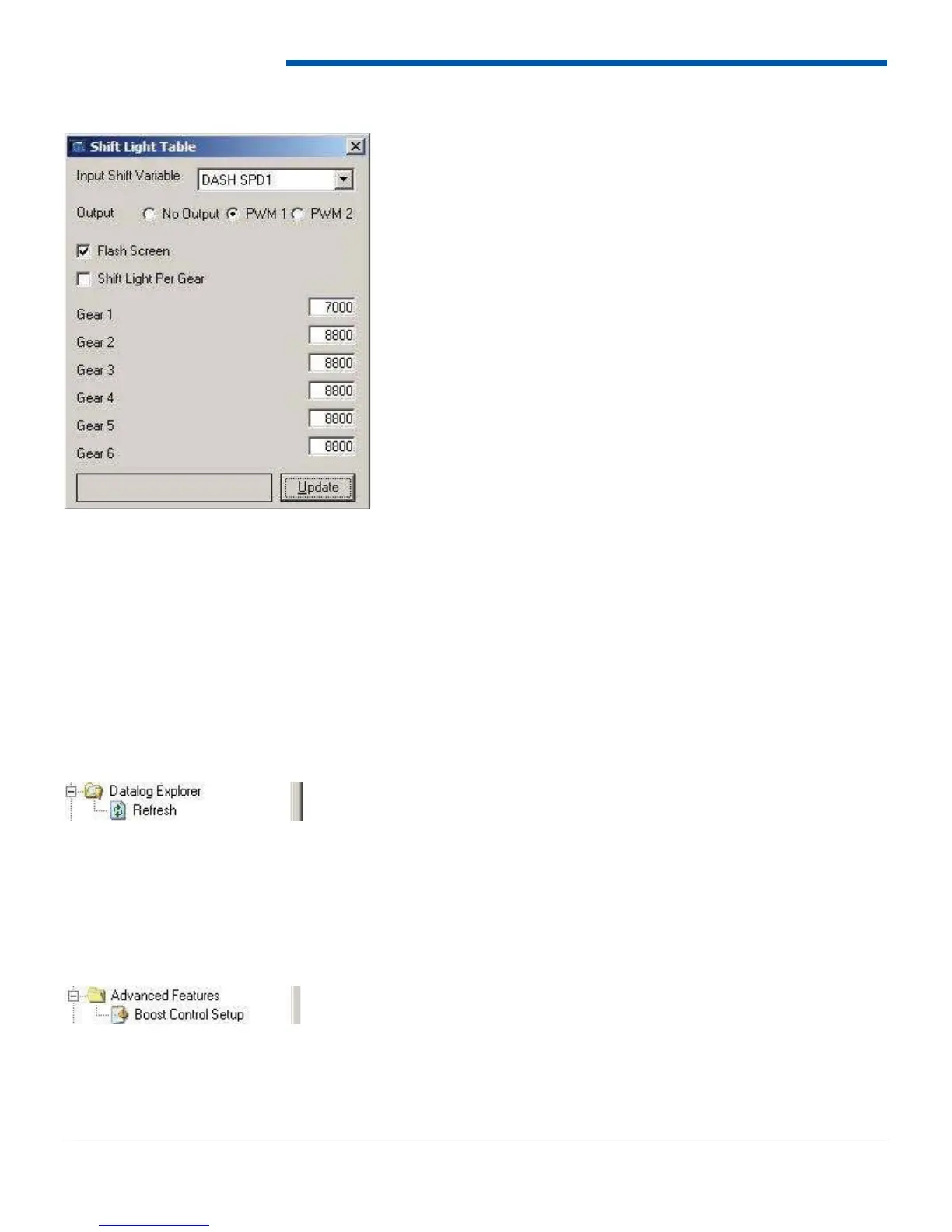
6.8.3 Shift Light Table
The shift light function allows the dash to turn on a shift light at a particular RPM. To enable the shift light function, select
Shift Light from Treeview under basic features or the drop down menu at the top. Next select the device’s RPM input to
use for the shift light. The shift light function can be used in either of two ways. The fi rst is to wire a shift light to one of
the PWM outputs and select the correct output radio button. When update is pressed if the selected output is not already
assigned to the shift light function it will be done for you. A message will display confi rming the choice to change the
output. The shift light function can also be used by fl ashing the entire screen when the shift light RPM is exceeded to
alert the driver. To have the shift light only fl ash the screen set the output radio button to no output and put a check in the
box next to Flash Screen. Another option is to control the shift light in each gear. For the per gear option to function, the
dash must calculate current gear as described in Section 6.8.2. If shift light per gear is enabled, enter the shift points in
the boxes provided. If the shift light is not acting per gear, then enter the shift point in the fi rst box. When done entering
information click the Update button to send the information to the dash.
6.9 Data Log Explorer
The Data Log Explorer group includes the refresh option. The refresh option checks the D200 Dash Logger for data logs
and lists them in the Data Log Explorer window. The Data Log Explorer is the window to view and download logs from the
dash. The window is opened automatically when the software opens. If the window is closed, double-click the Data Log
Explorer in the tree-view, or click the Logs button on the top tool bar. More information regarding data logs can be found
in Section 7.0.
6.10 Advanced Features
6.10.1 Boost Control Setup
The Boost Control Setup form is used to set the solenoid operation parameters for the boost control solenoid. For more
information refer to the boost control manual for more documentation.


 To Next Page